9
EN
Rudder
1. Power on the transmitter.
2. Turn TH HOLD ON and put transmitter in normal mode.
3. ConnectthehelicopterbatterytotheESC
NOTICE:DonotallowthehelicoptertomoveuntiltheStatusLEDissolid
blue and all menu LEDs are OFF. The gyro will not operate correctly if the
helicoptermovesbeforetheStatusLEDissolidblue.
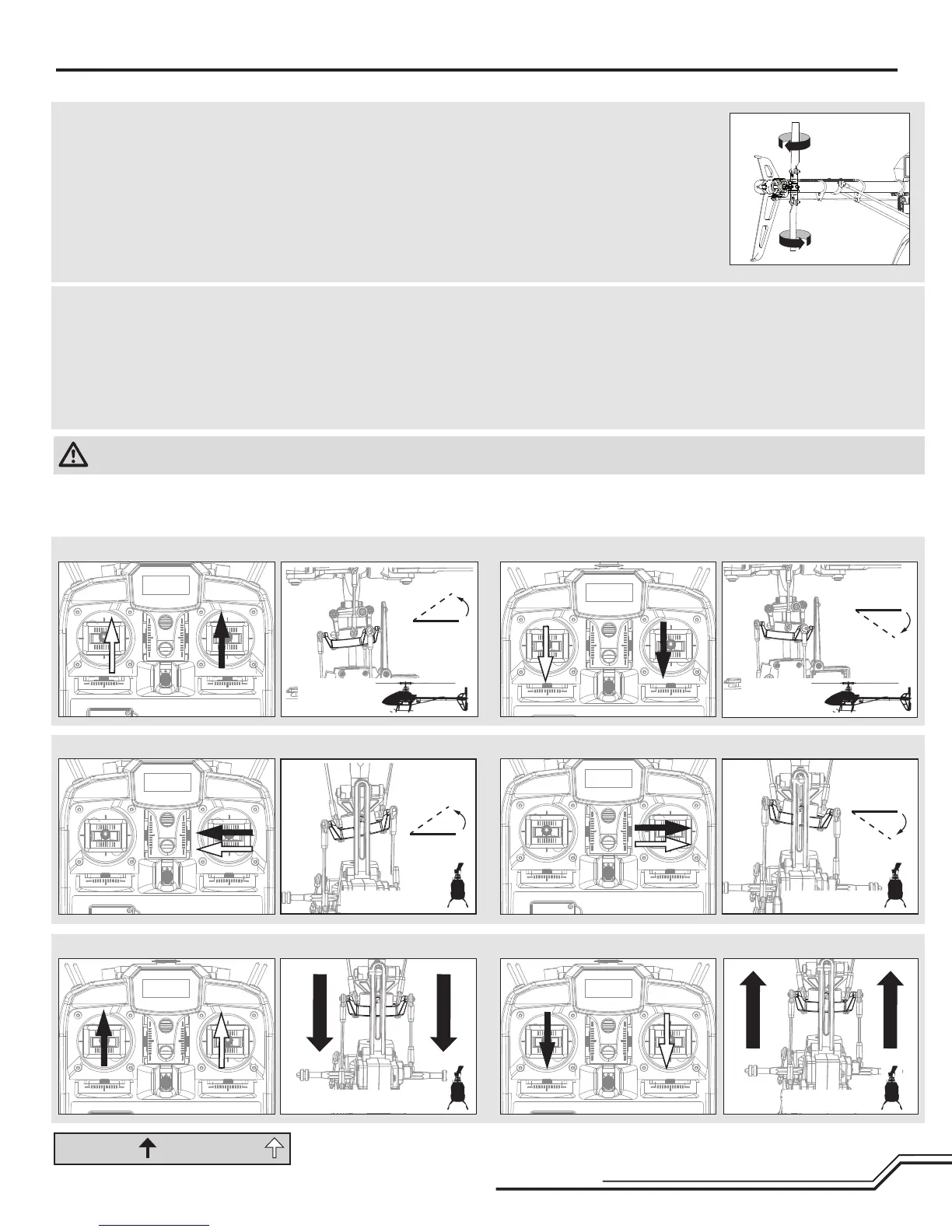
4. Movetheruddersticktotheright.Thetailrotorbladesmoveasshown.If
they do not move as shown, reverse the rudder channel in the transmitter
(refertoyourtransmittermanualforinstructions).
5. Releasetheruddercontrol.Manually
turn the helicopter nose to the left.
The tail rotor blades automatically
move as shown. If they do not move
as shown, refer to the AR7200BX
manual for information on reversing
thetailsensordirection(Setupmenu
pointF).
Cyclic
Whenusingaybarlessrotorhead,youarecontrollingrotationalrates
while the AR7200BX controls the servos. You are not directly controlling the
servos with the transmitter.
It is normal for the swashplate to slowly move back to its original
position after a stick input and for the servos to not move at the same
speed as your control sticks.
1.Tiltthehelicopterforward.Theswashplateshouldtiltbackward.
2.Tiltthehelicopterbackward.Theswashplateshouldtiltforward.
3.Rollthehelicopterleft.Theswashplateshouldrollright.
4. Roll the helicopter right. The swashplate should roll left.
5. If the swashplate does not move in the correct direction, you will need to
reverse the cyclic sensor direction. Refer to the AR7200BX manual for
moreinformation(SetupmenupointM).
Control Tests
MODE 2 MODE 1
Cyclic and Collective Control Test
Turn on Throttle Hold when doing the control tests
Rudder and Cyclic Gyro Test
Elevator
Side View
Side View
Aileron
Rear ViewRear View
Collective Pitch
Rear ViewRear View
CAUTION:YoumustcompletetheRudderandCyclictestspriortoight.Failuretocompletethetestsensuringthesensordirectionsarenotreversedcan
cause the helicopter to crash, resulting in property damage and injury.



 To Next Page