V6/R6 BIKES OWNER’S MANUAL
4
1. OPERATING YOUR V6X/R6X
Each V6X/R6X Bike contains an L.E.D. (light emitting diode) computer display. The control functions, with their unique features
and programs, have been designed with you in mind, to give you the best possible cycling workout by displaying important and
clear information regarding your exercise goal.
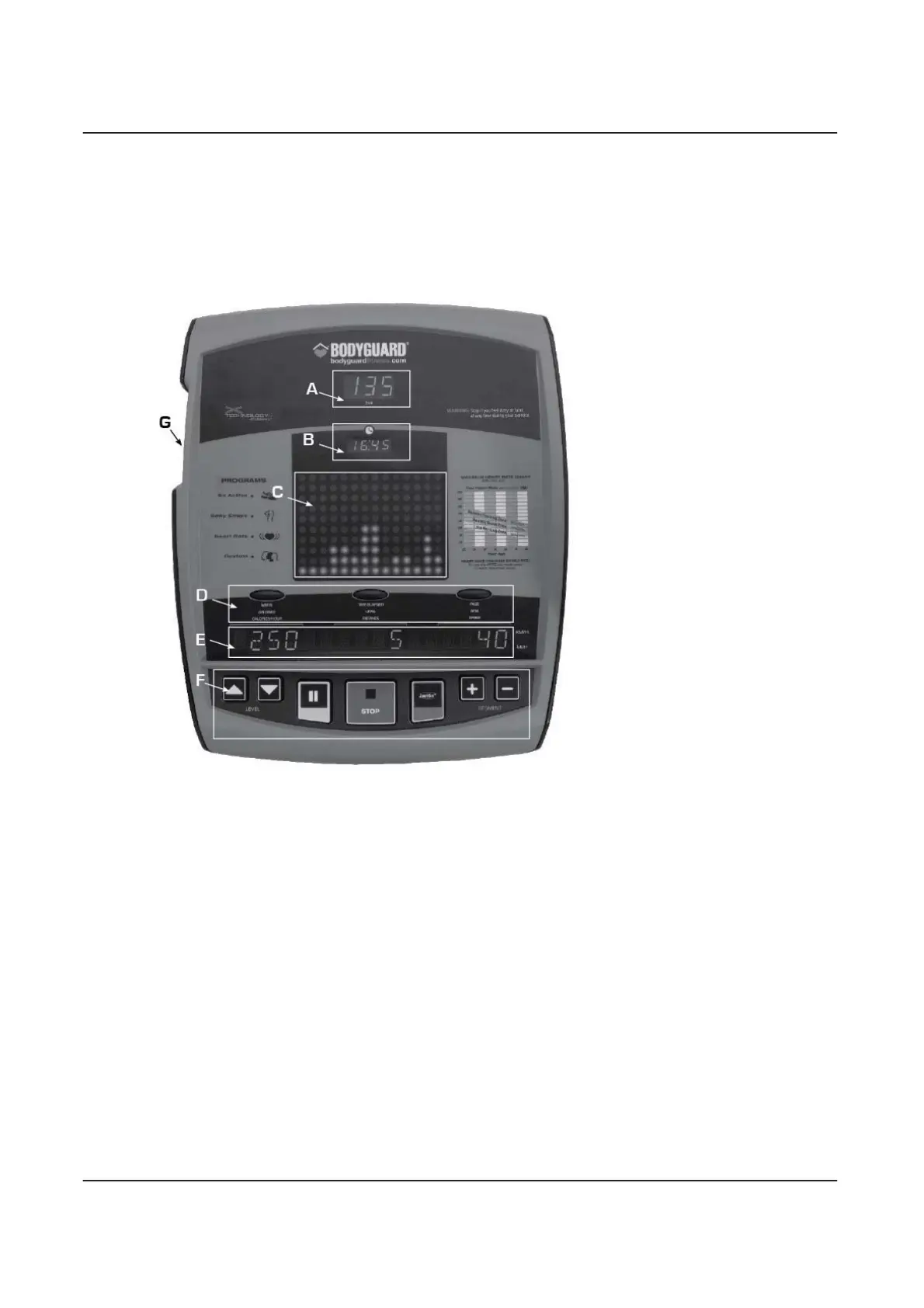
The V6X/R6X models have the following display features:
A : Heart rate window
B : Clock
C : 10.5 cm x 7.5 cm profile display
(4.25” x 2.75”)
D : Select keys
E : Scrolling screen
F : Main keypad
G : X-CARD
TM
slot
1.1 Getting to Know the V6X/R6X
A- HEART RATE WINDOW
The heart rate window lets you monitor your heart rate at a glance. The number displayed represents beats per minute.
B- CLOCK
Allows you to see the time of day when you are working. See Settings Section 2.12.
C- PROFILE DISPLAY
The large, easy-to-read, two-tone screen displays your exercise program’s braking resistance and target speed. Resistance
and speed are represented along the vertical axis. Each dot represents a higher level of resistance and speed. Each exercise
program starts from the left hand side of the screen and ends when it reaches the right hand side.
Dark green
: Braking resistance
Light green: Target speed
D- SELECT KEYS
During an exercise, you can change the value displayed on the scrolling screen by pressing the adjacent
SELECT
key. If you
wish to have values displayed in alternating mode, simply hold down the
SELECT
key for three seconds. To cancel the
alternating mode, simply press the select key again.


 To Next Page