V6/R6 BIKES OWNER’S MANUAL
6
H- HEART RATE TRAINING ZONE
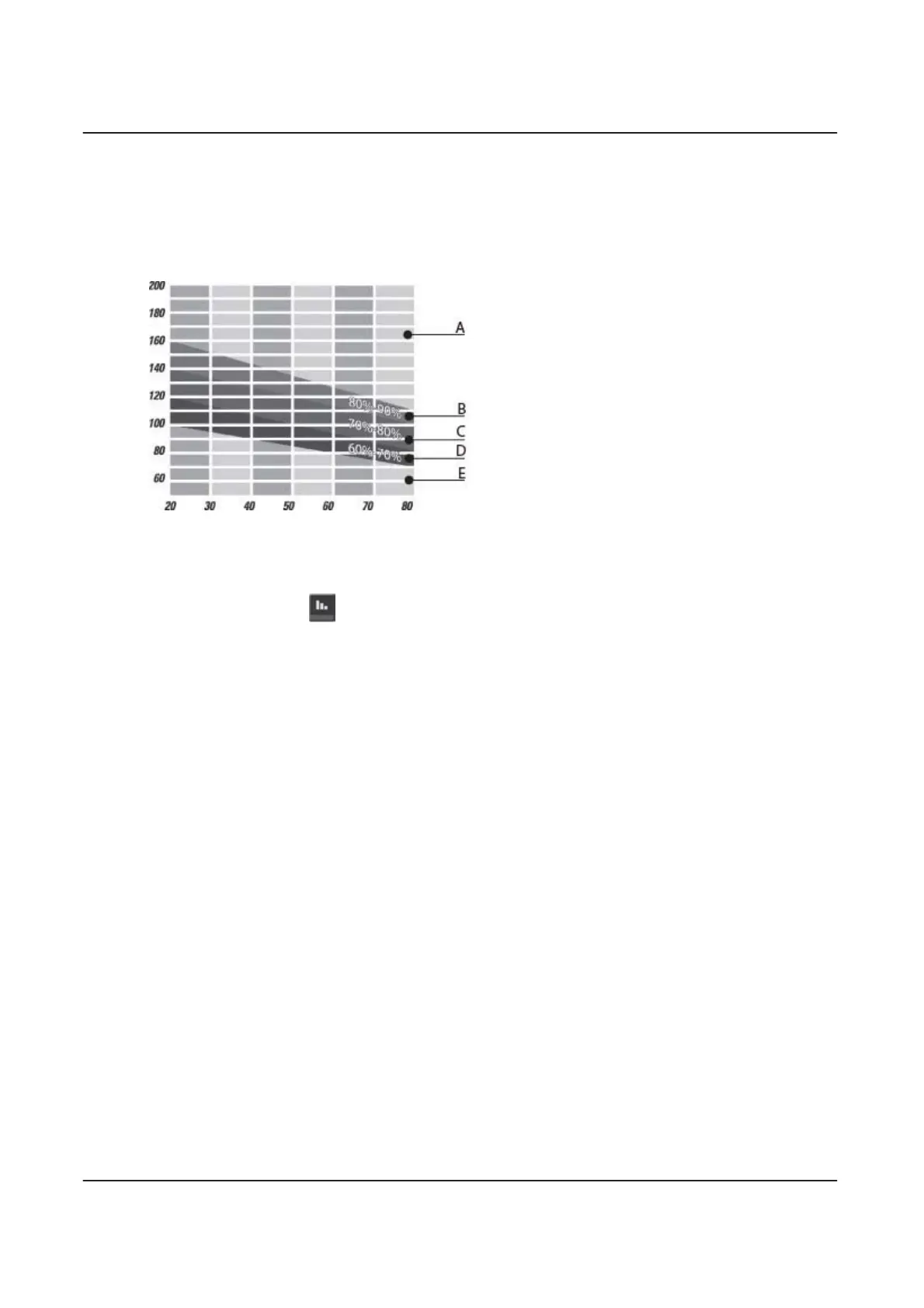
The heart rate training zone lets you keep track of the zone you are currently exercising in:
Fat Burning, Healthy Heart
, or
Aerobic
.
To determine you target heart rate, select the type of exercise program you wish to follow.
Your MAXIMUM HEART RATE
(MHR)
is calculated as follows:
220 - AGE = MHR.
A) It is not recommended to exercise above 90% of your
MHR.
B) Exercise within the 80-90% MHR range for an aerobic
exercise.
C) Exercise within the 70-80% MHR range for a
moderate, healthy heart zone.
D) Exercise within the 60-70% MHR range if you wish to
train in a fat burning zone.
E) Difficult to achieve exercise benefit below 60% MHR.
Your heart Rate (beast/minute)
Your Age
1.2 Pause during an exercise
You can STOP temporarily during any exercise by pressing the
PAUSE
key.
To PAUSE during an exercise:
1. Press the
PAUSE
key whenever you feel the need to STOP for a moment during an exercise. A message indicating the
PAUSE time remaining will appear on the screen. The countdown will start as soon as you press the key.
2. If you wish to continue exercising, simply press the
JustGo™
key to resume the program.
3. If you want to STOP exercising completely, simply press the
STOP
key, and the exercise will be terminated. A summary of
your exercise parameters will be displayed, along with the saving option if this option is activated and available for this
program.
If your PAUSE time runs out, the exercise will be terminated automatically.
1.3 Viewing Exercise Parameters
At the end of each exercise program, the computer will display THREE exercise parameters: TOTAL DISTANCE, CALORIES
BURNED, and TOTAL EXERCISE TIME.
• TOTAL DISTANCE displays the distance traveled for the entire exercise.
• CALORIES BURNED display the approximate caloric expenditure for the entire exercise.
• TOTAL EXERCISE TIME displays the length of the exercise in minutes and seconds.
The exercise parameters on V6X/R6X Bikes will loop for 2 minutes or until you press the
STOP
key to return to the welcome
screen. If you do not wish to view the exercise parameters, press the
STOP
key to return to the welcome screen.
1.4 Auto Power OFF
After a period of inactivity (15 minutes by default), your V6X/R6X will switch automatically to sleep mode. This option is ON by
default, but you can turn it OFF. See Section 2.14 for further instructions


 To Next Page