Modbus Instruction manual 6505/08
05/08
Modbus Instruction manual 65
9.2.2 Reference Percentage
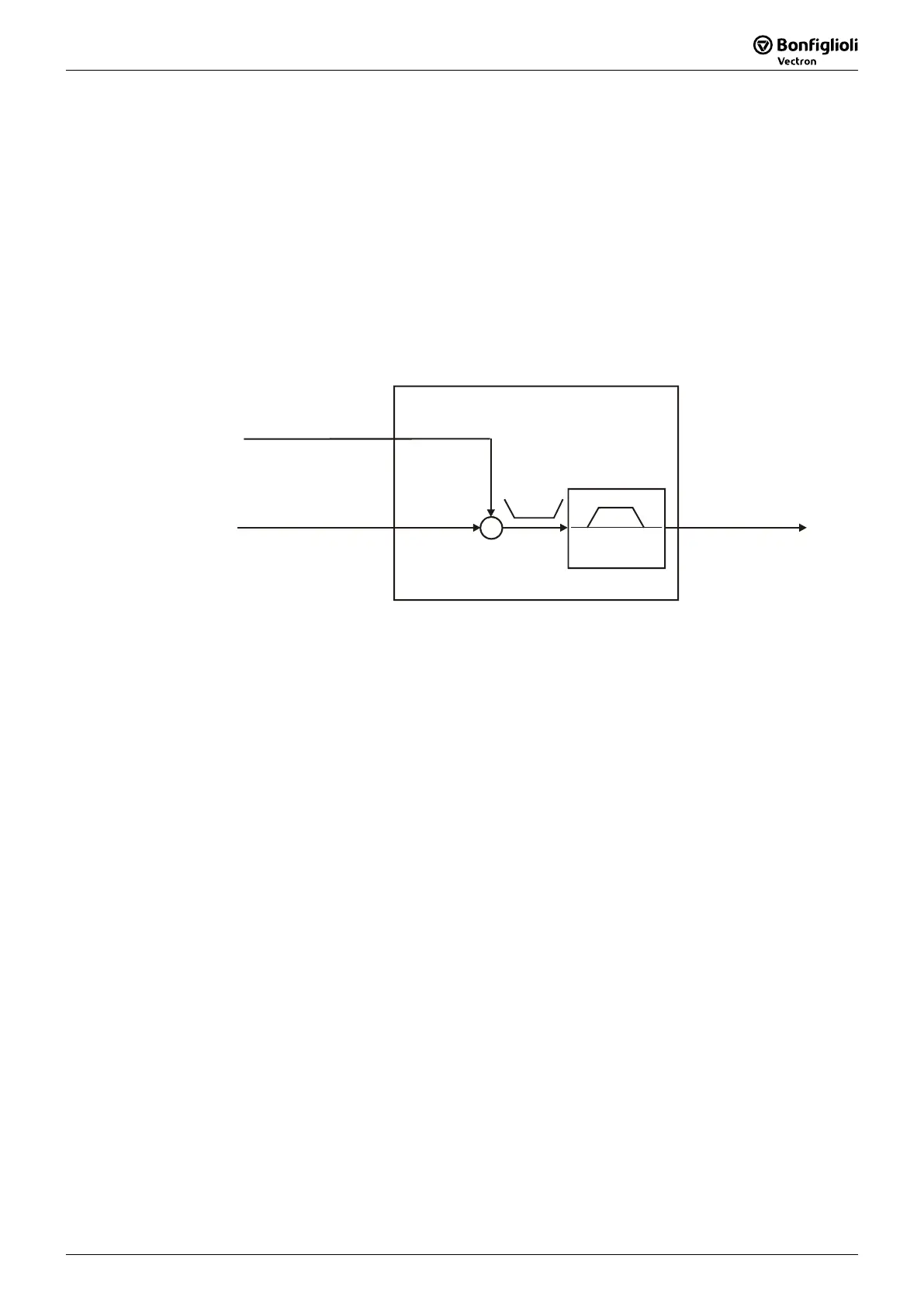
The following signal sources are available for determining the reference percentage:
− External reference value as reference line value from bus
− Internal reference value from the reference percentage channel
The reference line value with the parameter name Reference Percentage RAM 524 is
sent to the frequency inverter via the bus.
The internal reference value reaches the frequency inverter via the reference percent-
age channel. The reference percentage channel is configured via parameter
Reference
Percentage Source
476.
The parameter
Reference Percentage Value 229 can be read back as an actual value.
%max
Ramp
Reference percentage
channel
229
+
+
Reference line value
of Bus
Rampfunction
Reference Percentage
RAM
524
Internal reference
value of reference
percentage channel
The internal reference value from the reference percentage channel and the reference
line value are fed to the ramp as an added variable. The sum of the two variables has
a positive or a negative sign according to the mathematical operation.
For information on the reference percentage channel, refer to the frequency inverter
operating instructions.
Note: − The actual value parameter Reference percentage 229 can be checked
at the frequency inverter via the control unit KP500 or the control
software VPlus.
− For example, the
Reference Percentage Value 229 is processed in the
frequency inverter via the functions "Technology Controller" or
"Torque Controller" (e.g. speed controller for torque limitation. For
more information refer to the frequency inverter operating instruc-
tions.
Note: If the serial interface of the module CM-232/CM-485 is connected to a
PLC, for example, VPlus cannot access the frequency inverter via this in-
terface directly.
In this case, the PC must be connected via the optional interface adapte
r
KP232.


 To Next Page