equivalent new product.
Disposing of this product correctly will help save valuable resources and prevent any potential
negative effects on human health and the environment, which could otherwise arise from
inappropriate waste handling. Please contact your local authority for further details of your nearest
designated collection point. Penalties may be applicable for incorrect disposal of this waste, in
accordance with your national legislation.
Ion Pro RT information, installation, and special features
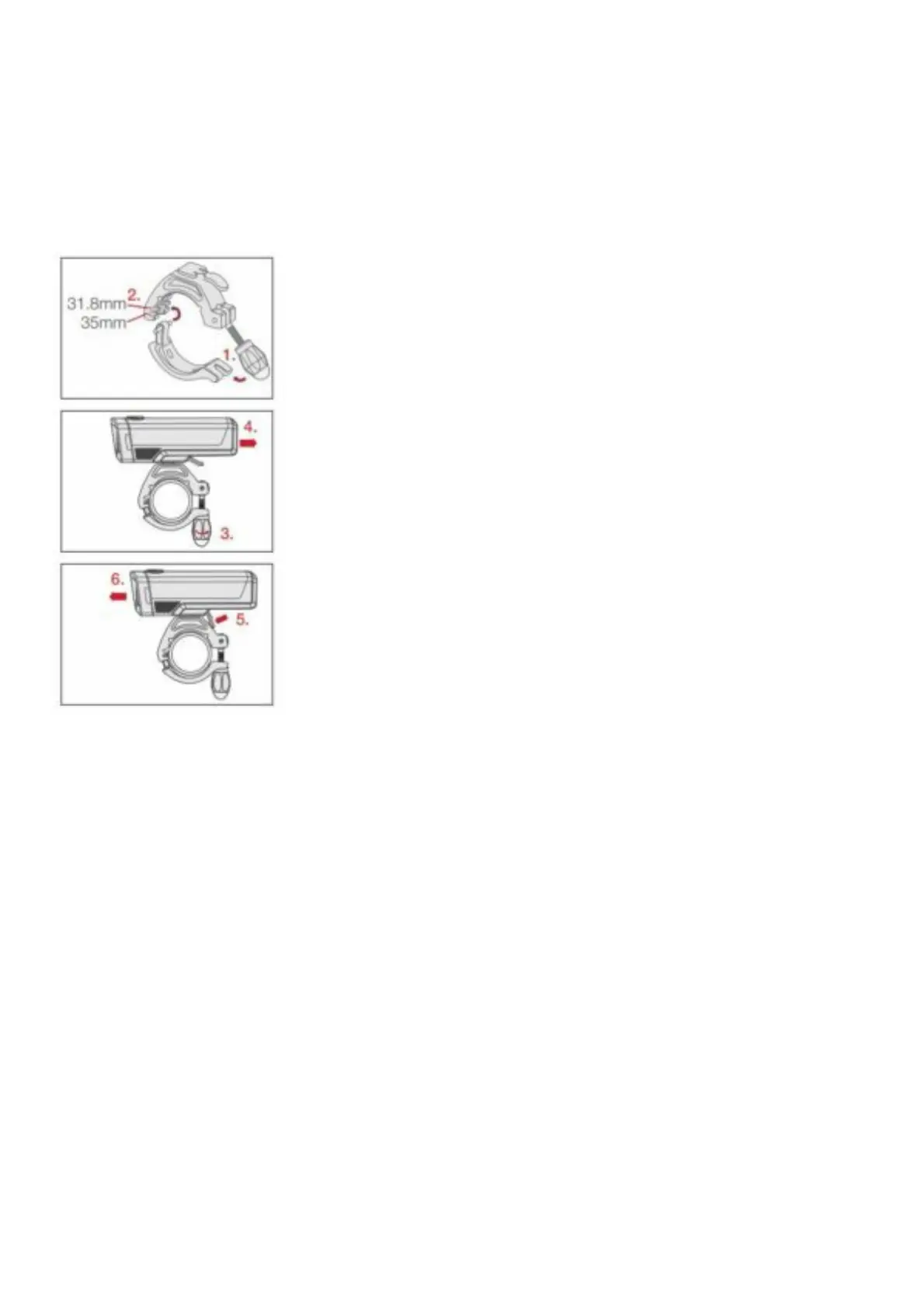
Installation
1. Loosen knob and open.
2. Adjust for bar size (31.8mm or 35mm).
3. Close and tighten knob.
4. Slide light onto mount until it locks in place.
NOTE: Use provided shim to fit 25.4 bars.
Removal
5. Press down.
6. Slide light to remove.
Low battery feature
When the battery charge drops below 5% the light automatically adjusts the output brightness to 50
lumens. This extends the light output for an additional 30 minutes.
Locking/Unlocking the mode
Turn on and select the desired mode, then press and hold the power button 8 seconds to select it. The
light will turn off and the main LED will flash once. To unlock, repeat the process.
Reset
To reset the light to factory default settings, with the light on, press and hold the power button for 15











 To Next Page