6
Chapter 3. Introduction to the Front and Rear Panel
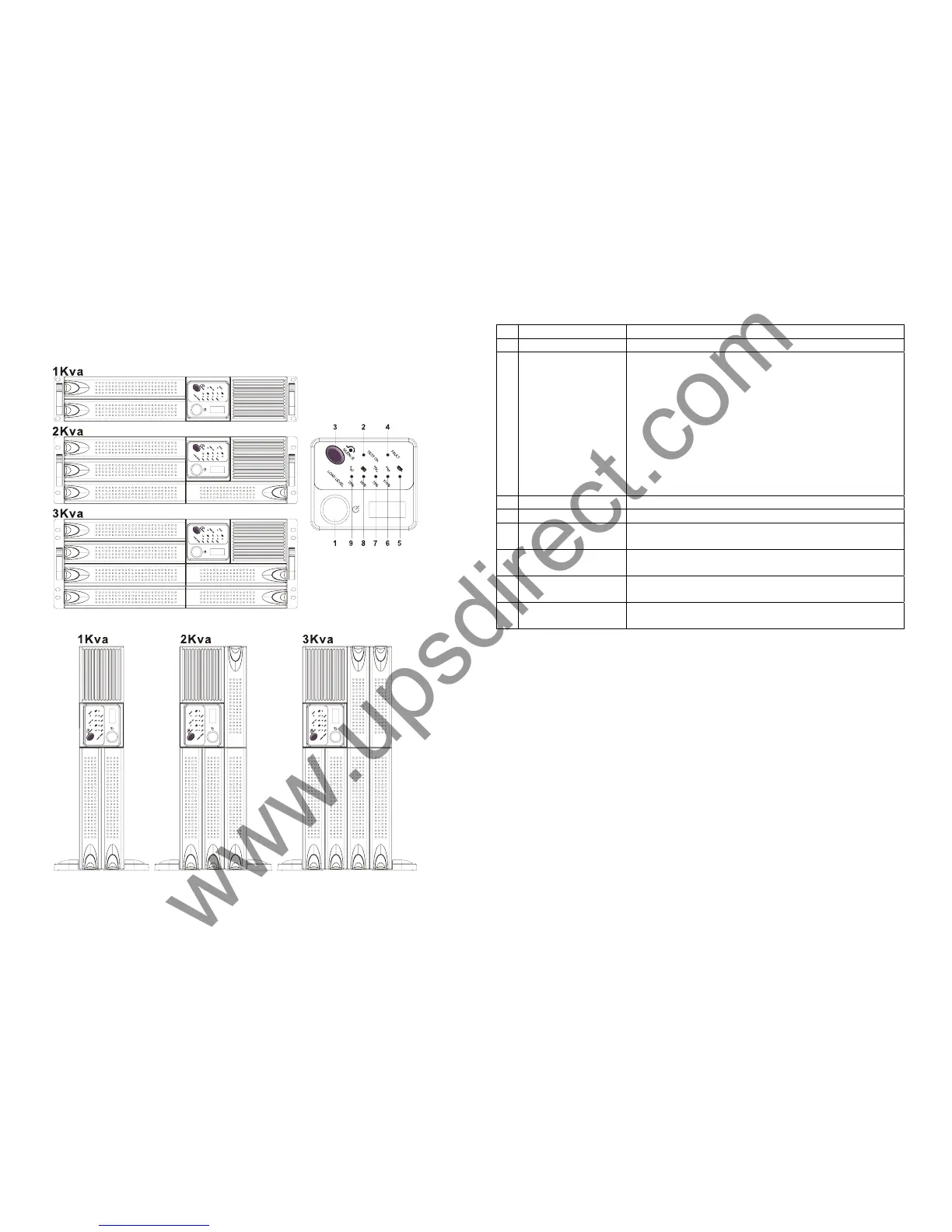
3.1. Front Display Panel Descriptions
7
1.
Main Switch Button
To Switch on/off the UPS
2.
Self Test OK LED
Green LED lights up if self test is satisfactory.
3.
Test/Silence
Button
a. To silence the alarm buzzer.
b.1. Applicable for Standard Unit
To execute the self test of the UPS by pressing the
button over 10 sec.
b.2. Applicable for Unit with Manual Bypass function
(Special order required)
To press the button over 5 seconds, the UPS will
be switched to Bypass mode and vice versa.
c. To illustrate the percentage of output load level at
AC Mode, and the battery energy level at Backup
Mode.
4.
Fault LED
Red LED lights up if UPS is faulty.
5.
Bypass LED
Amber LED lights up when UPS is in Bypass mode.
6.
Utility LED
a. AC normal: Green LED lights up.
b. 100% for load & battery level
7.
Inverter LED
a. Inverter On: Green LED lights up
b. 75% for load & battery level.
8.
Battery low LED
a. Battery low : Red LED lights up
b. 50% for load & battery level
9.
Over load LED
a. Over load condition: Red LED lights up
b. 25% for load & battery level.








 To Next Page