14
Initial Setup
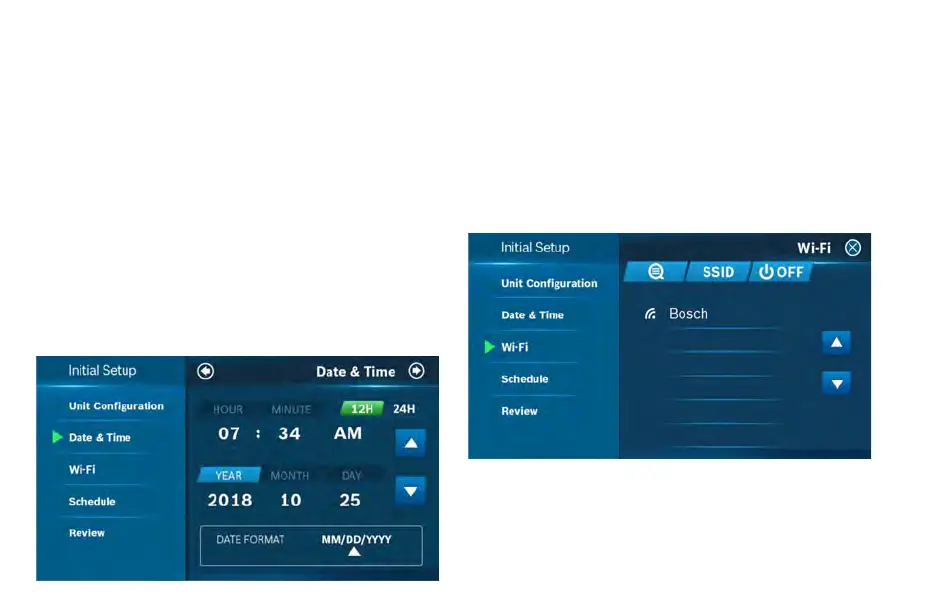
Date & Time
Follow the on-screen instructions to set the date and time of
BCC110 Thermostat and then click Next Arrow at the top right
corner of the screen.
On Device
Enter your location’s current date and time; after the device is
registered or linked to a user account, the date and time on the
device will automatically update to the current time associated
with the user account.
APP
The date and time for the device, as well as the user account, will
automatically update by selecting the time zone for the device.
Wi-Fi
The BCC110 requires a reliable Wi-Fi connetion in order to access
smart features such as remote access, weather forecast and more.
To complete the Wi-Fi setup, follow the on-screen instructions.
Scan
To start Wi-Fi setup, click the Scan icon to view available Wi-Fi
networks. Follow the on-screen instructions to complete the Wi-Fi
setup.


 To Next Page