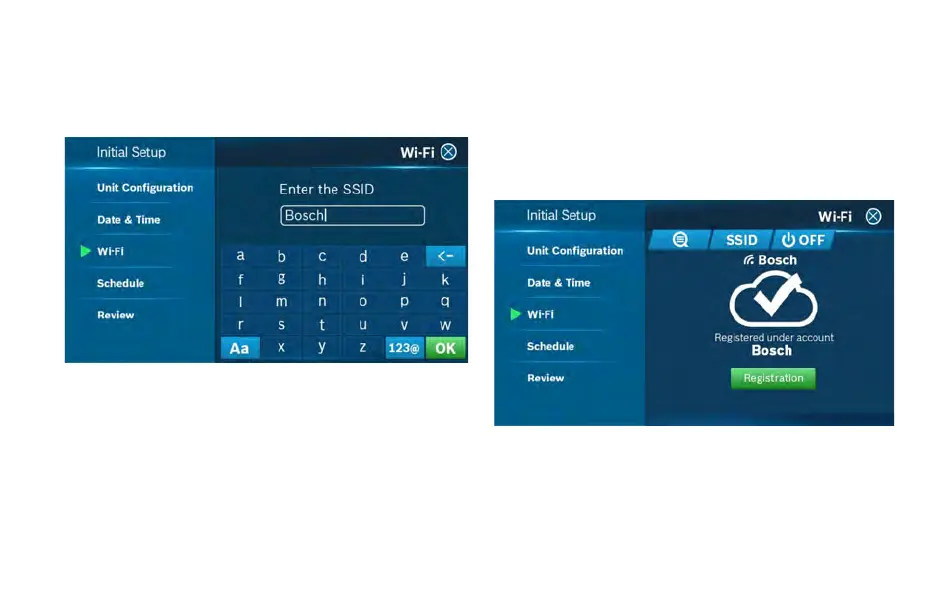
Manual Entry
If you are trying to connect to a hidden network, press the SSID
button to bring up the SSID screen. Enter your SSID into the text
box, then follow the on-screen instruction to complete the Wi-Fi
setup.
Note: If this is a first time installation, follow the instructions in
the App Setup section of this User Guide to register your
thermostat to your smart device.
The following may cause a failed connection to the device:
u Wi-Fi signal is too weak
u 5 GHz Wi-Fi network is not supported
u SSID contains space or non-ASCII characters
u Incorrect password
u Wi-Fi is okay but your internet is unavailable
u Additional web authentication is not supported
After you have successfully established a connection, your
network name appears. If your thermostat is already registered to
your account on your smart device, your User ID name appears.
Follow additional instructions on the screen to complete setup.
After completing the setup, download the Bosch Bosch EasyAir
App from the Apple Store or Google Play Store. Create an account
within the app and then add a device (BCC110) by following the
on-screen instructions.
Note: For all smart devices that require access to the same
thermostat, you must use the same account.


 To Next Page