16
Schedule
Choose the schedule you would like to modify, or select No
Schedule if you do not wish to set up a schedule at this time, and
click the Setup button or Next arrow.
Note: Home is the default schedule for your BCC110. If you wish
to add a different schedule, use the
Bosch EasyAir App.
To set up your periods for the day, click on the Start Time bubble of
the period and use the Up/Down arrows to set the start time of the
first period of the day.
1. Next, click the Heat bubble and use the Up/Down arrows to set
the heating setpoint for the first period of the day.
2. Then, click the Cool bubble and use the Up/Down arrows to set
the cooling setpoint for the first period of the day.
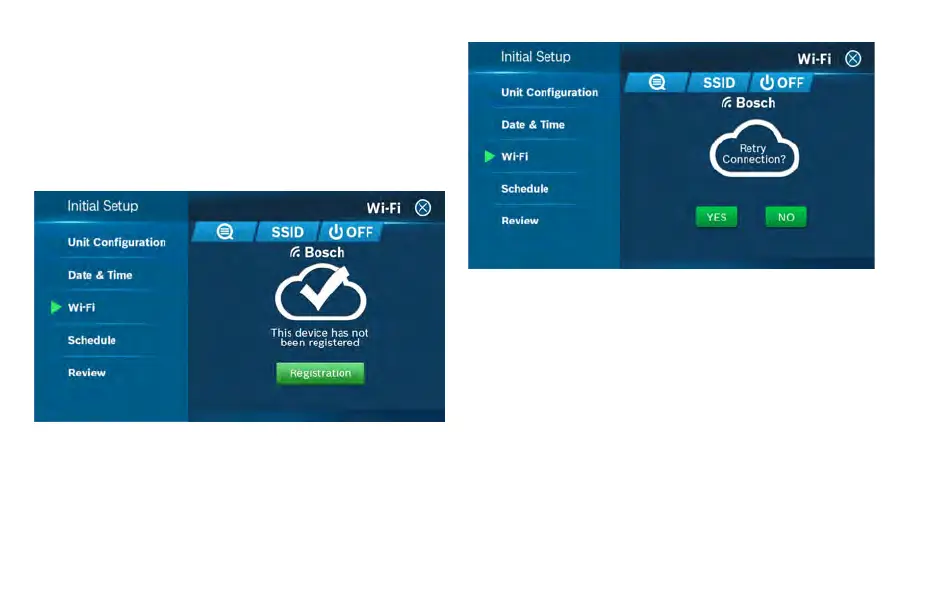
For an unregistered device, click the green Registration button to
register your account. If you want to register a different account to
your device, you can also click the Registration button and follow
the steps outlined in the App Setup section of this User Guide.
Auto Reconnect
If your device loses connection with your wireless network, it will
automatically attempt to reconnect after 5 minutes. If that fails, it
will make a new attempt every 15 minutes for the next 24 hours.
Any manual network reconfiguration of the thermostat will stop
automatic reconnection attempts.
Initial Setup


 To Next Page