42
Schedule Overview
Schedule
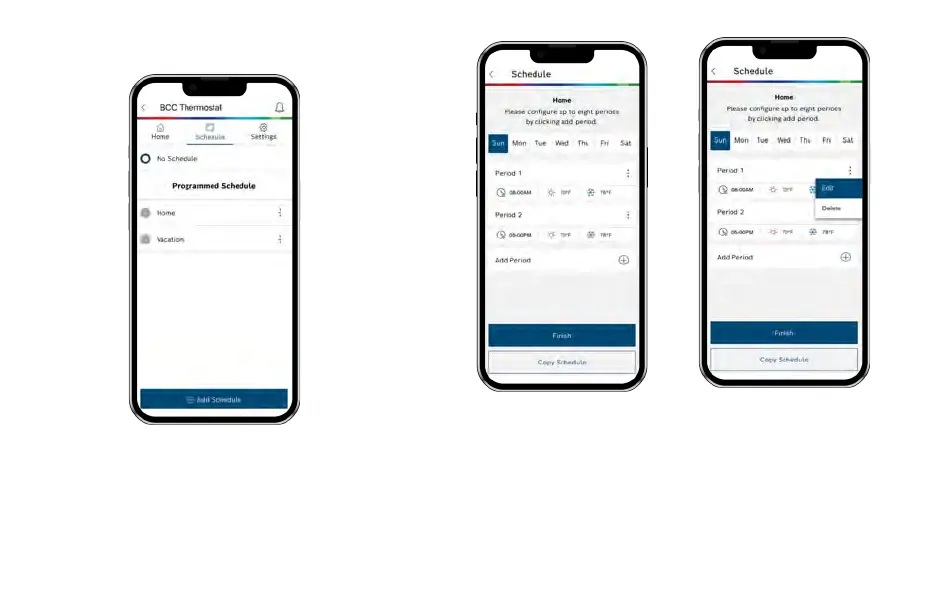
u To add a new Schedule, use theAdd Schedule” button at the
bottom, name your schedule and click OK.
u To modify an existing Schedule, click on the 3 dotted menu
button on the schedule you want to modify and select “Edit” or
“Delete”.
Add a New Period
To add a new Period to a given
day, click the Add Period button
in the middle of the screen.
Then individually select and set
the Starting time, Heat setpoint
and Cool setpoint.
Edit an Existing Period
To modify an existing Period, click
on the 3 dotted menu button on
the period you want to modify and
select “Edit”, Then click on the
Starting time, Heat setpoint or
Cool setpoint value you would like
to edit and use the scroll wheel to
update the value.



 To Next Page