8
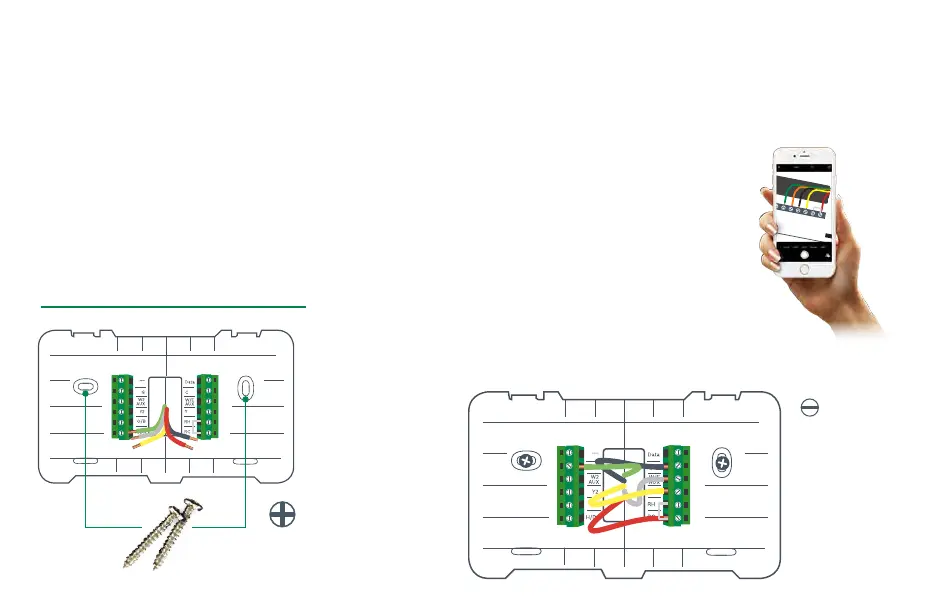
Drill and insert wall anchors (if necessary)
Drill two 7/32” holes where you marked the location of the
mounting screws and then insert the wall anchors provided into
these mounting holes.
Check if the wall plate is level and insert screws
Make sure your new BCC110 wall plate is level and insert the
included screws from the package. Mount your new wall plate to
the wall using a Phillips head screw driver.
Step 8
Insert each wire into the corresponding
terminal and close each terminal using a
flat head screw driver
Use the image you took with your smartphone
of your old thermostat wiring or the wire labels
as a reference for where to place each wire. Be
sure that you insert each wire, one by one, and
then immediately close the terminal and
confirm that the wire is secure inside the
terminal before moving to the next wire.
Repeat this process for each wire to be
installed. If you are unsure of the terminal
names on the BCC110 Wall Plate, refer to
BCC110 Terminal Key on the next page.
Step 9
SMALL
FLAT HEAD
SCREWDRIVER
NEEDED
PHILLIPS HEAD
SCREWDRIVER NEEDED
Thermostat Installation
LEVEL


 To Next Page