10
Changing the cooking time
Press the
0 button. Switch to cooking time using the rotary
selector. Press the
X button and turn the rotary selector to
change the cooking time. Exit the time-setting options with the
0 button.
Checking information
Press the
° button.
For more information, press the
° button again.
Time-setting options
The time-setting options are called up with the 0 button. The
following functions are available:
When the appliance is switched off:
■ Setting the timer
■ Setting the clock
When the appliance is switched on:
■ Setting the timer
■ Setting the cooking time
■ Setting a later end time
Setting time-setting options - in brief
1.Press the 0 button.
2.Select the desired time-setting option with the rotary selector.
3.Press the X button to change line and turn the rotary
selector to set the time or cooking time.
4.Exit the time-setting options with the 0 button.
Set the timer
The timer runs independently of the cooking mode. You can
use it like a kitchen timer and set it at any time.
1.Press the 0 button.
2.Press the X button and use the rotary selector to set the
timer time.
3.Exit the time-setting options with the 0 button.
The display switches to its previous state. The
Q symbol for
the timer appears, and the time can be seen counting down.
Changing the timer duration
Press the
0 button. Press the X button and change the timer
time within the next few seconds using the rotary selector. Exit
the time-setting options with the
0 button.
Once the timer duration has elapsed
A signal sounds.
Q "00:00" is shown in the display. Press the
0 button to stop the signal.
Cancelling the timer duration
Press the
0 button. Press the X button and turn the timer
time down to "00:00" using the rotary selector. Exit the time-
setting options with the
0 button.
Setting the cooking time
If you set the cooking time for your dish, the cooking operation
will end automatically after this time. The appliance stops
heating.
For types of heating involving steam, you must always set a
cooking time.
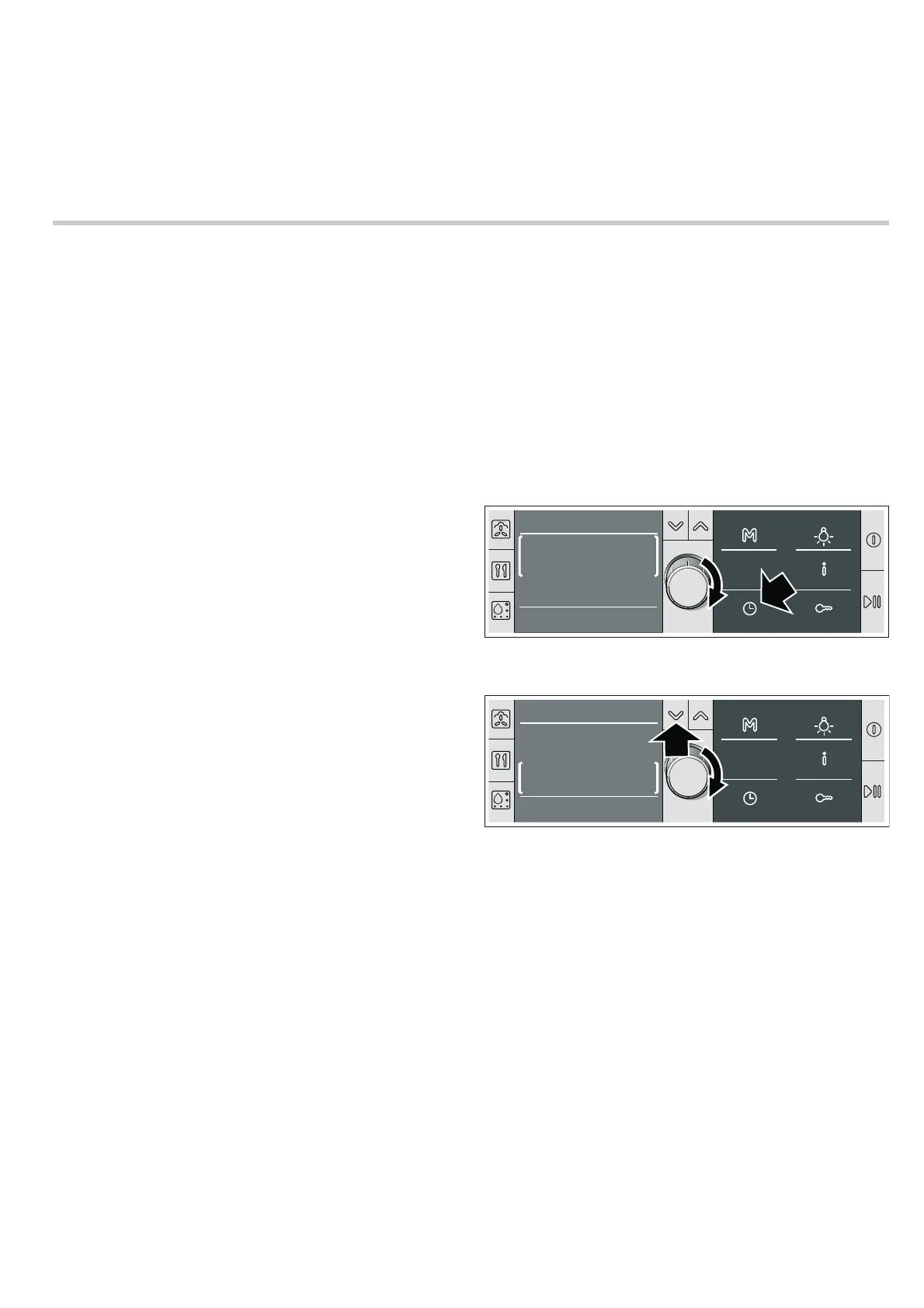
Example in the picture: set a cooking time of 45 minutes.
Requirement: The type of heating and temperature have been
set.
1.Press the 0 button.
2.Switch to cooking time using the rotary selector.
3.Use the X button to switch the line.
4.Set the cooking time using the rotary selector.
5.Close the Time-setting options with the 0 button.
6.If operation has not yet started, press the n button.
The cooking time counts down on the display.
For the Steam type of heating, the cooking time starts
counting down after the heating-up time.
Changing the cooking time
Press the
0 button. Switch to cooking time using the rotary
selector. Press the
X button and change the cooking time
using the rotary selector. Close the Time-setting options with
the
0 button.
The cooking time has elapsed
A signal sounds. The appliance stops heating. “00:00:00” is
shown in the display. Press the
0 button to stop the signal.
Cancelling the cooking time
Press the
0 button. Switch to cooking time using the rotary
selector. Press the
X button and set the cooking time to
“00:00” using the rotary selector. Close the Time-setting
options with the
0 button.
7RSERWWRPKHDWLQJ
&
7LPHVHWWLQJRSWLRQV
&RRNLQJWLPH
ZLWKFORVH
KPLQ
7RSERWWRPKHDWLQJ
&
7LPHVHWWLQJRSWLRQV
&RRNLQJWLPH
ZLWKFORVH
KPLQ


 To Next Page