en
Installation of the system pre-amplifier
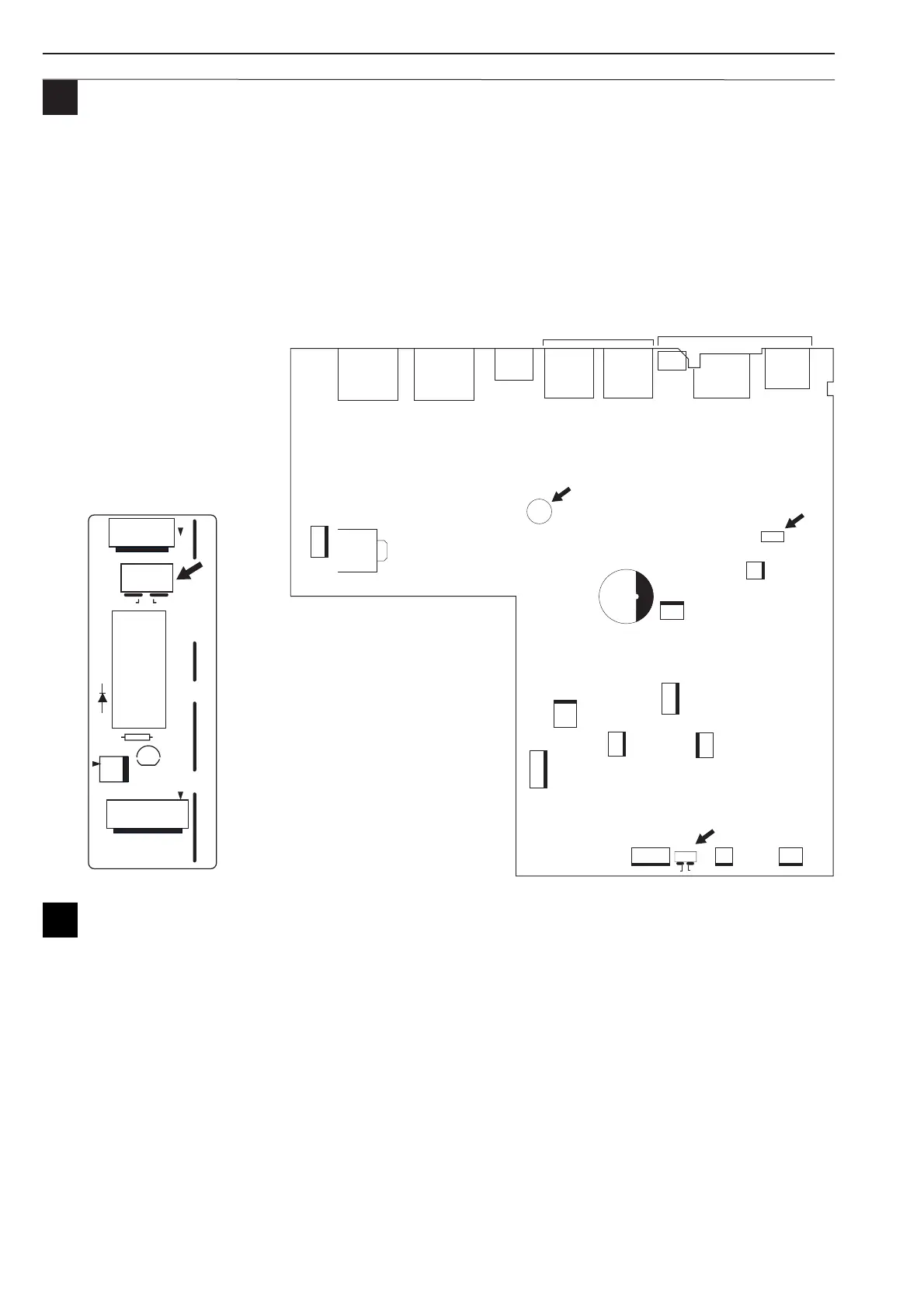
Setting the Speech filter and call station volume
The Speech filter for the mic/line input can be switched on/off with jumper JP101 (default ON).
You can set the call station volume with VR101.
Setting priority
The priority cannot be set manually. The default priority order is:
1. Emergency/Telephone input 5. 6-zone call station LBB 1946
2. Trigger 1 or 2 (first comes, first served) (DIP switch setting of LBB 1946)
3. All-call call station LBB 1941 6. Background music and mic/line input
4. 6-zone call station LBB 1946
(DIP switch setting of LBB 1946)
Setting single and dual channel use
The system pre-amplifier can be used with one booster amplifier for both music and calls ('1 channel use'). Any call will
interrupt background music in all zones. It is also possible to use separate booster amplifiers, for music and calls ('2
channel use'). Now a call will not interrupt music in zones, not addressed by the call. Jumper JP102 selects whether
background music is going to the Master output (1 channel use) or not (2 channel use). Jumper J2 must be set to either
1 channel use or 2 channel use to select the amplifier terminals for the zones.



 To Next Page