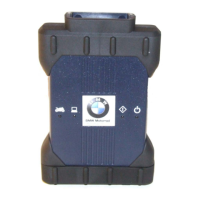
The BMW Race Calibration Kit (RCK3) VCI is a diagnostic and calibration tool designed for motorcycle racing owners to interface with BMW Motorcycle ECUs. It facilitates communication between a personal computer (PC) running the RCK3 application software and the motorcycle's Engine Control Unit (ECU). The kit includes the RCK3 VCI assembly, a 10-pin DLC (Diagnostic Link Connector) cable for the motorcycle, a USB-Mini B to USB-A cable for PC connection, a Velcro cable tie wrap, and instructions for downloading the RCK3 application.
Function Description:
The primary function of the RCK3 VCI is to enable the transfer of calibration files from a PC to the target ECU on a BMW Motorcycle. It also provides connection status and calibration feedback to the RCK3 application running on the PC. The device acts as an intermediary, translating commands and data between the PC software and the motorcycle's ECU. This allows users to modify and optimize engine parameters for racing applications.
Important Technical Specifications:
- Dimensions: 14.0 x 9.4 x 3.2 cm (5.5 x 3.7 x 1.3 inches)
- Weight: 0.18 kg (0.4 lb.)
- Power Consumption: 2.0 Watts @ 5 Vdc
- Input Voltage: 4.5 to 5.5 Vdc (USB)
- LED Display: 4 software-controlled on-board LEDs (Host LED, Motorcycle LED, Power LED, Error LED)
- Power Sources: USB power
- Operating Temperature: 0 °C to 50 °C (32 °F to 122 °F)
- Storage Temperature: -20 °C to 70 °C (-4 °F to 158 °F)
- PC System Requirements:
- Processor: Intel Pentium II 450MHz, AMD Athlon® 600MHz or faster (or equivalent)
- Memory: 128MB of RAM
- Operating System: Windows 7, Windows 8, and Windows 8.1 (32 & 64 bit)
- Network Settings (for PC USB connection):
- IP-Address: 192.168.171.30
- Subnet: 255.255.255.0
- The RCK3 VCI's IP-Address is static at 192.168.171.2 and is not changeable.
- Firewall Exceptions (for RCK3 Application Software):
- VCI Manager (VCI_Manager.exe)
- VCI Identification Service (VCI_Ident.exe)
- Port: 8194
Usage Features:
- Connectivity: The RCK3 VCI connects to the BMW Motorcycle via a 10-pin motorcycle connector and to a PC using a standard USB cable. The USB cable ensures a stable connection during the calibration process.
- LED Indicators: Four LEDs on the front of the RCK3 VCI provide visual feedback on its status:
- Power LED (Green): Permanently on when the VCI start-up phase is complete, indicating the tool is ready to use.
- Host LED (Green): Flickers when the PC and host application are connected and communicating.
- Motorcycle LED (Green): Flickers when the motorcycle and host application are connected and communicating.
- Error LED (Red): Turns on when a problem occurs.
- During start-up, the Motorcycle and Host LEDs illuminate once from left to right, followed by the green Power LED.
- Firmware Updates: The RCK3 VCI's firmware can be updated via the RCK3 PC software. The application will notify the user when an update is available, which is often required for initial installation or to maintain compatibility.
- Troubleshooting: The user guide provides a comprehensive troubleshooting section for common issues such as the VCI not powering on, a red Error LED, connection problems, or incomplete software screens. Solutions range from checking power and cable connections to reinstalling software or adjusting firewall settings.
- Firewall Compatibility: The RCK3 Application Software automatically adjusts Windows firewall settings during installation. However, for third-party security software, manual configuration of application exceptions (VCI_Manager.exe, VCI_Ident.exe) and port 8194 may be necessary.
- Identification: Each RCK3 VCI unit has an assembly label on the back with an identification number consisting of a manufacturing code and a unique serial number, aiding in traceability.
Maintenance Features:
- Care and Cleaning:
- Always exit PC applications before powering off the RCK3 VCI.
- Disconnect cables from the motorcycle, PC, and VCI after use.
- Regularly inspect cables and connectors for damage and corrosion, replacing faulty components immediately.
- Store the RCK3 VCI and its components in a secure, dry location.
- Clean the VCI, connectors, and cables by wiping them with a rag lightly coated with a mild detergent or non-abrasive hand soap.
- Important: Do not immerse the RCK3 VCI or any of its parts in water. Avoid harsh solvents like petroleum-based cleaning agents, Acetone, Benzene, or Trichloroethylene. Ensure the device is thoroughly dry before storage.
- Recovery Procedure: In cases of power failure or communication errors during software updates that corrupt the RCK3 VCI, a recovery procedure is available:
- Unpower the VCI by removing the USB cable.
- Remove the bottom boot of the RCK3 VCI.
- Depress the internal reset tab.
- While the reset tab is depressed, connect the USB cable to the RCK3 VCI and the PC to apply power.
- Continue holding the reset tab until all LEDs flash on and then off.
- The RCK3 VCI will then be in a recoverable state, allowing it to be updated from the RCK3 PC application.
- Recycling (WEEE Compliance): For products sold in the European Union, the RCK3 VCI complies with the Waste Electrical and Electronic Equipment (WEEE) directive. The WEEE symbol on the product or packaging indicates that it must not be disposed of as residual garbage. Users are obliged to collect old devices separately and return them to a WEEE take-back system for environmentally sound recycling.
- Electrical Conformance: The equipment complies with the European community Standard EN 61010-1:2001 – Part 1: General Requirements.
- FCC Compliance: The device has been tested and found to comply with Class A digital device limits under Part 15 of the FCC rules, designed to provide reasonable protection against harmful interference in a commercial environment. Users are advised that operation in a residential area may require them to correct any interference at their own expense.


 To Next Page
 General