23
Adding laundry + Ending the programme
Terminating the programme
If you would like to terminate a programme before it is
completed:
• Set programme selector to ”Aus”.
The drum does not stop with the cover opening facing up.
Note: drum may be hot when using the 90°/60° settings!
1
Aus
End of the programme
• To remove the laundry more easily, the cover opening is
automatically facing up at the end of the programme.
• Turn programme selector to ”Aus”.
1
(1) -
If ”Stop” is displayed at the end of the programme, pressing pushbutton or will
return you to the programming mode.
(2) -
For purposes of safety, it is recommended that the mains cable be unplugged and the
tap closed when the programme has ended.
Remember to set the time when putting the machine into operation again!
42
Control lights and display
Control lights and display
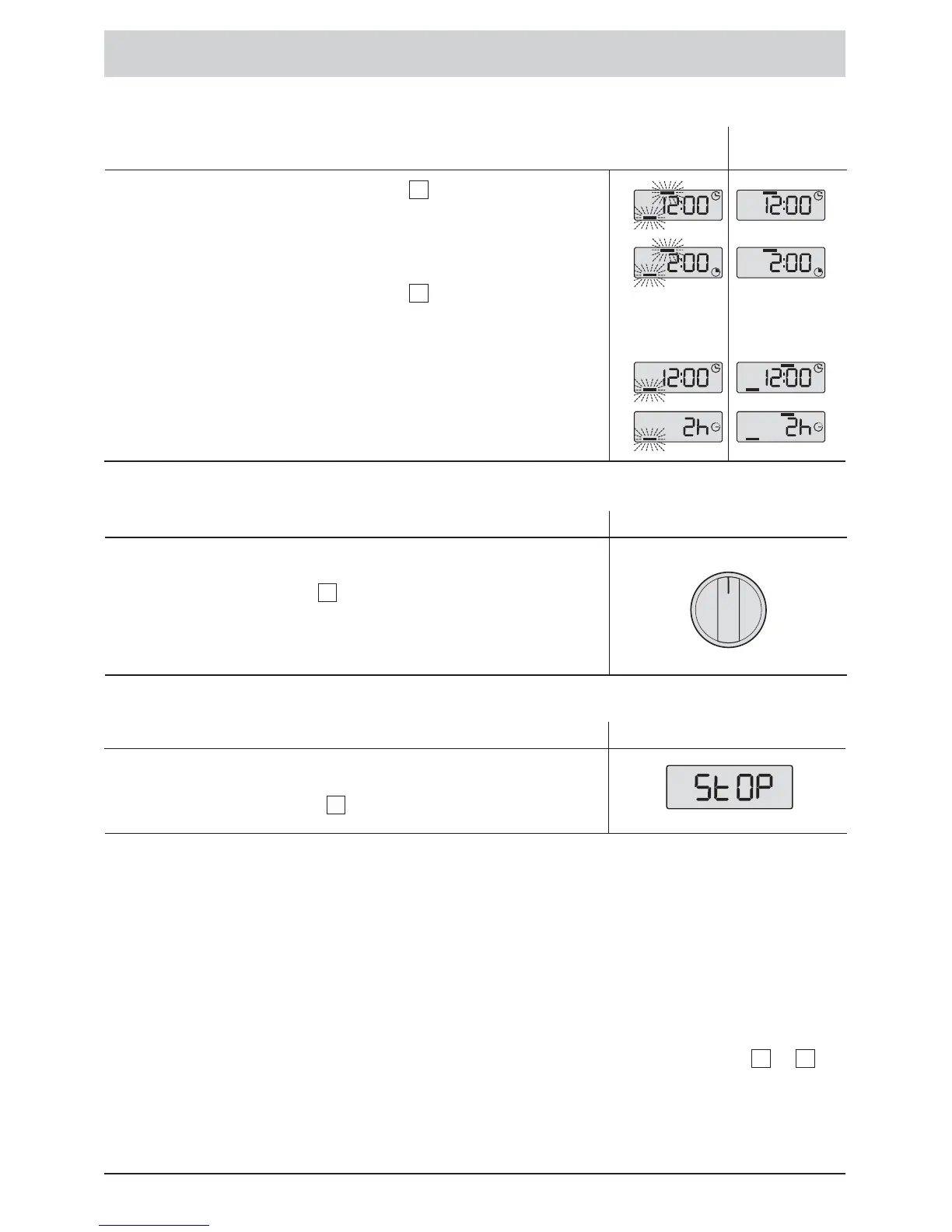
• Press the ”Start/Pause” pushbutton to interrupt the
programme.
The ”Pause” and programme sequence bars flash.
• Remove or add laundry if necessary. (It may be 1 to 2
minutes until the lid unlocks).
• Press the ”Start/Pause” pushbutton to restart the
programme.
If a Delayed Start has been selected, the drum may be
opened at any time during the selection of the Starting Time
before the start of the programme without aborting the
programme and having to start anew.
4
4
Adding or removing laundry
(not possible during spin cycles):
Screen display
During
the Pause
After
the Pause







 To Next Page