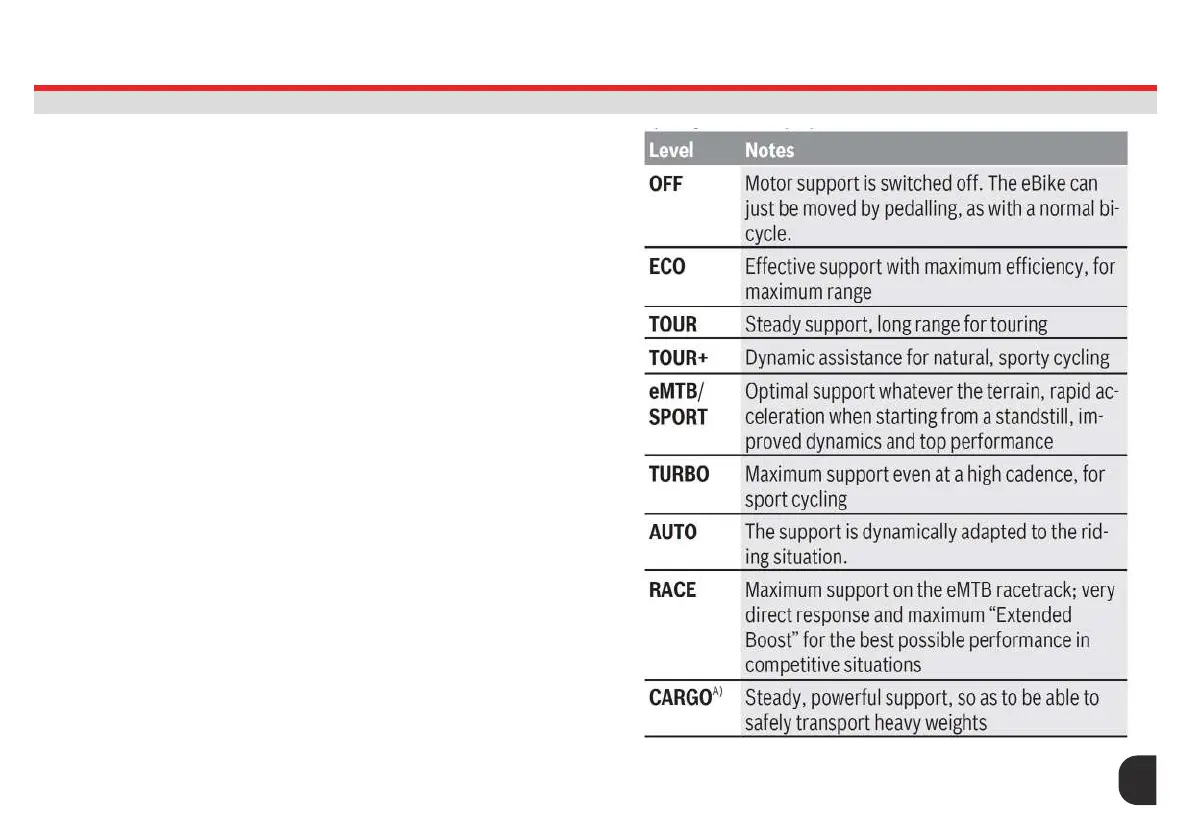
Setting the assistance level
On the operating unit, you can set the level of assistance you want the
eBike drive to provide you with while pedalling.
Mini Remote: Briey press (< 1 s) the buttons to increase assistance + (4) or
decrease assistance – (6) in order to increase or decrease the assistance
level accordingly. System Controller: Briey press (< 1 s) the mode button
(14) to increase assistance. Press the mode button (14) for longer than 1 s to
decrease the assistance.
The assistance level can be changed at any time, even while cycling, and is
displayed in colour.
Adapting the Assistance Level
The assistance level can be adapted within certain limits using the eBike
Flow app. This gives you the option of adjusting your eBike to your personal
requirements. It is not possible to create a completely new mode. You can
only adjust the modes that have been enabled by the manufacturer or
retailer on your system. This may be fewer than 4 modes.
Due to technical limitations, you cannot adjust the eMTB and TOUR+ modes.
In addition, restrictions in your country may mean that it is not possible to
adjust a particular mode. The following parameters are available for making
adjustments:
– Assistance in relation to the base value of the mode (within the legal
requirements)
– Drive response
– Top limit speed (within the legal requirements)
– Maximum torque (within the limits of the drive)
The parameters are dependent on each other and inuence each other. For
example, it is not fundamentally possible to simultaneously set a low torque
value and high assistance.
Note: Please ensure that your modied mode retains the position,
name and colour on all on-board computers and controls.
ASSIST MODES & PUSH ASSIST
MINI REMOTE (BRC3100 | BCR3300)
22




 To Next Page