EasyManua.ls Logo

Bose IZA 190-HZ - User Manual

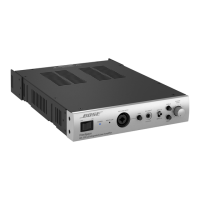
Bose IZA 190-HZ
22 pages
Print Icon
To Next Page IconTo Next Page
Loading...
FreeSpace
®
Integrated Zone Amplifier/Zone Amplifier
Installation and Operating Guide
Installations- og betjeningsvejledning
Installations- und Bedienungsanleitung
Guía de instalación y funcionamiento
Guide d’installation et d’utilisation
Manuale di installazione e funzionamento
Installatie- en bedieningshandleiding
Bruksanvisning för installation och användning
* For use by professional installers only
* Kun beregnet til at anvendes af professionelle installatører
* Nur zur Verwendung durch einen fachkundigen Monteur
* Solo apto para instaladores profesionales
* Réservé à un technicien professionnel
* L’utilizzo è riservato agli installatori professionisti
* Uitsluitend bestemd voor professionele installateurs
* Endast för professionella användare
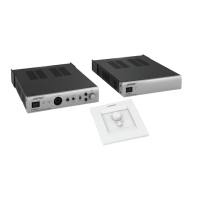
IZA 190-HZ
IZA 250-LZ
ZA 190-HZ
ZA 250-LZ

Questions and Answers

  • J
    Justin HaneyJul 31, 2025
    How to troubleshoot a Bose Amplifier with no power?
    • M
      Matthew WilliamsJul 31, 2025
      To troubleshoot a Bose Amplifier with no power: turn the power on and check for the blue LED. Ensure the power cord is correctly plugged in and test with a different, working AC outlet.
  • F
    fbushAug 6, 2025
    What to do if my Bose IZA 190-HZ has power but no sound?
    • D
      daniel41Aug 7, 2025
      If your Bose Amplifier has power but no sound, ensure the input source is on and has a signal. Check the cable connections and that the correct source (A/B) is selected on the front panel. If a user interface is connected, verify the source selection and volume on it, as it overrides the front panel. Also, ensure a cable isn't connected to the Aux Input, which overrides the selected Input A/B source. Check the Mute and Page connectors on the rear panel, and confirm that the loudspeakers are properly connected with correct tap settings. Finally, ensure the amplifier has adequate ventilation and the output wiring is correct, as a short circuit can trigger protection mode.
  • B
    boothtimAug 12, 2025
    Why is the sound distorted on my Bose IZA 190-HZ?
    • V
      vguzmanAug 12, 2025
      If the sound from your Bose Amplifier is distorted, check if the Input Clip red LED on the front panel is lit. If it is, reduce the source output level or the input gain. If the input signal is clean, make sure that the loudspeakers are not overdriven or damaged, and check the loudspeaker tap setting.
  • R
    Robert SanchezAug 18, 2025
    How to fix low sound on my Bose IZA 190-HZ Amplifier?
    • B
      Benjamin AndersonAug 18, 2025
      If your Bose Amplifier has power but the sound is low, first check that the audio input source output is at a normal level and the cable connections. Then, increase the input level using the Gain controls until the Input Clip LED doesn't light up red. Also, make sure the Output Trim controls aren't turned down too much. If a user interface is connected, check its volume control, as it overrides the front panel settings.
  • R
    Rachel PaulAug 25, 2025
    Why does my Bose IZA 190-HZ Amplifier sound unnatural?
    • B
      Bobby RichardAug 25, 2025
      If the sound from your Bose Amplifier sounds unnatural, ensure you have the correct EQ preset selected for your loudspeakers. Use the HPF setting for loudspeakers other than FreeSpace® DS 16/DS 40 models. Check the Treble and Bass controls on the front panel and verify that the loudspeakers are wired correctly (+ to + and - to -).

Summary

Important Safety Information

Professional Installation Requirement

Product intended for installation by professional installers only.

Regulatory and Compliance

Must be used in accordance with local, state, federal and industry regulations.

Electrical Safety and Fire Hazards

Do not expose to rain or moisture; avoid condensation and liquid spills.

Important Safety Instructions

Operational Safety Guidelines

Follow instructions, use dry cloth, protect cords, unplug during storms, avoid overloading.

Servicing and Maintenance Procedures

Refer all servicing to qualified personnel; do not attempt self-service.

IZA 190-HZ;IZA 250-LZ Integrated Zone Amplifier

Front-panel Controls and Indicators

Overview of power, input, gain, EQ, and level controls on the front panel.

IZA Amplifier Rear-panel and Connections

Loudspeaker Connection Guide

Instructions for connecting loudspeakers using 3-pin Euroblock for 70V/100V operation.

IZA Amplifier Rear-panel Setup

DIP Switch Configuration Options

Configuration options for amplifier mode, output mode, and front mic settings.

IZA Amplifier Front-panel Operation

ZA 190-HZ;250-LZ Zone Amplifier Basics

ZA Amplifier System Integration and Operation

Expanding Systems with ZA Amplifiers

Using ZA amplifiers to add power to IZA systems.

Installation and Placement Guidelines

Ensuring Proper Ventilation

Importance of airflow and avoiding obstructions for amplifier cooling.

Rack Mounting a Single Amplifier

Rack Mounting Two Amplifiers

Troubleshooting Common Issues

Power and No Sound Problems

Solutions for issues with no power or no sound output.

Low Sound and Output Issues

Resolving low volume, distorted, or unnatural sound problems.

Bose IZA 190-HZ Specifications

General IconGeneral
BrandBose
ModelIZA 190-HZ
CategoryAmplifier
LanguageEnglish

Related product manuals