BOSS Electronics 7” PC TABLET User Guide
24
9. Personalized Settings
Click the settings on the shortcut menu.
9.1 Wireless controls
Manage Wi-Fi and airplane mode
Wi-Fi
If you want to open and close the Wi-Fi, please long press back Settings Wireless
controls Wi-Fi.
Wi-Fi Settings
If you want to set up and manage the wireless access point, please long press back
Settings Wireless controls Wi-Fi settings.
Airplane mode
Not applicable to this particular device.
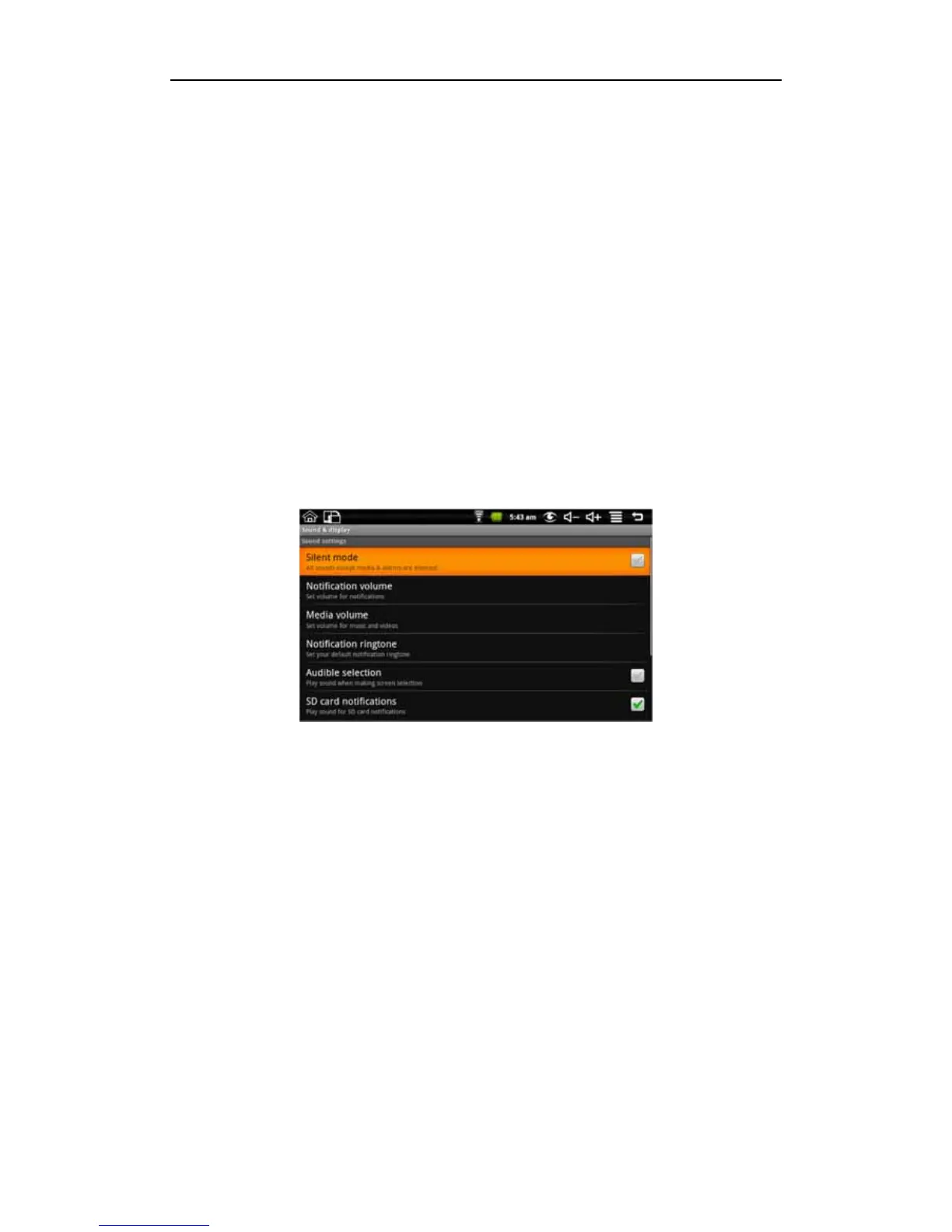
9.2 Sounds & Display
Set ringtones, notification, and screen brightness.
Silent mode
Mutes all notification sounds. Long press back Settings Sound & display (Sound
settings) Silent mode.
Notification volume
To set the notification volume level, long press back Settings Sound & display (Sound
settings) Notification volume.
Media volume
To set the volume of music and video, long press back Settings Sound & display
(Sound settings) Media volume.
Notification ringtone
To set the various ring tones, long press back Settings Sound & display (Sound
settings) Notification ringtone.
Audible selection
To set touch screen sounds, long press back Settings Sound & display (Sound
settings) Audible selection.
SD card notifications
To set the SD card notification sound, long press back Settings Sound & display
(Sound settings) SD card notifications
Orientation


 To Next Page