BOSS Electronics 7” PC TABLET User Guide
25
Long press back Settings Sound &display(Display settings) Orientation, you can
switch orientation automatically when rotating. If you choose “switch orientation
automatically when rotating”, the interface will switch automatically when the device is
rotated. If you don’t choose “switch orientation automatically when rotating”, there will be
a rotating screen icon
on the screen status bar and the interface will switch
following the device only if you click the rotating screen icon.
Animation
To open and close the window to display animation, long press back Settings Sound
& display(Display settings) Animation.
Brightness
To adjust the brightness of the screen, long press back Settings Sound & display
(Display settings) Brightness.
Screen timeout
To adjust the screen automatically turns off before the delay, long press back Settings
Sound & display (Display settings) Screen timeout.
9.3 App Market
Unknown Source
After an authenticity check for non-market applications an application is allowed to be
installed.
Manage applications
To manage and remove the installed applications, please long press back Settings
Application Management applications.
Development
To set options for application development, please long press back Settings
Application Development.
9.4 SD Card & Device Storage
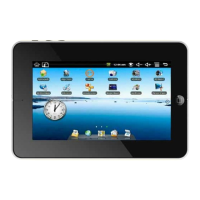
To safely remove the Micro SD card, view available storage, etc.
Total Space
Long press back Settings SD card & device storage Total space, you can view the
total amount of localdisk storage and SD card .
Available space
Long press back Settings SD card & device storage Available space, you can view
the available space of localdisk storage ,SD card and internal device storage.


 To Next Page