44
Panel Descriptions
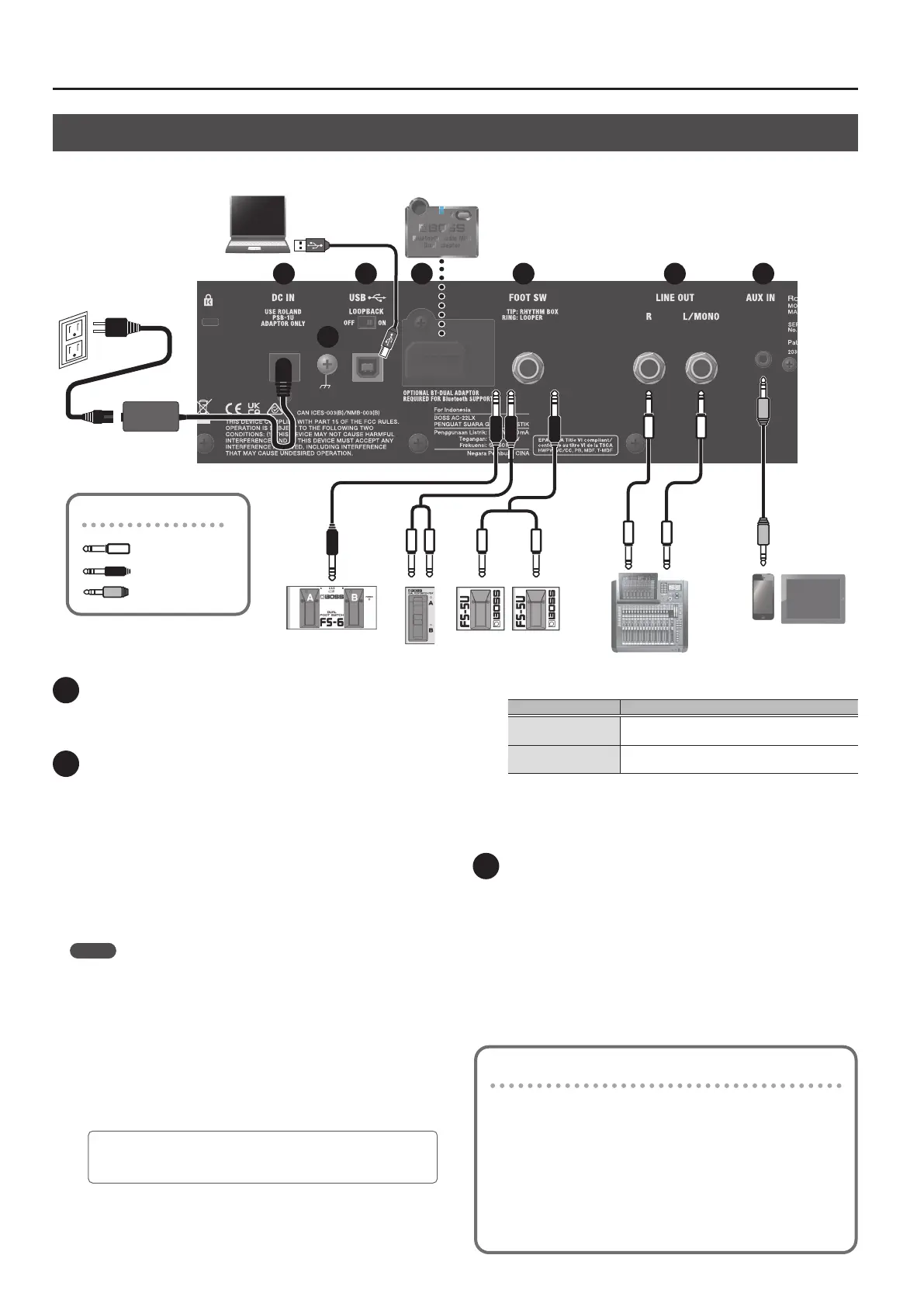
1 DC IN jack
Connect the included AC adaptor to this jack.
* Use only the AC adaptor that came with this unit.
2 USB port
Connect a commercially available USB 2.0 cable to play back and
record the sound from this unit on your computer. You can also use
dedicated app to edit the settings of the internal eects.
Playing back/recording the sound of this unit using your
computer, iPad or iPhone
Use the standard driver provided by the operating system.
When using a computer, you can also use the dedicated USB driver.
When connecting an iPad or iPhone, use a commercially-available
USB B type adaptor or cable.
MEMO
You can use your iPad or iPhone to adjust the volume (when using
system program ver. 1.02 or later).
Download the AC-22LX system program from the BOSS website.
Using the dedicated app
When using the dedicated app, use the dedicated USB driver.
Download the USB driver from the BOSS website. For details, refer
to the “Readme.htm” le included with the download.
BOSS website
https://roland.cm/dl/425141A
Conguring the USB driver to use
USB driver What to do
Dedicated USB driver
Set the [AIR FEEL] knob to “DRY”, and turn on the
power while holding down the [MEMORY] button.
Standard OS USB
driver
Set the [AIR FEEL] knob to “XY”, and turn on the
power while holding down the [MEMORY] button.
[LOOPBACK] switch
When the [LOOPBACK] switch is on, the USB audio input sound can
be sent back to your computer, iPad or iPhone.
3 Bluetooth ADAPTOR connector
Connect the Bluetooth® Audio MIDI Dual Adaptor
(model: BT-DUAL) to wirelessly play back music from your mobile
device such as a smartphone or tablet (hereafter “mobile device”),
or to edit the eects using an app on your mobile device (p. 8).
* Do not touch any of the printed circuit pathways or connection
terminals.
* When circuit board installation is complete, double-check your
work.
Rear Panel (Connecting Your Equipment)
* To prevent malfunction and equipment failure, always turn down the volume, and turn o all the units before making any connections.
Using the AC-22LX’s dedicated app
You can connect the AC-22LX via USB to your computer and use
it with dedicated app. Using the dedicated app lets you do the
following:
¹ Edit the eect settings.
¹ Back up eects and other internal settings, or restore settings
from a backup.
Download the dedicated app from the BOSS website (https://
roland.cm/dl/425141A).
Plugs shown in this illustration
1/4” phone (mono)
1/4” phone (stereo)
Stereo Miniature phone
2 3 4 5 6
7
1



 To Next Page