6
Panel Description
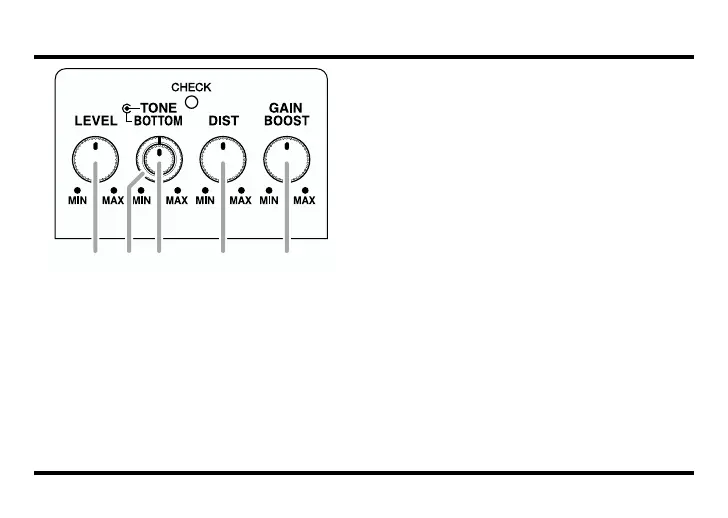
fig.02
7. LEVEL Knob
This knob adjusts the level of the effect
sounds.
8. BOTTOM Knob
Adjusts the amount of boost in the low
end. The lower frequencies are empha-
sized more as the knob is turned clockwise.
9. TONE Knob
This controls the tone.
Rotating the knob counterclockwise will
make the sound milder, while rotating it
clockwise will make the sound sharper.
10. DIST (Distortion) Knob
This adjusts the amount of distortion.
Rotating it clockwise increases the effect,
whereas counterclockwise rotation reduc-
es the effect.
11. GAIN BOOST Knob
Adds even more distortion, in addition to
that obtained with the DIST knob setting.
The further clockwise you turn the knob,
the more powerful the distortion gets, cre-
ating sounds that are really expansive.
98 10 117



 To Next Page