Connect the guitar or bass guitar to be tuned here.
* The INPUT jack doubles as the power switch. Power to the unit is turned on when you plug into the INPUT jack; the power is turned off when the cable is
unplugged.
8. OUTPUT Jack
Connect an effects processor, guitar amp, or other such device here.
* The output is muted when the tuner is on.
9. BYPASS Jack
Connect an effects processor, guitar amp, or other such device here.
This jack will always output the signal from the instrument connected to the Input jack. Use this jack if you want to be heard while you tune.
10. Pedal Switch
This switch turns the effect on/off.
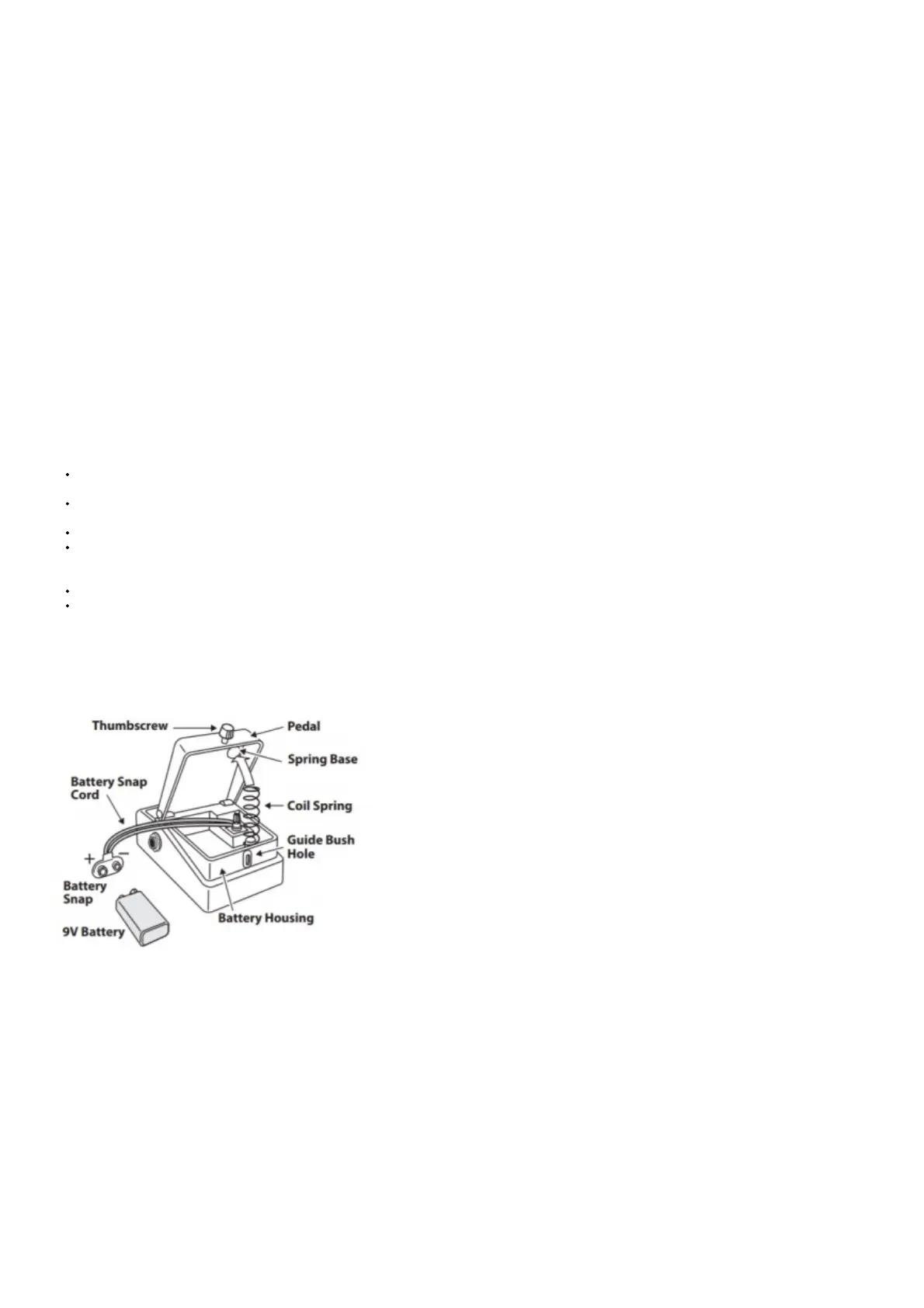
11. Thumbscrew
When this screw is loosened, the pedal will open, allowing you to change the battery. For instructions on changing the battery, refer to “Changing the Battery.”
12. DC OUT Jack
When an AC adapter is used, you can connect a PCS-20A parallel DC cord (optional) to supply power to effects processors and other PSA adaptor-compatible gear.
* Power cannot be supplied from the DC OUT jack when the TU-3W is running on batteries.
13.DC IN Jack
Accepts connection of an AC Adaptor (PSA series: optional). By using an AC Adaptor, you can play without being concerned about how much battery power you
have left.
* Use only the specified AC adaptor (PSA series), and connect it to an AC outlet of the correct voltage. Do not use any other AC adaptor, since this may cause
malfunction.
* We recommend that you keep batteries installed in the unit even if you’ll be powering it with the AC adaptor. That way, you’ll be able to continue a performance
even if the cord of the AC adaptor gets accidently disconnected from the unit.
14.OUTPUT BUF/THRU Switch
Switches between true bypass and buffered bypass.
Precautions When Connecting
To prevent malfunction and/or damage to speakers or other devices, always turn down the volume, and turn off the power on all devices before making any
connections.
Some connection cables contain resistors. When connection cables with resistors are used, the sound level may be extremely low, or impossible to hear. For
information on cable specifications, contact the manufacturer of the cable.
If you’ll be using the TU-3W for an extended time, we recommend that you use an AC adaptor.
Once the connections have been completed, turn on power to your various devices in the order specified. By turning on devices in the wrong order, you risk
causing malfunction and/or damage to speakers and other devices. When powering up: Turn on the power to your guitar amp last. When powering down: Turn
off the power to your guitar amp first.
This unit is equipped with a protection circuit. A brief interval (a few seconds) after power up is required before the unit will operate normally.
When operating on battery power only, the unit’s indicator will become dim when battery power gets too low. Replace the battery as soon as possible.
Changing the Battery
When the indicator goes dim or no longer lights while the effect is on, it means that the battery must be replaced. Replace the battery following the steps below.
* Please be sure to read the separate sheet “USING THE UNIT SAFELY” and “IMPORTANT NOTES” for details on battery handling.
* Batteries should always be installed or replaced before connecting any other devices. This way, you can prevent malfunction and damage.
1. Hold down the pedal and loosen the thumbscrew, then open the pedal upward.
* The pedal can be opened without detaching the thumbscrew completely.
2. Remove the old battery from the battery housing, and remove the snap cord connected to it.
3. Connect the snap cord to the new battery, and place the battery inside the battery housing.
* Be sure to carefully observe the battery’s polarity (+ versus -).
4. Slip the coil spring onto the spring base on the back of the pedal, and then close the pedal.
* Carefully avoid getting the snap cord caught in the pedal, coil spring, and battery housing.
5. Finally, insert the thumbscrew into the guide bush hole and fasten it securely.
Storefront Demo Display
1. While holding down the STREAM/CENT button and Pedal switch, turn the power on (insert a plug into the INPUT jack). The storefront display appears. The
storefront display remains until you turn the TU-3W’s power off and then on again, or until you press the Pedal switch.
Specifications
TU-3W: Chromatic Tuner



 To Next Page