ENGLISH
11
Sequential Actuation
Use sequential actuation mode for intermittent nailing
where very careful and accurate placement and depth
control is desired. The sequential actuation mode provides
the maximum delivery of power for driving the longestnails.
To operate the nailer in sequential actuation mode:
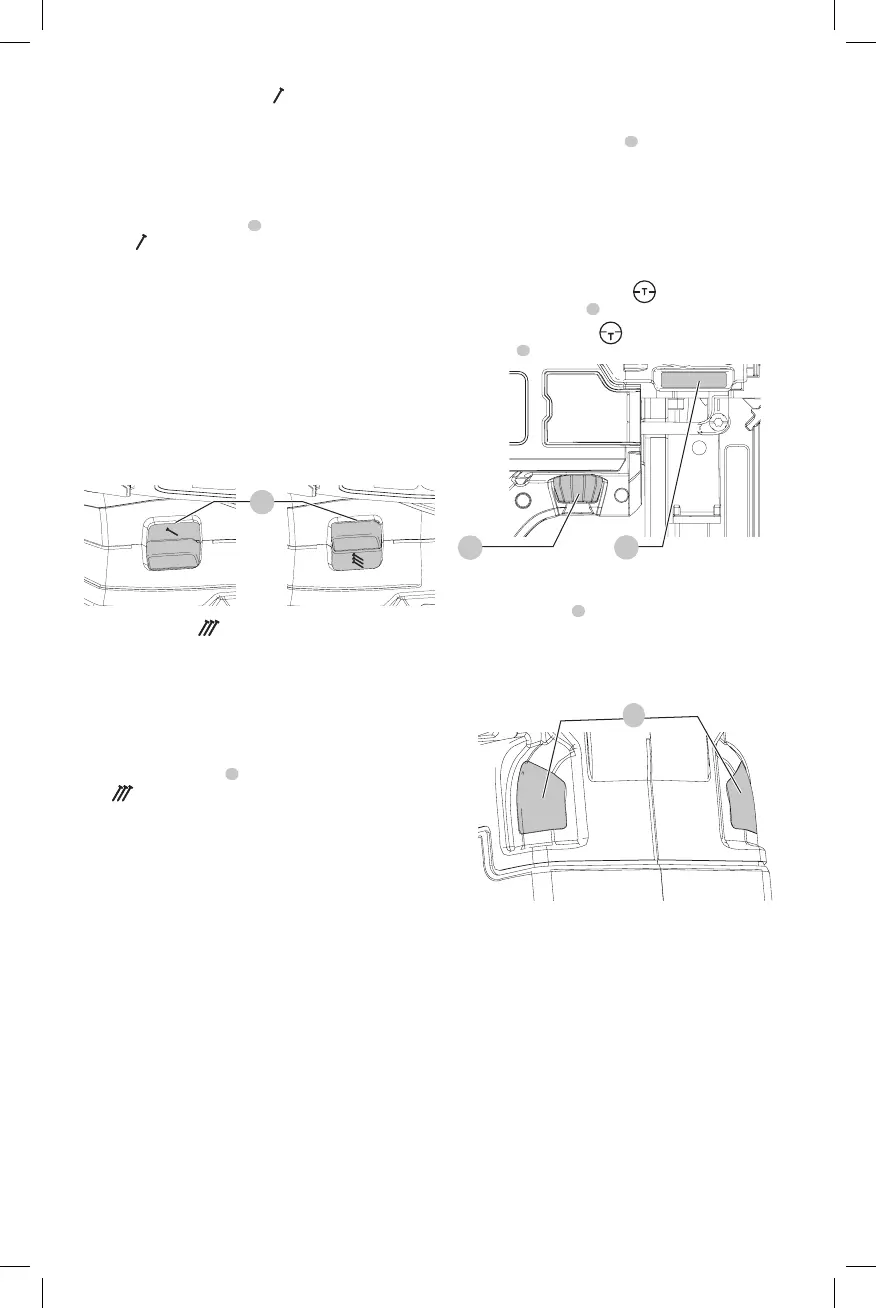
1. Slide the selector switch
8
to expose the singlenail
icon
.
2. Fully depress nosepiece against the work surface (motor
will start).
3. Pull trigger (nail will drive into work surface).
4. Releasetrigger.
5. Lift nosepiece off worksurface.
6. Repeat steps 2 through 4 for nextapplication.
NOTICE: The contact trip needs to be depressed
followed by a trigger pull for each nail followed by
a release of both the contact trip and trigger after
eachnail.
Fig. I
8
Bump action
Bump action is intended for rapid nailing on flat, stationary
surfaces and typically most effective for applications that
require driving shorternails.
When the tool is set in the bump actuation mode, two
methods of tool operation are available: place actuation
and bumpactuation.
Slide the selector switch
8
to expose the triplenail
icon
.
To operate the tool using the place actuation
method:
WARNING: A nail will be driven each time the
trigger is depressed as long as the contact trip
remainsdepressed.
1. Depress the contact trip against the worksurface.
2. Depress thetrigger.
To operate the tool using the bump actuation
method:
1. Depress thetrigger.
2. Push the contact trip against the work surface. As long
as the trigger is depressed, the tool will drive a nail every
time the contact trip is depressed. This allows the user
to drive multiple nails insequence.
WARNING: Do not keep trigger depressed when tool
is not in use. Keep the trigger lock-off in the locked
position when the tool is not inuse.
WARNING: When the tool’s motor is running, pulling
the trigger or depressing the contact trip will cause a
nail to bedriven.
Adjusting Depth (Fig. J)
The depth that the fastener is driven can be adjusted using
the depth adjustment wheel
3
on the side of thetool.
WARNING: To reduce risk of serious injury from
accidental actuation when attempting to adjust
depth, ALWAYS:
• Remove batterypack.
• Engage trigger lock-off.
• Avoid contact with trigger duringadjustments.
1. To drive the nail shallower
, rotate the depth
adjustment wheel
3
away from the nose of thenailer.
2. To sink a nail deeper
, rotate the depth adjustment
wheel
3
toward the nose of thenailer.
Fig. J
3
13
Headlights (Fig. K)
There is a headlight
4
located on each side of the nailer.
Headlights turn on upon battery insertion, activation of
the trigger, or depressing the contact trip. The lights will
automatically shut off after 20 seconds unless tool remains
inuse.
Fig. K
4
NOTE: These headlights are for lighting the immediate work
surface and are not intended to be used asflashlights.
LOW BATTERY INDICATOR: The left-side headlight will
flash four consecutive times and then shut down to indicate
lowbattery.
JAMMED NAIL INDICATOR: The right-side headlight will
flash continually if a nail becomes jammed in the nosepiece
(see Clearing a Jammed Nail).
Clearing a Jammed Nail (Fig. A, L)
If a nail becomes jammed in the nosepiece, keep the tool
pointed away from you and follow these instructions
toclear:


 To Next Page