19
Service Mode Procedures
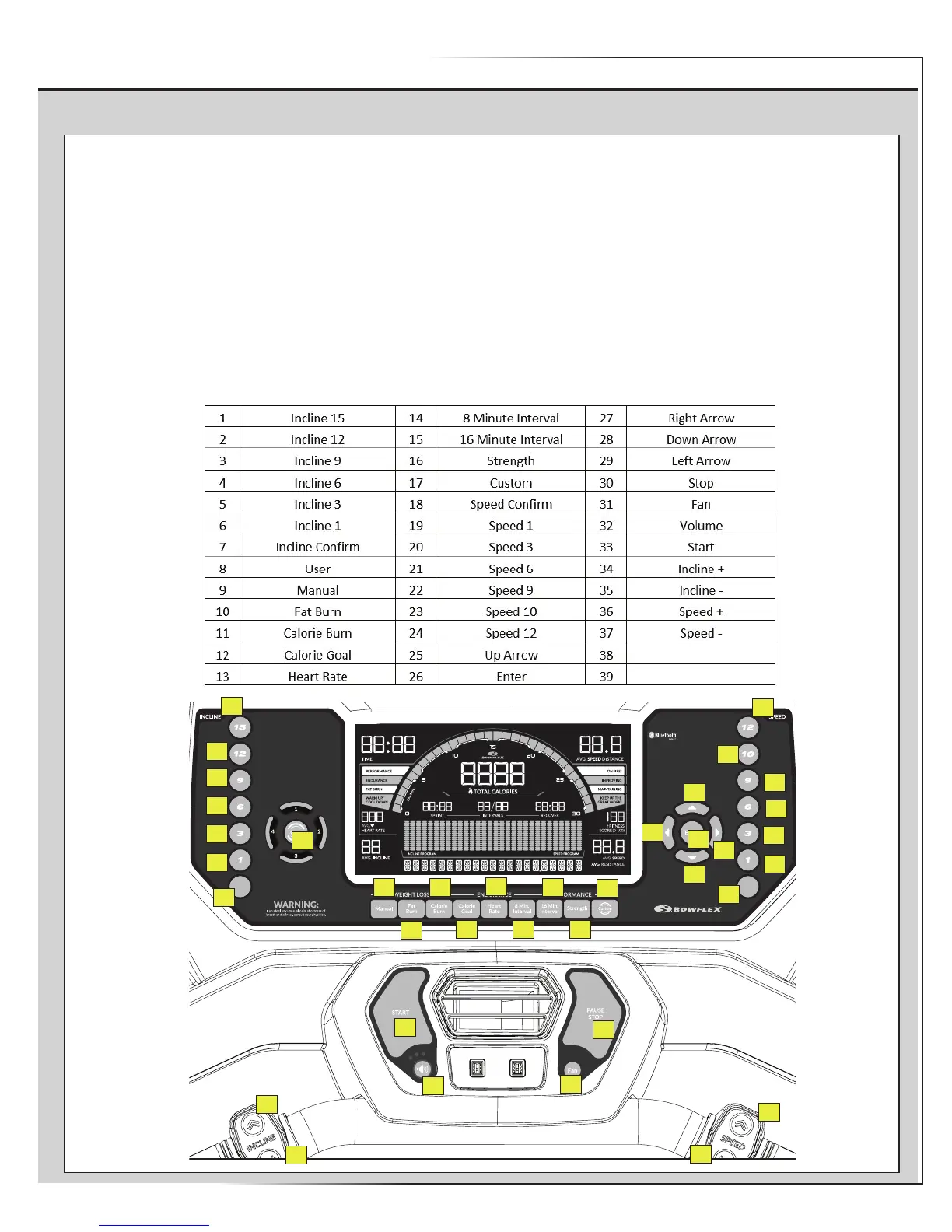
PROCEDURE 5: BUTTON (or KEY) TEST:
1. Hold down the PAUSE/STOP button and Down() arrow button together for three seconds while at the Welcome screen to enter the Console
Setup Mode.
2. The Console displays the TOTAL HOURS screen.
3. Hold down the PAUSE/STOP button and Down() arrow button together for 3 seconds to go into the Engineering Mode.
4. Push the Down() arrow button 8 times until the Console displays “ENTR KEY TEST”.
5. Push the Enter button. The Console will display “BUTTON TEST”.
6. Using the guide below, push the corresponding button in the order provided. Continue through all the buttons.
Note: If a faulted button is discovered, the Console may need to be powered down to exit the button test.
7. When the button test is complete, the Console will display “DONE”, followed by “BUTTON PASS”. Push the PAUSE/STOP button to return to
Welcome screen.
8. Flip the power switch to OFF.
CONFIRM
SPEED
CONFIRM
INCLINE
CONFIRM
SPEED
CONFIRM
INCLINE
3634
35
33
32
31
30
37
24
36
23
22
21
20
19
18
25
29
28
27
26
17
16
15
14
13
12
11
10
9
8
1
2
3
4
6
5
7















 To Next Page