6
Demonstration Mode
During Demonstration Mode, the Console will cycle through messages prompting to connect to the JRNY™
app, and display sample workout information. The machine ships with Demonstration Mode inactive.
To activate the Demonstration Mode:
1. With the machine activated, push and hold the hidden button beside the JRNY QR code on the Console
for 3 seconds. The hidden button is centered in the text to the left of the QR code.
Note: The setting will take eect after the next time the machine goes into Sleep Mode.
2. Inspect the Console to be sure that Demo mode is active and running on the Console Display.
To exit Demonstration Mode, perform the above steps.
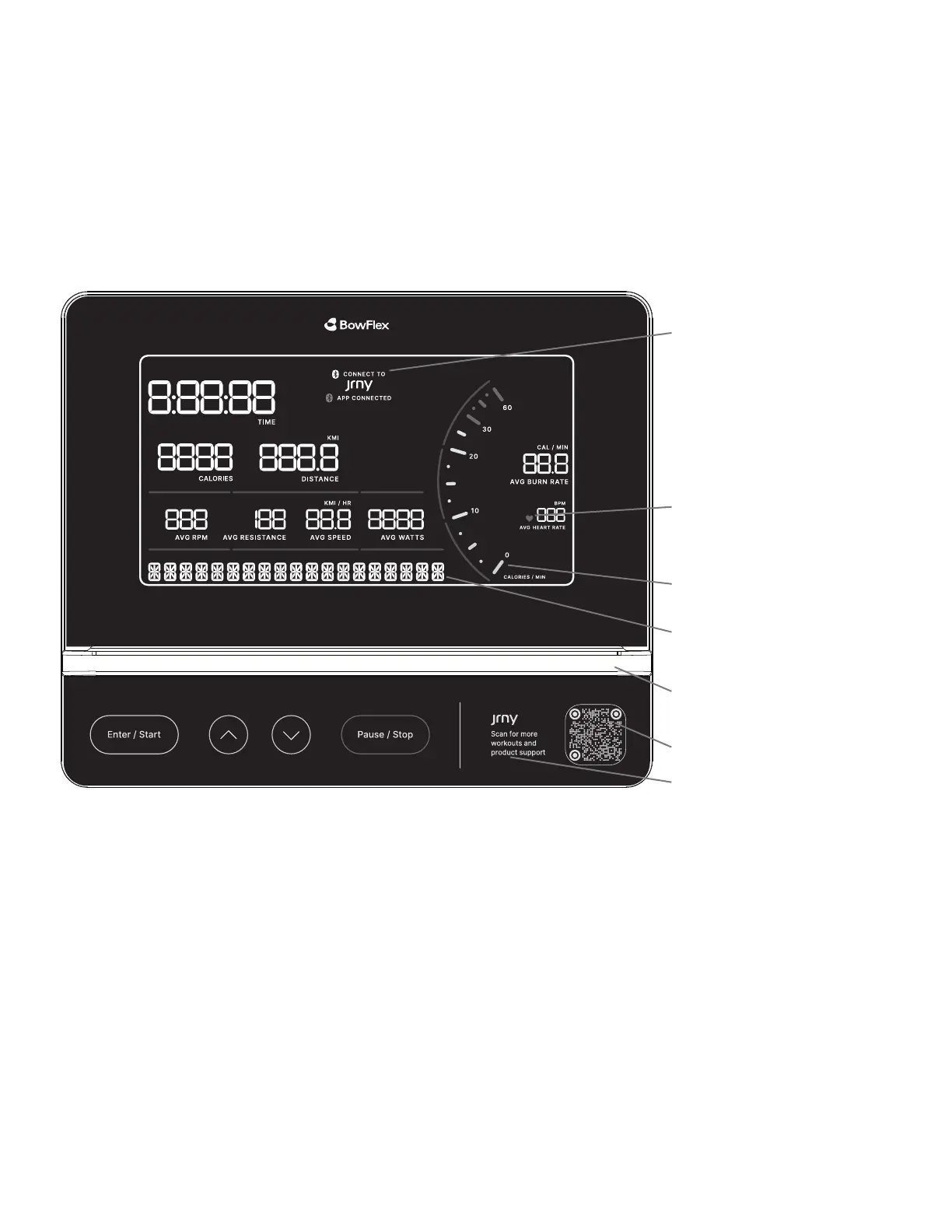
Heart Rate Detected icon
JRNY / App Connected icons
Message display
Media Holder
Tachometer
JRNY QR code
Reset button
Changing Unit Measures (English Imperial/Metric)
To switch units between kilometers and miles before a workout, push the Enter/Start button and hold for 3
seconds to enter the Console Setup Mode. The System Units prompt appears. Push an Increase/Decrease button
to change the units (KM or MI). With the desired unit of distance displayed, push the Pause/Stop button to save.
Note: The default distance unit is MI.
Muting the Console
The Console has the option to be muted. It does not aect the output from your personal device.
1. Push and hold for 3 seconds the Enter/Start button to enter the Console Setup Mode. The System Units prompt appears.
2. Push the Enter/Start button twice. The Audio Volume prompt will appear with the current volume setting.
3. Push the Decrease button until MUTE is displayed as the Volume setting.
4. With the desired volume setting displayed, push the Pause/Stop button to save. The Console will display “Settings Saved” for 2
seconds, and then exit the Console Setup Mode.
Note: The default volume setting is Medium.
Demo Mode, Changing Units, and Muting the Console














 To Next Page