USER GUIDE ProColor 652U, 702U, 752U 862U | 5
BOXLIGHT.COM
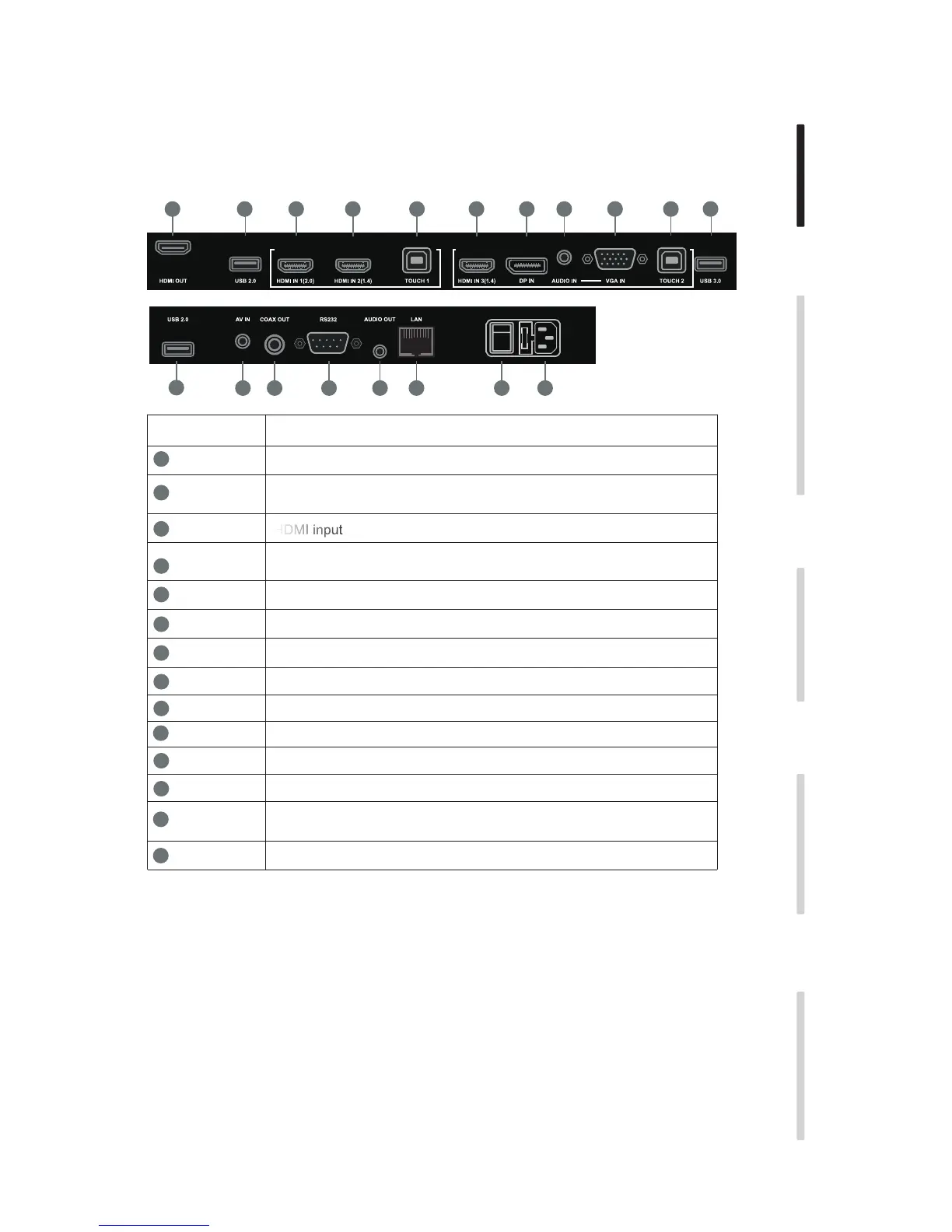
2. Connector Panel
Installation Connecting and Setting Menu Operation Troubleshooting Care Maintenance
Items Function description
Connect USB devices such as mobile hard disk, U disk, USB keyboard
and mouse, USB drives, etc.
Line level audio input
VGA input
Touch signal output for connection to external computer
Composite video + audio input - 3.5mm 4-conductor
Digital audio output - “RCA” connector
RJ-45 connector
Control interface
AC power input
LAN
USB
HDMI IN
AUDIO IN
VGA IN
TOUCH
AV IN
COAX OUT
RS-232
Master power switch
13
12
11
10
9
8
7
6
5
4
3
2
1
AC IN
HDMI input
LAN
5 63
4
1
2
3
3
7 4
2
2
8 9 10 11 12 13
14
HDMI OUT Displays whatever is on the screen, including Android annotation.
DP DisplayPort input
AUDIO OUT Output to an external amplifier and speaker
14
AC SWITCH
HDMI = High-definition multimedia interface


 To Next Page