91
An important feature of the ECO Tronic EBS is that it provides an
extensive on board diagnostic capability. The system displays
a range of codes, which allow rapid diagnosis of the problem
should one occur. BPW offers a diagnostic case containing the
necessary software and connectors.
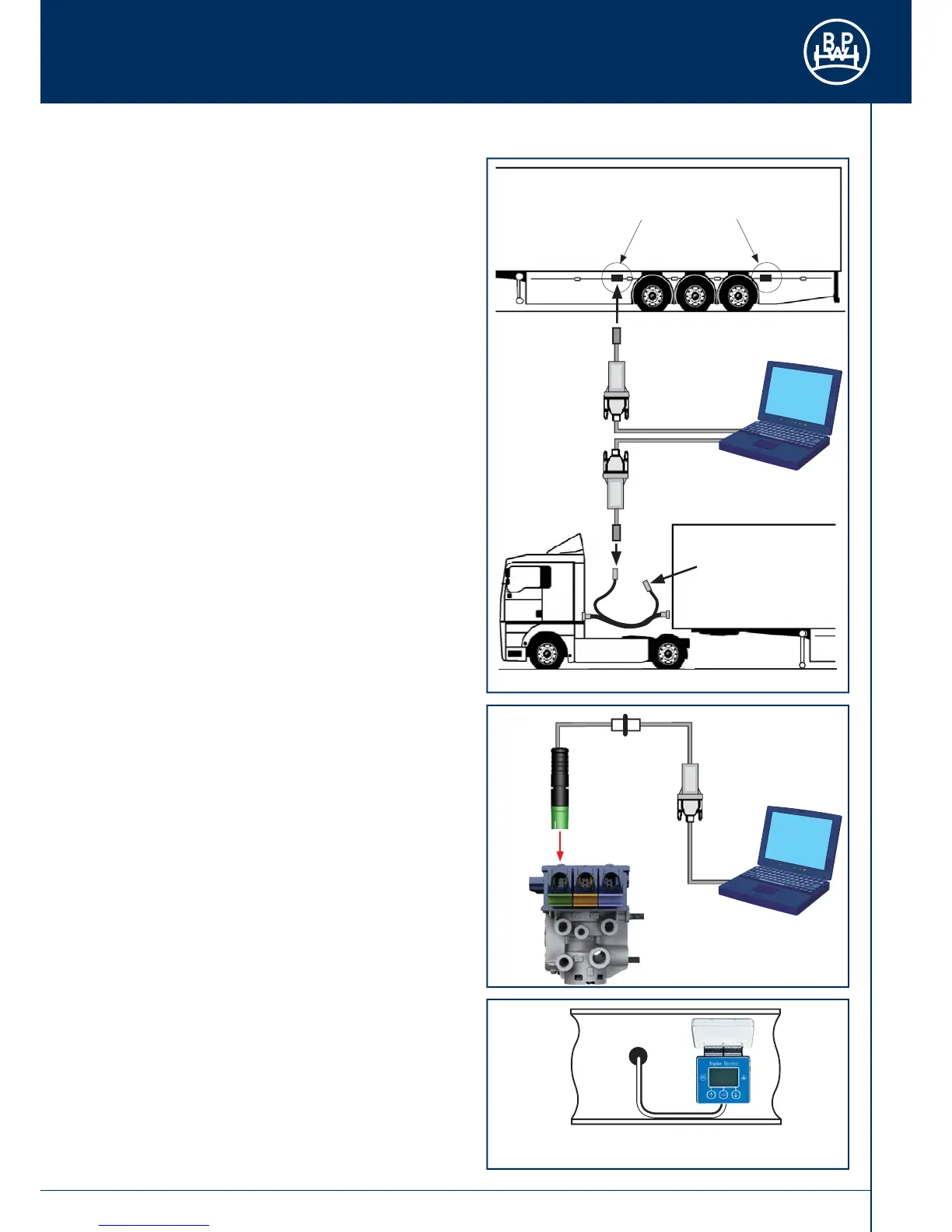
Diagnostic communication is in accordance to ISO 11898 using
Keyword Protocol (KWP2000). It is accessed by an optional side-
of-vehicle connector, or by the ISO 7638 - 7 pin connector which
uses pin 6 and 7 as a CAN data bus using the ISO Interface
Assembly (Fig. 159), or directly via the diagnostic connection to
the ECU (Fig. 160, 161). Any suitable device connected to this
CAN data bus may read diagnostic information.
The Trailer Monitor can be connected permanently to the
ECU’s diagnostic ‘DIAG’ connection. While the ECU is powered
information is transferred to the Trailer Monitor’s memory, which
can be recalled. Power is supplied from the vehicle system via
the ECU diagnostics connector. The Trailer Monitor also contains
a replaceable battery.
The Trailer Monitor displays the following on a backlit dot-
matrix LCD screen:
Distance:
• Total distance in km
• Trip distance in km
• Distance and time to next service
• ...
Information:
• Active DTC‘s (DTC = Diagnostic Trouble Codes)
• Stored DTC‘s
• Confi guration of the trailer
• Version of the ECU
• Pressure values of the sensors in the ECO Tronic EBS
• Brake lining wear information
• ...
Settings:
• Service interval
• Tyre size
• Date
• Time
• Units
• ...
Auxiliaries:
• Detect the presence of auxiliaries
• Test auxiliaries
• ...
Test:
• Vehicle load
• Detected speed of each wheel sensor
• ...
Pressure values, wheel sensor values and vehicle load are
displayed with bar-graph style visual indicators. Please refer
to the Trailer Monitor documentation for additional information.
A PC based programme from BPW - „Trailer Manager” -
may be used for more advanced diagnosis. This also allows
confi guration with system parameters to be entered and an
End-of-Line Test to be carried out.
Please bear in mind our extensive and practical training
courses on this topic, since only trained and qualifi ed specialist
personnel are allowed to undertake work on the vehicle and the
corresponding software.
Fig. 159
Alternative positions
Diagnostic
connection
'DIAG' on ECU
PC Interface
Connect to
side-of-vehicle
connector or to
ECU directly
Fig. 160
Fig. 161
Connected to side-of-vehicle connection
or - as an alternative - directly to ECU
PC Interface
PC Interface
ISO Interface assembly



 To Next Page