4
ALTERNATE METHOD: IF THERE IS NO UTILITY SINK NEARBY
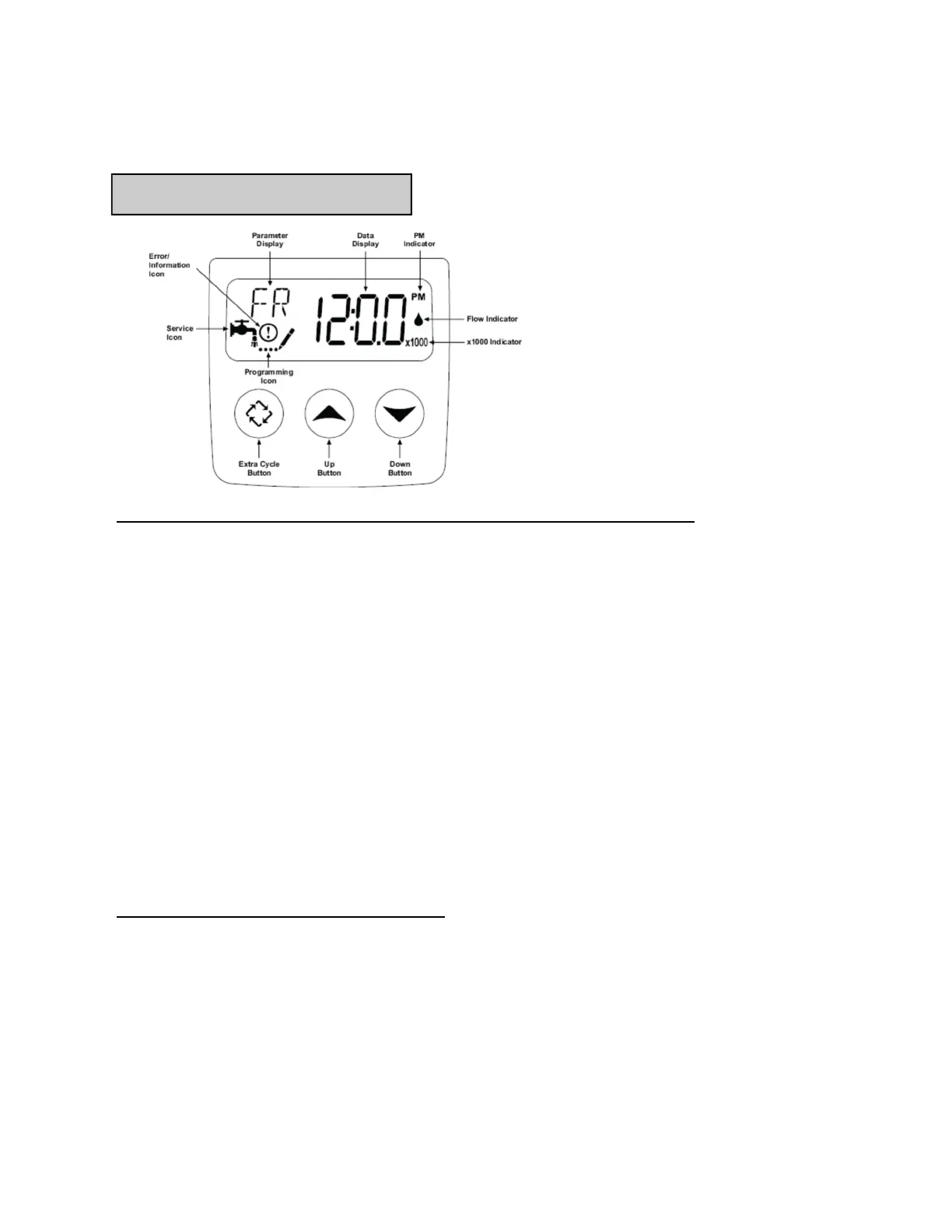
• Pre-soak MEGAbite filter media: Press and hold the extra cycle button for 5 or more sec-
onds and release. “BW” should appear on screen. After approx. 30 seconds, a count down
timer will appear on the screen. Press extra cycle button again to advance unit. “BR”
should appear on screen. In approx. 30 seconds, a count down timer will appear on the
screen. Again, press extra cycle button. “RR” will appear on screen. After approx. 30 sec-
onds, a count down timer will appear on the screen. Slowly open bypass valve to “service”
position. Allow “RR” cycle to run through completion. Note that water will begin to run
out of drain line as filter unit becomes filled.
• Flush the MEGAbite filter with water: When the “RR” cycle has completed, wait ap-
prox.. 2 minutes for unit to advance back into service mode (faucet symbol will appear on
screen). At this point, press and hold extra cycle button for 5 or more seconds and release
to advance unit to “BW” mode. After approx. 30 seconds, water will begin to flow from
drain line. Note that water may appear dirty/discolored for several minutes. This is normal
as media fines are flushed out. Allow water to flow to drain until discoloration is gone
(water is clear). Use extra cycle button to advance unit back into service mode (faucet sym-
bol appears on screen). Note that you’ll need to pass through “BR” and “RR” cycles (with
approx. 30 seconds between cycles for valve to advance).
RUN A COMPLETE REGENERATION
• Regenerate the MEGAbite filter: After flushing is complete, press and hold extra cycle
button for 5 or more seconds and release. Allow the system to run a complete regeneration
and return to service.
Start-Up Procedure
Placing unit into service
Normal
Operation
Mode Icon
− While in service, the Data Display alternates between time of day,
volume remaining or days to regeneration.
− The Flow Indicator flashes when outlet flow is detected.
− The Faucet Icon flashes if a regeneration cycle has been queued.



 To Next Page