COMPETINO Manual
- 17 -
Glide Ratio over the ground:
L/D gnd = GS / Sink (Ground Speed divided by Sink)
Required Glide Ratio in order to reach a chosen destination from the present position:
L/D req. = Distance to the waypoint divided by the height difference to the waypoint
6.6 The Wind Component: Head, Cross, and Tail Winds
During a goal flight or in calculating a final glide, it is the wind component (i.e. the difference
between Ground speed and Air speed) that is important. In most cases the wind does not
blow directly from the front or rear, but from an angle. If the wind component Spd-Diff (in the
User Selected Fields) is positive, then the pilot will fly with a tail wind influence and the glide
ratio over the ground will improve. If it is negative, then the glide ratio will worsen. The
COMPETINO takes the wind into consideration when doing final glide calculations
Press F1 several times until HT wind = auto appears. There are reasons why this
automatically calculated wind component can be intentionally overwritten by inputting a
head-wind (with negative ‘-‘ sign) or a tailwind, but be careful with this manual wind input (the
results will be wrong when changing your flight direction). Anyway, the field Spd-Diff always
displays the real and actual difference between Ground and Air speed and can be used as a
check or a required correction.
6.7 Wind Direction and Strength
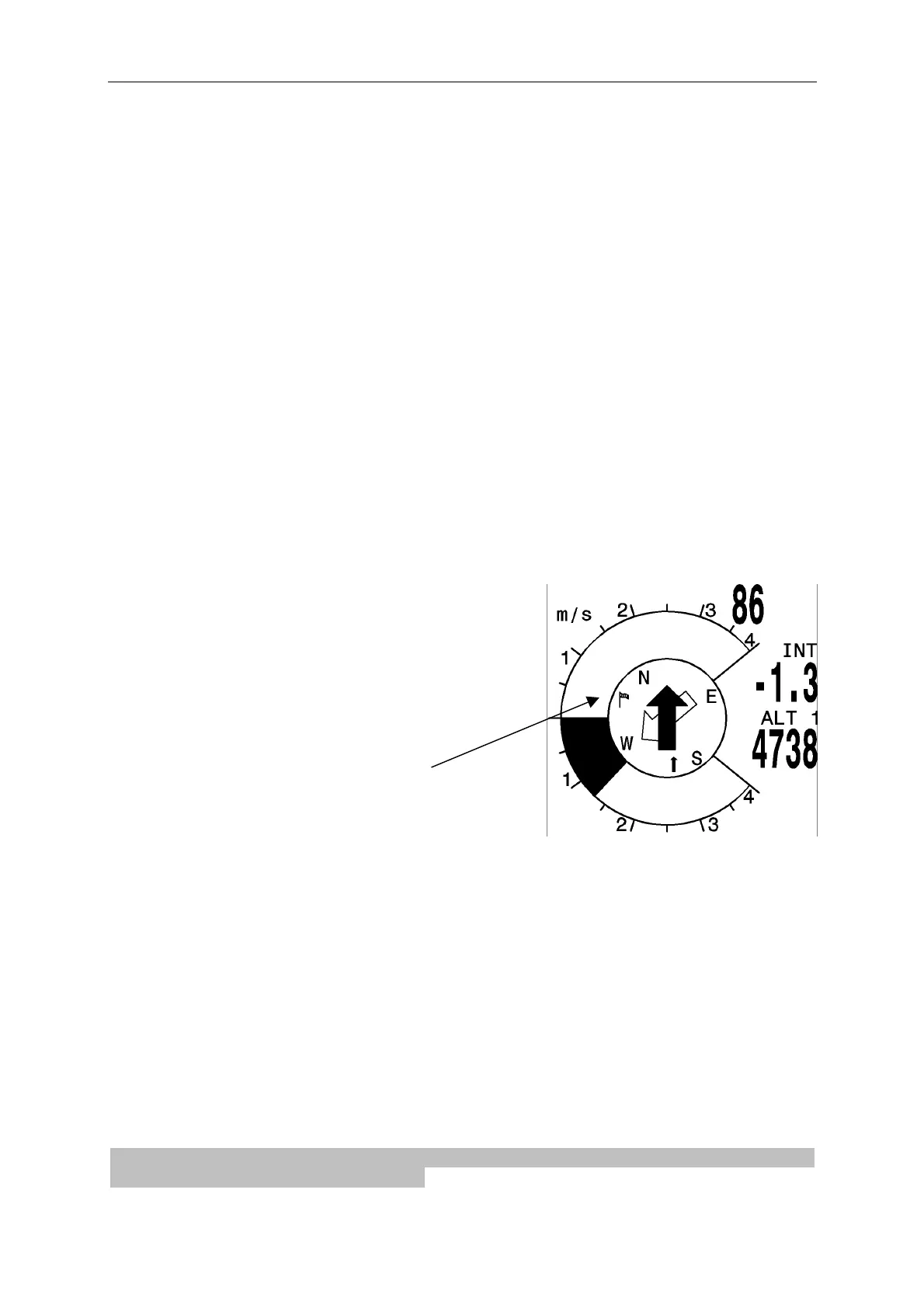
It is very important to know wind direction and strength
before an out landing.
The Wind Strength can be selected within the User
Defined Fields. It is necessary to fly one or two
complete circles as steadily as possible and it is while
circling that the COMPETINO is able to determine the
wind direction and strength. Wind direction is shown in
the compass rose by a small windsock. During the
landing approach this symbol must always be at the
top.
The maximal difference between Ground Speed and
Air Speed gives the Wind Strength. The unit keeps in mind Wind Strength and Direction as
long as it is refreshed by flying new complete circles.
From Vers. 1.12 up there is a new user field “Calculated Air Speed”. The shown value is
found by an addition of Ground Speed and Wind Component. Wind Strength is a fix value,
Wind Component however is changing with the direction of your flight.
6.8 Waypoints and Co-ordinates
A waypoint is any single point on the earth’s surface that you would like to go to. The
COMPETINO can save up to 200 different waypoints. Each named waypoint can have up to
17 characters, e.g. “Laber Airfield”. In determining the waypoint, it is also necessary to
enter the altitude, e.g. “1865” meters above sea level. We still need the waypoint co-
ordinates (refer as well to 7.8.1 Waypoints — Alter, Delete or Add) and for this, the
COMPETINO utilizes only the most internationally used geographical maps with the name
WGS84 (World Geodetic System 1984). This reference system assumes that latitude is
measured from the equator (0 degrees) to the North Pole (90 degrees north), and to the


 To Next Page