COMPETINO Manual
- 20 -
6.9 Goto-Function
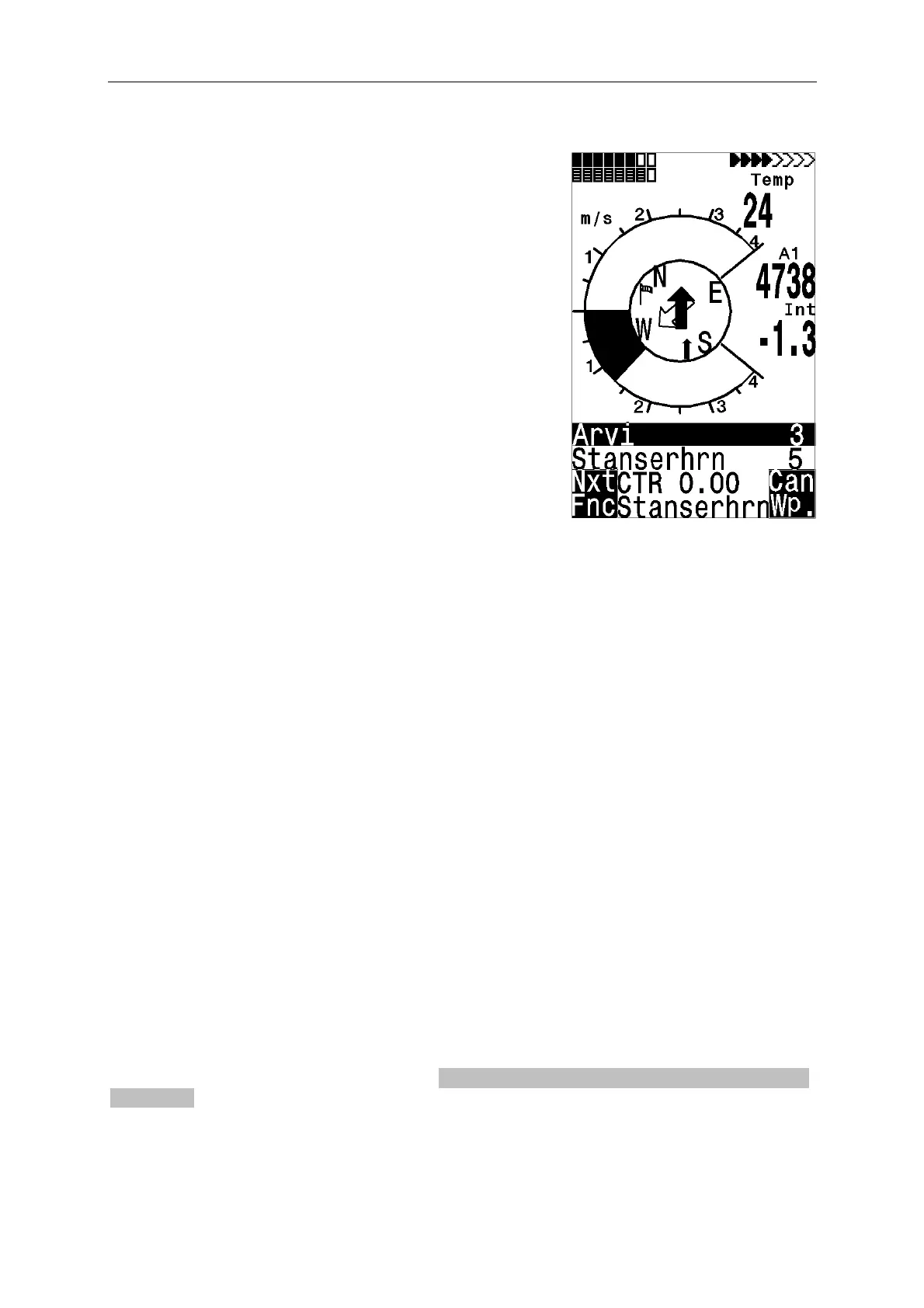
Prolonged pressure on the Enter/Goto key switches the
lower half of the display into the ‘Goto’ mode. This function
allows you to search for a waypoint stored in the memory
of the COMPETINO and choose it as a destination (goal).
At the same time, the next waypoint is listed in the order of
shortest distance from the user. The number after the
WP’s name indicates the distance in kilometers.
The Goto function can be deactivated with the F2 key
(Cancel Goto).
The big black arrow in the center of the compass is
pointing directly towards goal.
If a strong cross wind is encountered on the way to goal,
the correct angle between the destination and the wind can
be found as long as one carefully changes the direction of
flight against the wind, until the directional pointer in the
compass rose points directly upwards. The black arrow in
the compass will now look like the one pictured on the
right.
By doing this you can be sure that your flight path over
ground is in a straight line to goal and thereby the shortest
one.
Also amongst the user-selected fields is the Alt a. BG (Height above the best glide path).
While circling upwards before approaching the WP, this height will show 0 when the pilot
should be able to reach the goal by flying at the best glide speed. Every meter above that
means a greater safety margin.
The Alt a. BG then shows how much ‘security height’ the pilot will have available to use if
necessary in order to compensate for unexpected sink. Under no circumstances should the
pilot go ahead and fly towards goal if the Alt a. BG (Height) shows zero or negative numbers
(reaching goal would then be impossible without finding lift on the way).
6.10 Flying Routes
A route is an arrangement of various waypoints. Of course, the waypoints used on a route
have to be saved in the unit’s memory.
In contrast to the Goto function where you have to choose the next waypoint from a long list
by prolonged pressing of the Goto button, you can fly along a route by briefly pressing
(next WP) or
(previous WP). This function must be chosen with F1. (Next Function)
To choose a route, press the button
0-I-II/Route and hold it for a few seconds. Each route
should also be assigned a route name (e.g. “Karwendel Triangle”). It makes sense to store
many well-known thermal sources as waypoints along a route. The pilot does not have to
feel compelled to reach these waypoints and at times he/she may be high enough to jump a
waypoint on a route, while at another time he/she may have already found a thermal several
kilometers before reaching the waypoint. ) Only routes containing at least one waypoint can
be chosen.
Of course there is still the option of looking up other, possibly closer, waypoints without
leaving the current route by using the Goto function. Altogether, the COMPETINO can have
up to 20 routes set. The same waypoint can be used more than once along a route, and the
same waypoint may occur on other routes as well. Once a waypoint has been used along a
route, it cannot be deleted from the list.


 To Next Page