Series 98 & 98H Scotch Yoke Actuator
Installation, Operation and Maintenance Manual
© 2020 BRAY INTERNATIONAL, INC. ALL RIGHTS RESERVED. BRAY.COM The Information contained herein shall not be copied, transferred,
conveyed, or displayed in any manner that would violate its proprietary nature without the express written permission of Bray International, Inc.
76 of 84
19.7 Configuring as a Locking Device to Lock at CW
End
The valve is sometimes required to be locked in the clockwise
end position, which is usually the valve’s closed position,
during maintenance or for safety reasons. The PST&LD on
S98 is easily configured to do this.
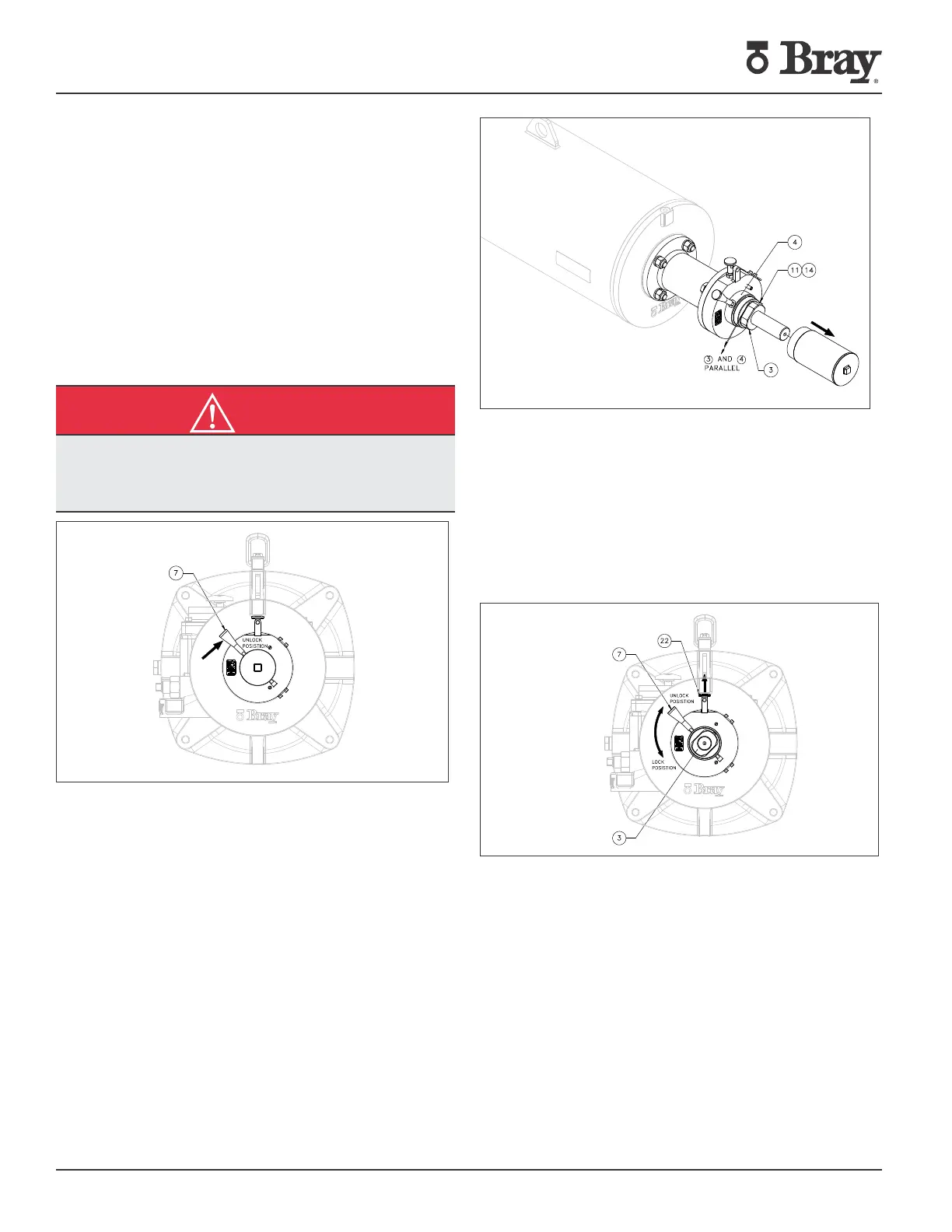
1. On the standard assembly, ensure the actuator is at
clockwise end, stopped by it’s travel stop and that both travel
stops have been set and locked to the valve’s requirement.
Turn the handle (7) on the device to the UNLOCKED position,
if not already in this position, by pulling up the index plunger
and then turning the handle upwards until the index plunger
locks in this position.
CAUTION
Be wary of the extension rod moving in /out of the device
and keep hands away while actuating the assembly on
power.
Fig. 71
2. Unscrew and remove the tubular cover. Thread in the lock
nut (3) on the extension rod threads with the inside face of
locknut right up to the face of the index sleeve (4). Turn the
nut a bit counterclockwise, to align the flat sides on the lock
nut with the flats in the sleeve, so that the nut will enter the
sleeve without any interference when the extension rod (2)
moves inwards.
Note: Do not turn the nut clockwise to align it with the
sleeve, as this could compromise the working clearance
required between the locknut’s inner face and the
sleeve face.
Fig. 72
3. Tighten the set screws (11) to jam the plastic buttons (14)
on the extension rod threads to secure this position of the
locknut.
4. Pull the index plunger up and turn the handle up and
down, to check for smooth movement without the locknut
rubbing on the sleeve face. If necessary, reset the locknut (3)
by loosening it half turn and realign it with the index sleeve’s
profiled bore. Restore the device to UNLOCKED position and
thread in the tubular cover (6) on the index sleeve threads.
Fig. 73
5. Actuate the assembly with compressed air at working
pressure a couple of times in the UNLOCKED position of
device, to ensure there is no restriction or any rubbing noise
from the device side and that the actuator works full stroke,
as normally would.
6. With the actuator at the Spring end position, engage the
locking by pulling up the indexing plunger and turning the
handle downwards to the LOCKED position, ensuring the
indexing plunger seats into the position and that the handle
cannot be turned in this indexed position.
7. Rotation of the actuator by pressurizing in this condition
will be prevented by the locknut bearing on the sleeve face,
thus mechanically locking the actuator in its end position.



 To Next Page