10
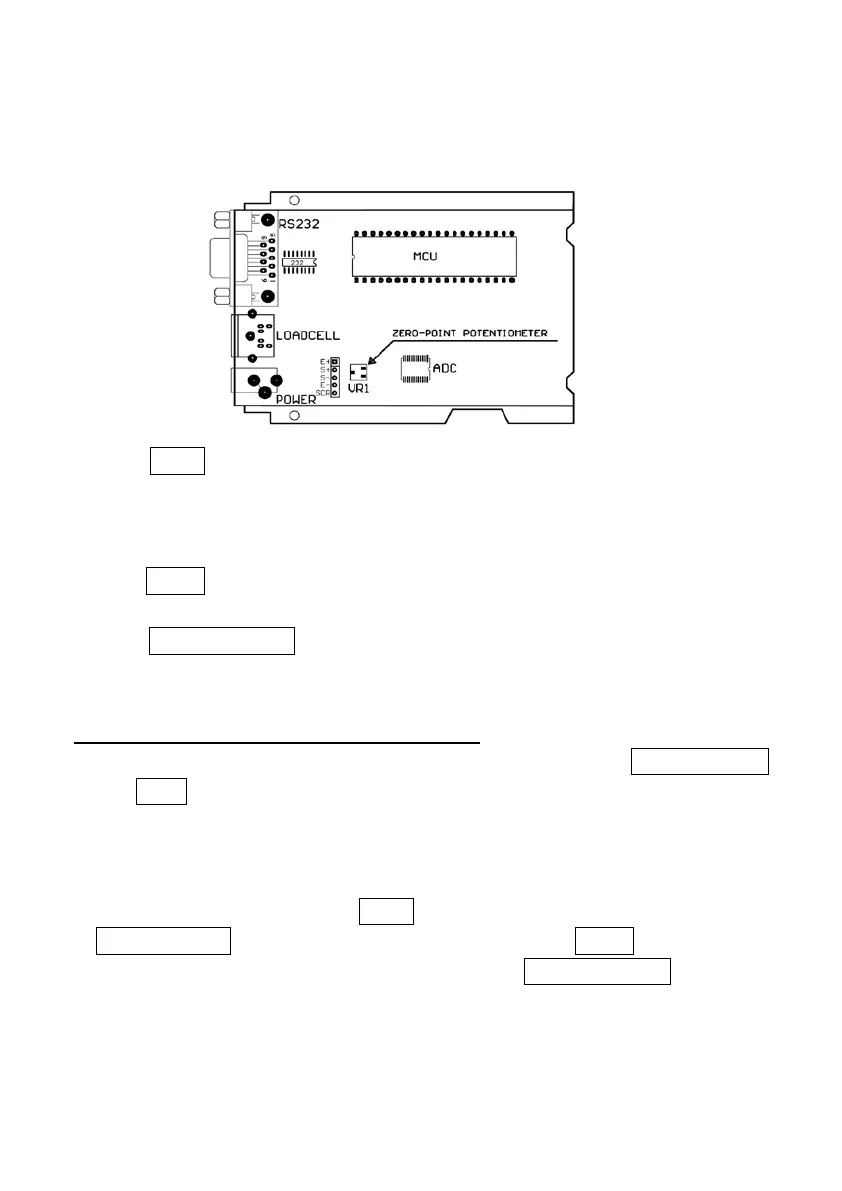
Below is the drawing of position of the zero-point potentiometer on PCB for
conference, decrease ADC data by rotating clockwise, and increase ADC data
by rotating counter-clockwise.
3. Press UNIT key to select displaying weight inner code or input the inner
working voltage value. When the “U x.xx” is displayed, the display digit is
voltage value, and the unit is V. The proper working power voltage is between
5V and 8V.
4. Press TARE key to display filtered or un-filtered weight A/D data; when is
on, the data is filtered.
5. Press ON/OFF/ZERO key to exit this mode and return to normal weighing
mode.
. WORKING PARAMETER SETUP:
1. When scale is in normal weighing mode, press and hold down ON/OFF/ZERO
and UNIT key until “SEtUP” is shown, that means the scale is in SETUP
mode.
2. This indictor has 19 kinds of parameters to be selected and setup by this
function.
3. During SETUP mode, press UNIT key to change the flashed digits, and
HOLD/PRINT key to shift the flashed position. Press TARE key to confirm
and save the set data and enter next setting. Press ON/OFF/ZERO key to exit
this mode.
4. Display
1) P
A.B: Item A parameters and one digit can be input.
2) P
A.BC: Item A parameters and two digits can be input



 To Next Page