38
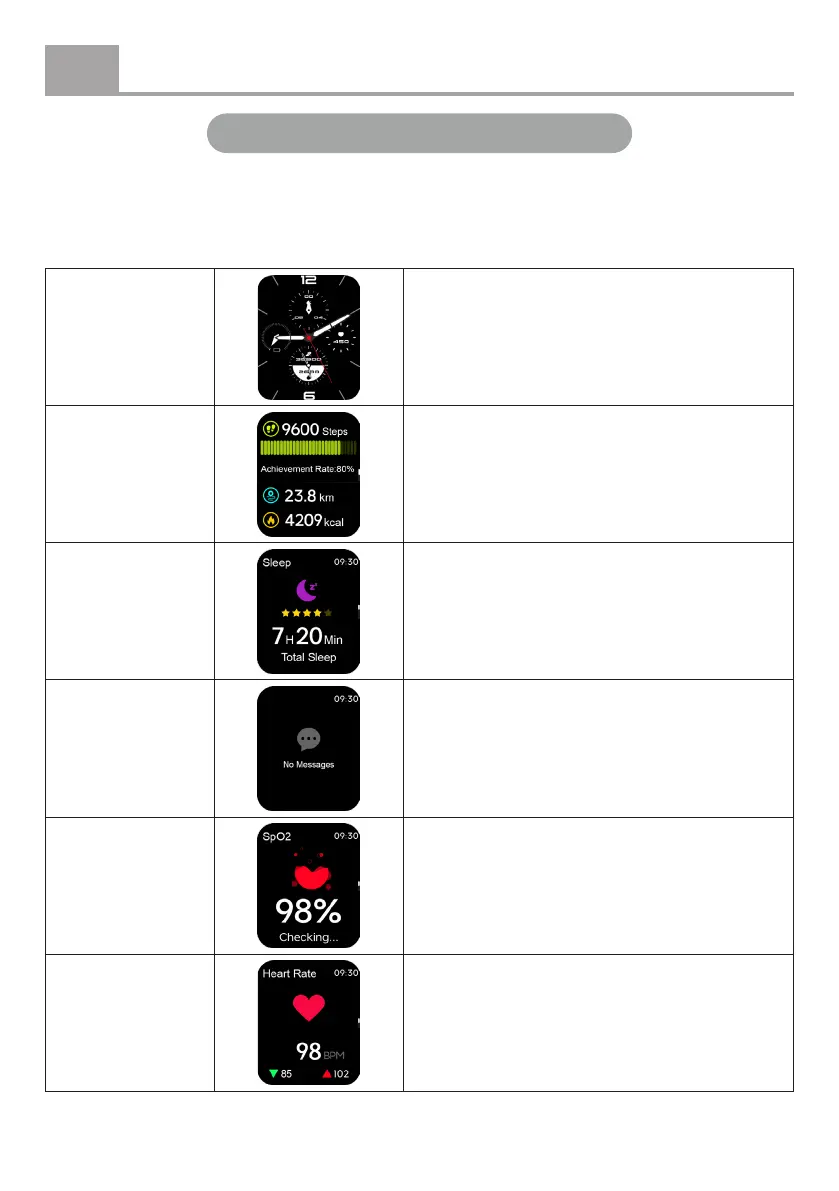
Press the function button once to activate the screen. This will take you to the main page.
• Swipe left or right: Quickly navigate through various data screens.
• Swipe up: View messages from connected applications.
• Swipe down: Open the quick settings menu.
Activate main
page
Swipe left or right, or press the function
button.
Steps, distance,
and calories
Displays your daily step count, distance
travelled, and calories burned. Set a daily
goal via the app.
Sleep
Wear the device while sleeping to monitor
the duration and quality of your sleep.
Messages
Displays push notications from connected
apps. Ensure that notications from your
preferred apps are enabled in the app
settings.
Blood oxygen
(SpO2)
Displays the measured oxygen level in your
blood. For continuous monitoring, go to the
settings menu > Auto Detection.
Heart rate
Shows your heart rate. For continuous heart
rate monitoring, go to the settings menu >
Auto Detection.
Instructions for use – apps
English
EN


 To Next Page