28
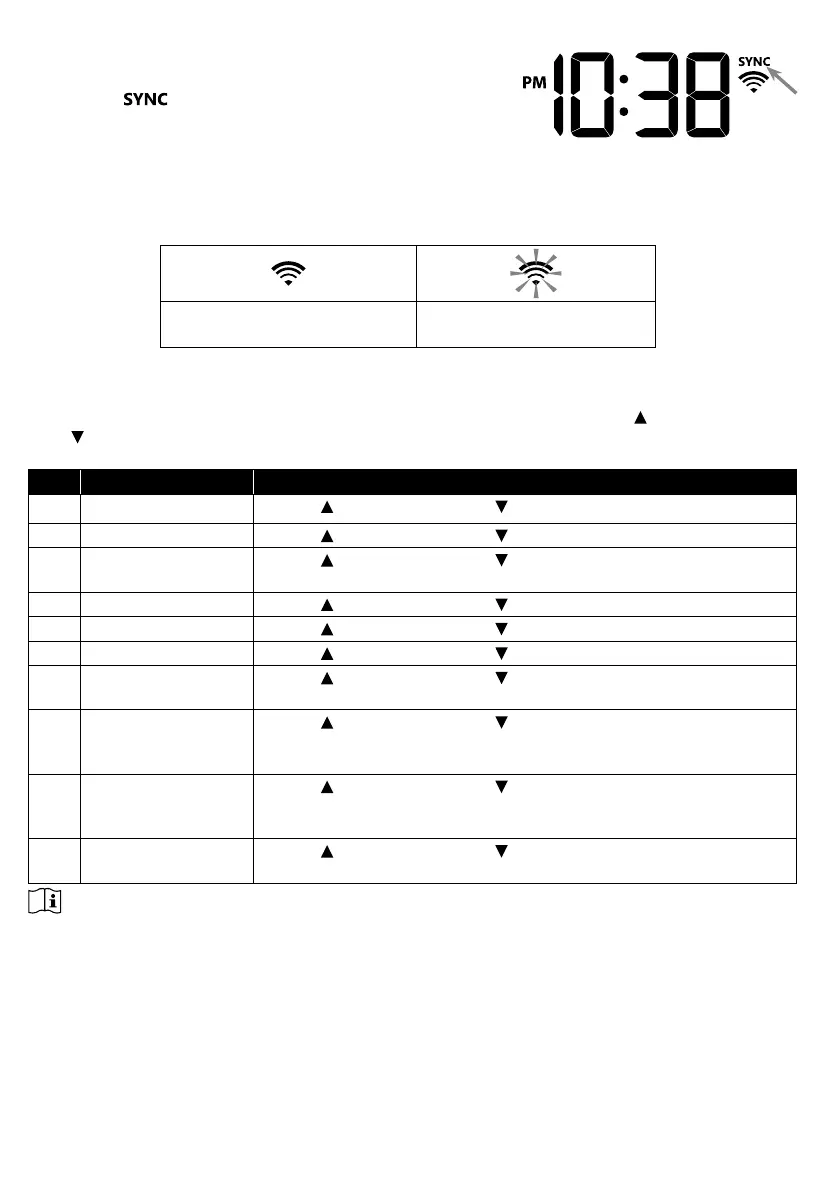
4.3.18 TIME SYNCHRONIZE STATUS
After the console has connected to the PWL, it can get the
time from PWL that according to your selected time zone in
PWL. The “
” icon will appear on the LCD.
The time will automatically synchronize per hour. You can also press the [ REFRESH ] key to
get the Internet time manually within 1 minute.
4.3.19 WI-FI CONNECTION STATUS
WI-FI icon on the console display indicates the console's connection status with WI-FI router.
Stable: Console is in
connection with WI-FI router
Flashing: Console is trying
to connect to WI-FI router
4.4 OTHER SETTING
4.4.1 TIME, DATE AND GENERAL SETTING
Press and hold the
[ SET ] key for 2 seconds to enter the SET mode. Press [ / FORECAST
] or [
/ INDEX ] to adjust, and press [ SET ] to proceed with next step of the setting. Please
refer to following setting procedures.
Step Mode Setting procedure
1 Hour Press [
/ FORECAST ] or [ / INDEX ] key to adjust the hour
2 Minute Press [
/ FORECAST ] or [ / INDEX ] key to adjust the minute
3 12/24 hour format Press [
/ FORECAST ] or [ / INDEX ] key to select 12 or 24
hour format
4 Year Press [
/ FORECAST ] or [ / INDEX ] key to adjust the year
5 Month Press [
/ FORECAST ] or [ / INDEX ] key to adjust the month
6 Day Press [
/ FORECAST ] or [ / INDEX ] key to adjust the day
7 M-D/D-M format Press [
/ FORECAST ] or [ / INDEX ] key to select "Month /
Day" or "Day / Month" display format
8 Select Sunrise /
Sunset or Moon rise
/ Moon set display
Press [
/ FORECAST ] or [ / INDEX ] key to select Sunrise /
Sunset or Moon rise / Moon set display
9 Time Sync ON/OFF Press [
/ FORECAST ] or [ / INDEX ] key to enable or disable
Time Sync function.
If you want to set the time manually, you should set Time Sync OFF
10 Weekday language Press [ / FORECAST ] or [ / INDEX ] key to select weekday
display language
NOTE:
- In normal mode, press [ SET ] key to switch between year and date display.
- During the setting, you can back to normal model by press and hold [ SET ] key for 2 seconds.







 To Next Page