EasyManua.ls Logo

Bresser 7003230 - Wireless 7-in-1 Sensor; Install Wind Vane

Bresser 7003230
84 pages
Print Icon
To Next Page IconTo Next Page
To Previous Page IconTo Previous Page
Loading...
7
3. GETTING STARTED
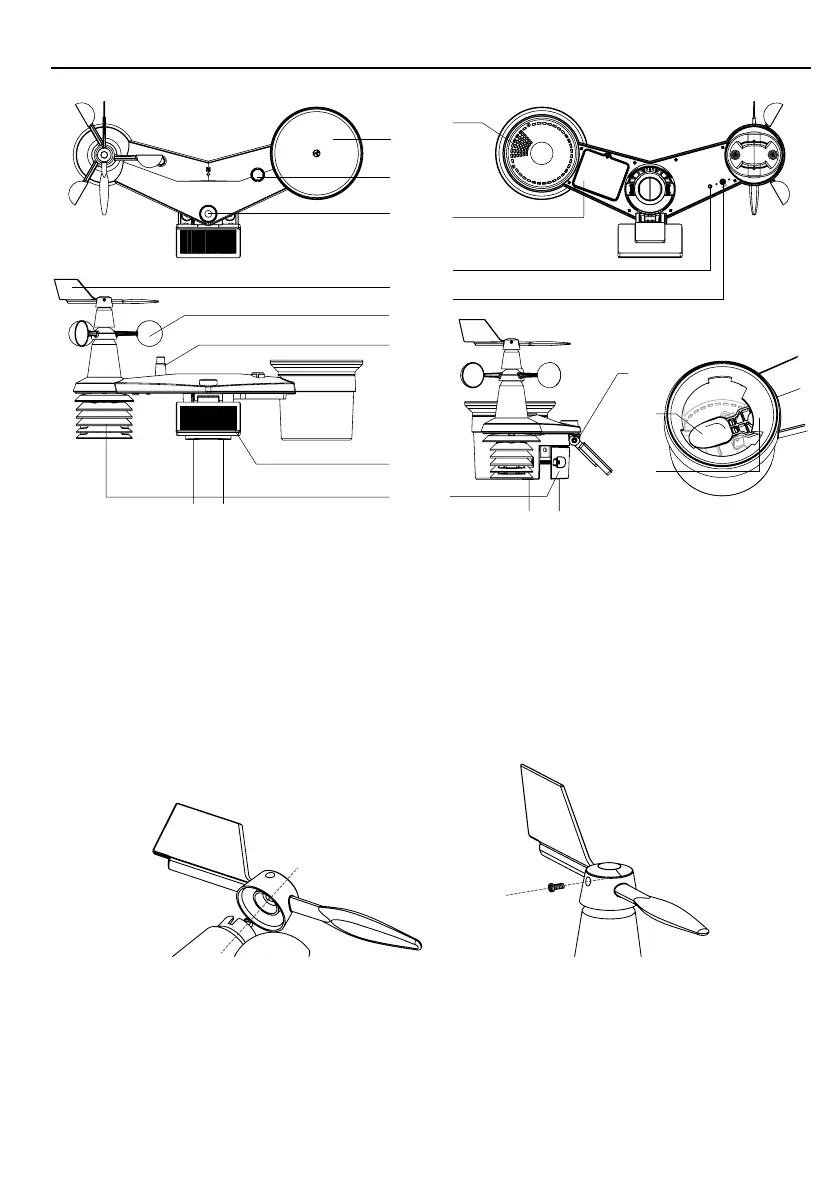
3.1 WIRELESS 7-IN-1 SENSOR
16
15
14
12
13
11
10
2
3
6
1
4
5
7
9
8
1. Rain collector
2. Balance indicator
3. UVI / light sensor
4. Wind vane
5. Wind cups
6. Antenna
7. Solar panel
8. Radiation shield and
thermo-hygro sensor
9. Drain holes
10. Battery door
11. Red LED indicator
12. [ RESET ] key
13. Mounting clamp
14. Adjustable hinge of solar
panel
15. Tipping bucket
16. Rain sensor
3.1.1 INSTALL WIND VANE
With reference to photo below, (a) locate and align the at are on the wind vane shaft to the
at surface on the wind vane and push the vane onto the shaft. (b) tighten the set screw with a
precision screwdriver.
Step 1 Step 2

Table of Contents

Related product manuals