Home
Breville
Microwave Oven
Quick Touch BMO735
Page 37 (Advanced Microwave Features)
Breville Quick Touch BMO735 - Advanced Microwave Features
56 pages
Manual
Save Page as PDF
To Next Page
To Next Page
To Previous Page
To Previous Page
Loading...
37
A BIT MORE™
A BIT MORE™ B
UTT
ON
U
se A BIT M
ORE™ wh
en cookin
g
is finish
ed and y
our f
ood is n
ot
quite cooked or h
ot eno
ugh.
One simple pr
ess of A BIT M
ORE™ will add
a little e
xtra cooking tim
e
.
F
or e
xample
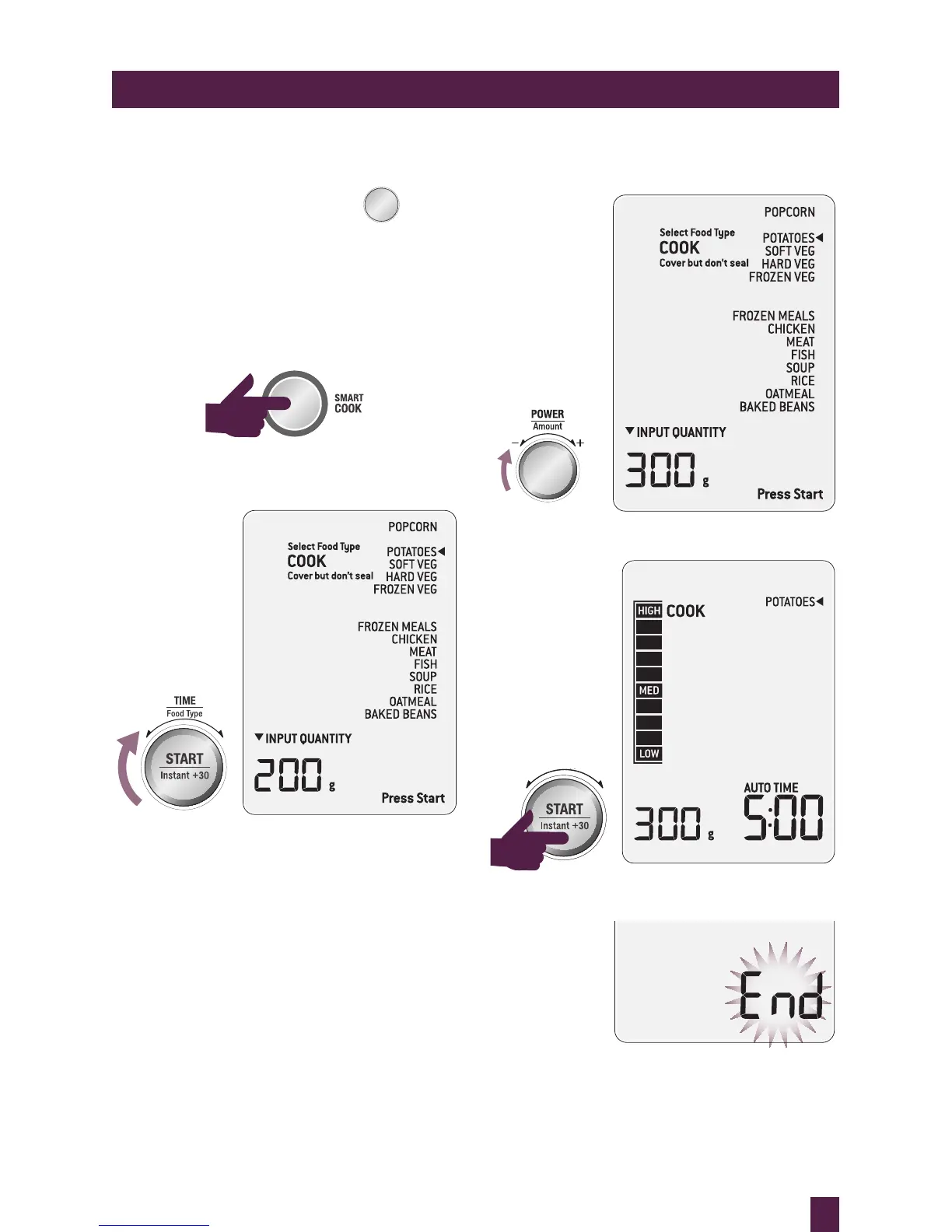
1.
U
ser pr
esses the S
MAR
T C
OOK b
utton.
STOP
CLEAR
A Bit More
2.
U
ser turn
s the TIME/F
OOD TYPE dial to
select PO
T
A
TOE
S.
STOP
CLEAR
A Bit More
STOP
CLEAR
A Bit More
3.
U
ser turns the A
MOUNT di
al to adjust
weight to 300g
.
STOP
CLEAR
A Bit More
4.
Press ST
AR
T to begin cookin
g
.
STOP
CLEAR
A Bit More
STOP
CLEAR
A Bit More
5.
C
ooking process end
s.
36
38
Table of Contents
Main Page
Table of Contents
3
Breville Recommends Safety First
4
Important Safety Instructions
4
Microwave Oven
6
Save These Instructions
9
Know Your Breville Product
11
The Microwave Oven
13
Assembling Your Breville Product
13
Operating Your Breville Product
16
Setting Child Lock
17
Smart Cook Settings
22
Smart Reheat Settings
30
Smart Defrost Settings
34
A Bit more
37
Shortcuts Panel
39
Sensor Cook
40
Time Defrost
43
Hints & Tips
47
Introduction to Microwave Cooking
48
Microwave Utensils
49
Care & Cleaning
50
Troubleshooting
52
Related product manuals
Breville Quick Touch BMO734XL
55 pages
BMO700 Quick Touch Crisp
44 pages
Breville Quick Touch BMO625
40 pages
Breville Quick Roast BMO715
20 pages
Breville the Quick & Easy BMO300
36 pages
Breville MW4
36 pages
Breville BMO850
64 pages
Breville BMO870
36 pages
Breville BMO734XL
112 pages
Breville Combi Wave 3 in 1
36 pages
Breville the Combi Wave 3 in 1
116 pages
Compact Wave Soft Close BMO650
44 pages



 To Next Page