10
Maintenance
The Cold Pro Nitro™ System has very lile maintenance requirements.
Changing the Air Filter
• The air lter used with the Cold Pro Nitro™ System is a micro air-lter that lters
parcles up to 0.1 μm (microns) with an eciency of 99.9998%. According to DIN
EN 1822 this represents a U 15 lter class.
• We recommend changing the lter module every 2 years.
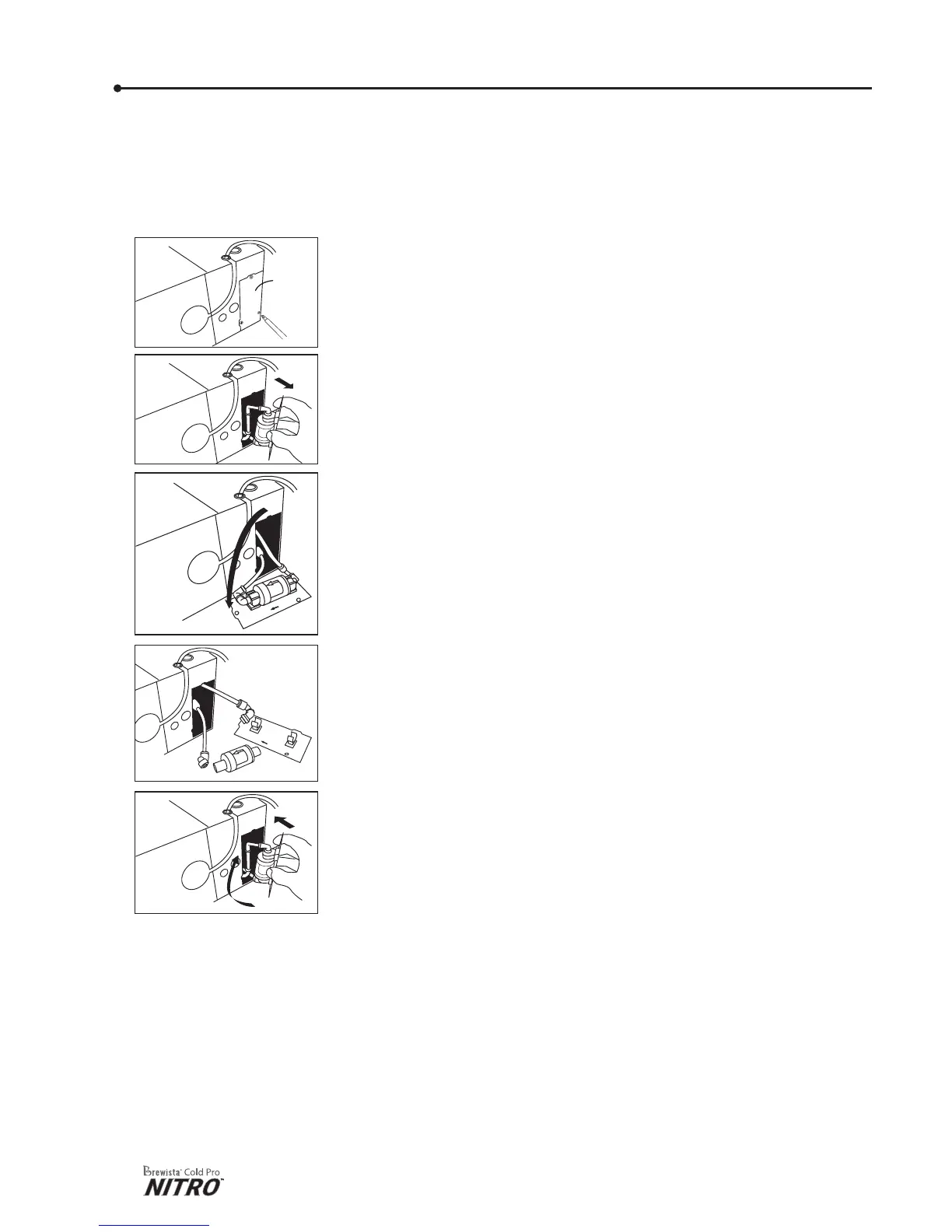
To change your system’s air lter:
1) Unplug the power cord from its wall outlet, open the tap on
your Cold Pro Nitro™ Machine, and release the pressure in
the lines. Turn the dispenser on its side.
2) Using a Phillips-head screwdriver, remove the screws from the
air lter cover and set aside in a safe place
3) Open the lter cover, pull it out, and turn it half way in a
counter-clockwise direcon so that the panel lays on your
work surface. You now have access to the air lter module.
4) Click the module out of the clamps; unscrew the side adapters
and put the new module in.
5) Click the module in the clamps and insert the cover back while
making a half turn clockwise.
6) Close the cover and replace the 3 screws.
7) Return the dispenser to its upright posion. ALWAY S place
the dispenser in an upright posion before connecng the
power cable.
Air
Filter
Cover
Remove Dust at Condensator Grid
• Blow away any dust parcles that sele at the condensator grid on top of the
dispenser at least every 6 months or as needed. Dust parcles on this grid can
reduce the machine’s cooling eciency.
Changing O-rings and Connectors
• If a Bag-In-Box connecon system is used, O-rings or connectors may need to be
changed periodically. Frequency of changing these parts depends on the specic
system being used.
• Brewista recommends checking these connecons about once a month to ensure
proper system funcon.


 To Next Page