7
Connect your Cold Brew Container
• Note: Brewista recommends checking funconality of your system by using
water. This will also help ush out any cleaning soluon residue from the
system as well.
• Connect the intake line tubing (11) to your cold brew container. If your intake
line is connected to a keg, be sure the system can draw air or is fed with inert
gas when tapping starts and coee is dispensed.
Dispensing your Nitro Cold Brew
1) Push air-compressor switch (marked with PRESSURE) to “I” (on). The
compressor can remain switched on overnight.
2) Place a glass on the drip tray under the dispensing spigot and pull the tap
handle forward by 90°.
3) The unit now pumps the coee from the container and aer a short period of
me, cooled and nitrogenized cold brew coee ows out of the tap. You may
need to tap 1-2 glasses unl you get the desired foam level.
4) To stop dispensing, lt the tap handle upwards to a vercal posion.
Adjustable Sengs
• Temperature
The target dispensing temperature can be adjusted with the temperature
control at the front of the dispenser within a range of 21° F (12° C).
◦ To make the brew colder, turn the temperature control (5) clockwise (max
posion is 7 o’clock).
◦ To make the brew warmer, turn the temperature control (5) counter-
clockwise
◦ Turn the cooling funcon o by turning the temperature control (5) to the
9 o’clock posion.
- Temperature range: 41° F (5° C) (+/- 1.8° F or 1° C) to 62° F (17° C).
◦ The dispenser has an internal buer of 17 oz (500 ml) that is kept cold
according to the temperature control sengs. In a non-stop dispensing
situaon the cooling result depends on the owrate.
- When using the 2-hole disc (10) (ow rate of 0.6 L/min) there will be
a 12° F (7.0° C) reducon between input and output temperature.
- When using the 5-hole disc (9) (ow rate of 1.2 L/min) there will be a
6.3° F (3.5° C) reducon between input and output temperature.
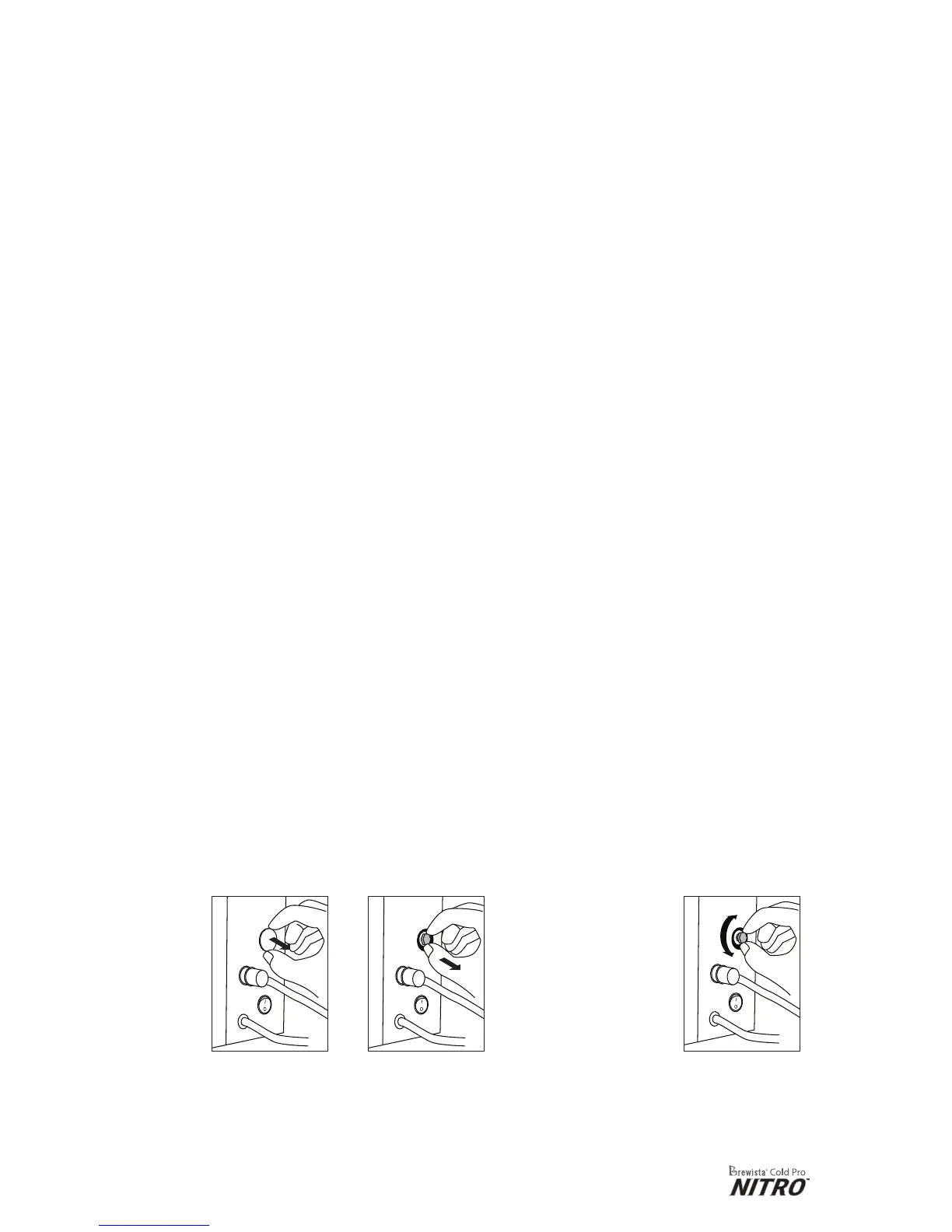
• Gas Level
On the side of the
machine, remove
the white cap
marked with “GAS
CONTROL” (14).
Pull out the
grey knob
approximately
2 mm.
By default the knob
is set to 1 (with a
tolerance of +/- 0.25).
- Turn the knob
clockwise to reduce
the gas level
- Turn the knob
counter-clockwise
to increase the gas
level
- Do not turn knob
higher than 2
Push back the
grey knob to
lock posion
and replace the
white cap.


 To Next Page