7
Installing the recorder in your vehicle
4
Always refer to the vehicle manufacturer’s guidelines for installation and
connections to the vehicle.
• Disconnect the vehicle battery.
• Follow safe working practices.
Ensure the product is attached to the windscreen properly.
- Clean the windscreen and adhere the product firmly, otherwise it may become
detached due to temperature/humidity/dust/shock/vibration.
2
Mounting the GPS antenna
1. Clean the windscreen.
2. Stick the GPS to the screen (using supplied self-adhesive pad).
3
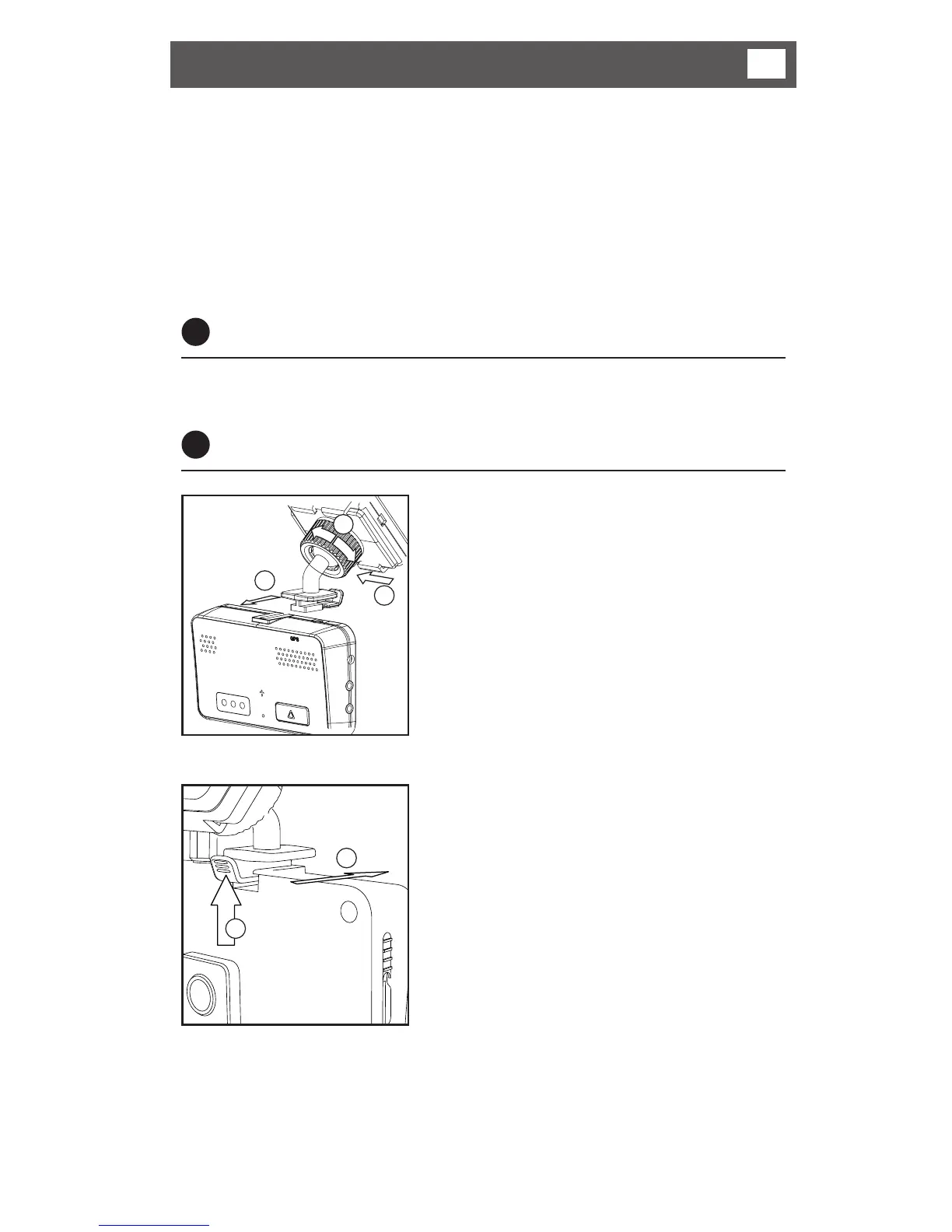
Mounting the recorder
1 Slide the mounting bracket into the
front of the receiving channel until
the retaining lug latches in.
2 Slide the mounting bracket into the
retainers on the rear of the GPS
antenna.
3 Loosen the locking wheel.
4 Adjust the angle of the recorder.
5 Tighten the locking wheel to lock
the angle of the bracket.
To remove the recorder from the
mounting bracket:
1 Apply light pressure to the release
tab until the retaining lug un-
latches.
2 Slide the recorder off the bracket.
1
1
2
3
2



 To Next Page