13
PC Viewer Manager
7
1
How to use PC VIEWER MANAGER
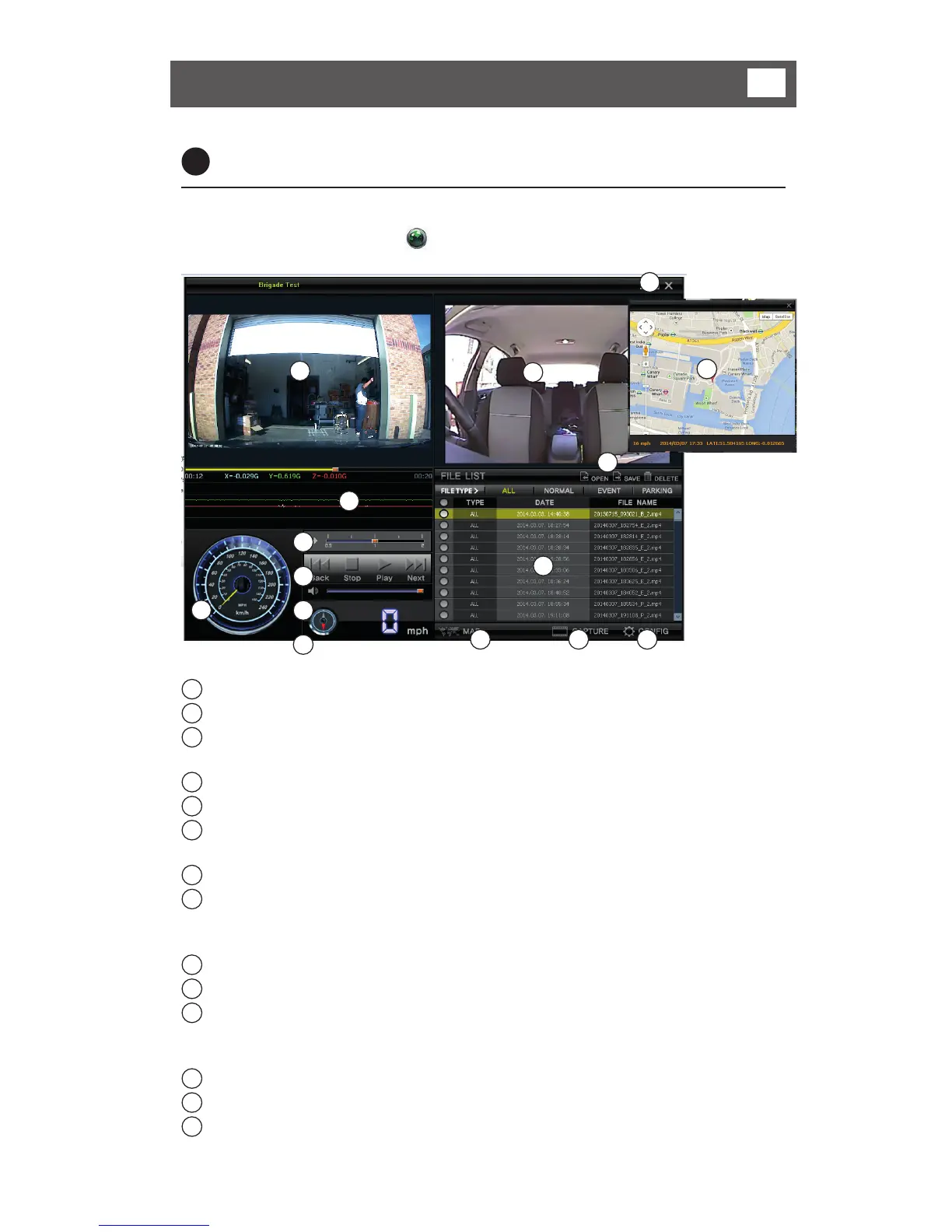
Copy the PC Viewer program from the CD to your PC.
Once copied, double click on icon to run the PC Viewer Program.
1
3
5
10
11
9
2
11 12 13
6
7
8
4
14
1
Playback display Shows front camera video
2
Playback display Shows rear camera video
3
G-SENSOR/Playback Location Shows G-SENSOR data with graphs and
playback location
4
Speedometer Displays GPS speed
5
Playback Control Adjusts speed of playback
6
Viewer Control Stop/Previous file /Rewind/Play(Pause) /
Forward / Next file
7
Volume Control Controls the play volume. (Mute/Volume +,-)
8
GPS Information The GPS location data is shown through
this map. (Data / Time / Speed / Location /
Direction)
9
File Management File open / Save / Delete
10
Playback List Shows playback list
11
Map Information (Google map) The driving routes are shown through this
map. This function is only possible when an
internet connection is available
12
Screen Capture Saves the playback screen as Jpeg file
13
Configuration Set Adjusts settings for the system configuration
14
Program Exit/Minimization Exits the PC Viewer program or Minimizes
the PC Viewer program



 To Next Page