42
•
•
•
•
•
•
EXAMPLE 4:
Video and slide playback using button input
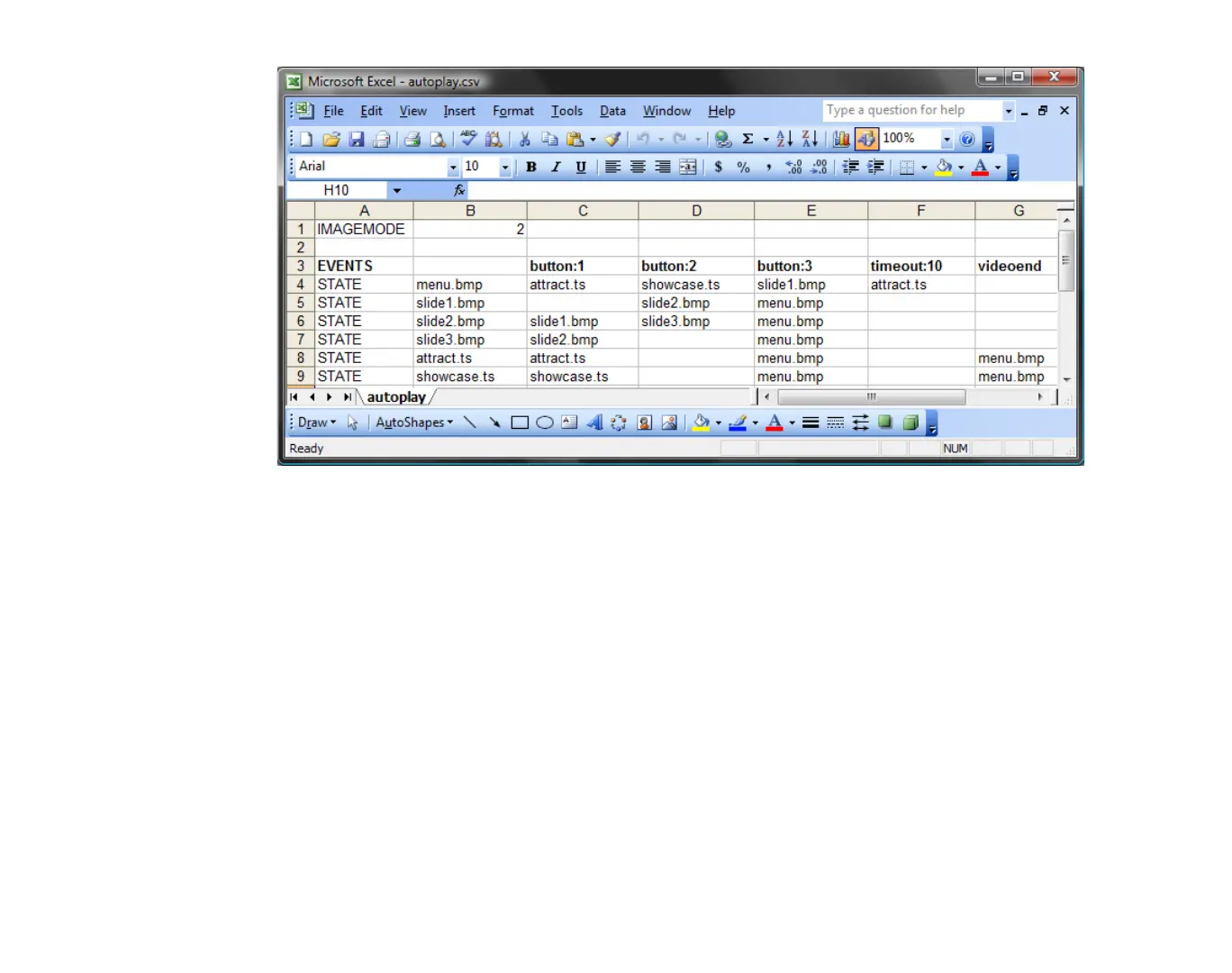
Example 4 plays two videos and three images and it contains five events: three button events, a
timeout event, and a videoend event. When Example 4 starts, BrightSign displays MENU.BMP,
since it’s in the first STATE position.
•
If the menu is being displayed, pressing button 1 starts the attract video; pressing button 2
starts the showcase video; and pressing button 3 starts the slideshow. If no button is pressed,
the attract video starts automatically after 10 seconds.
•
If the attract or showcase video is playing, pressing button 1 restarts it.
•
If the attract or showcase video is playing, pressing button 3 returns to the menu. Since there
is no entry under button 2 for either video, button 2 is ignored. When either the attract or
showcase video ends, the menu is displayed, as indicated under the videoend event.
•
For the slideshow, button 2 advances to the next slide, and button 1 goes back to the previous
slide. Button 3 returns to the menu.



 To Next Page