EasyManua.ls Logo

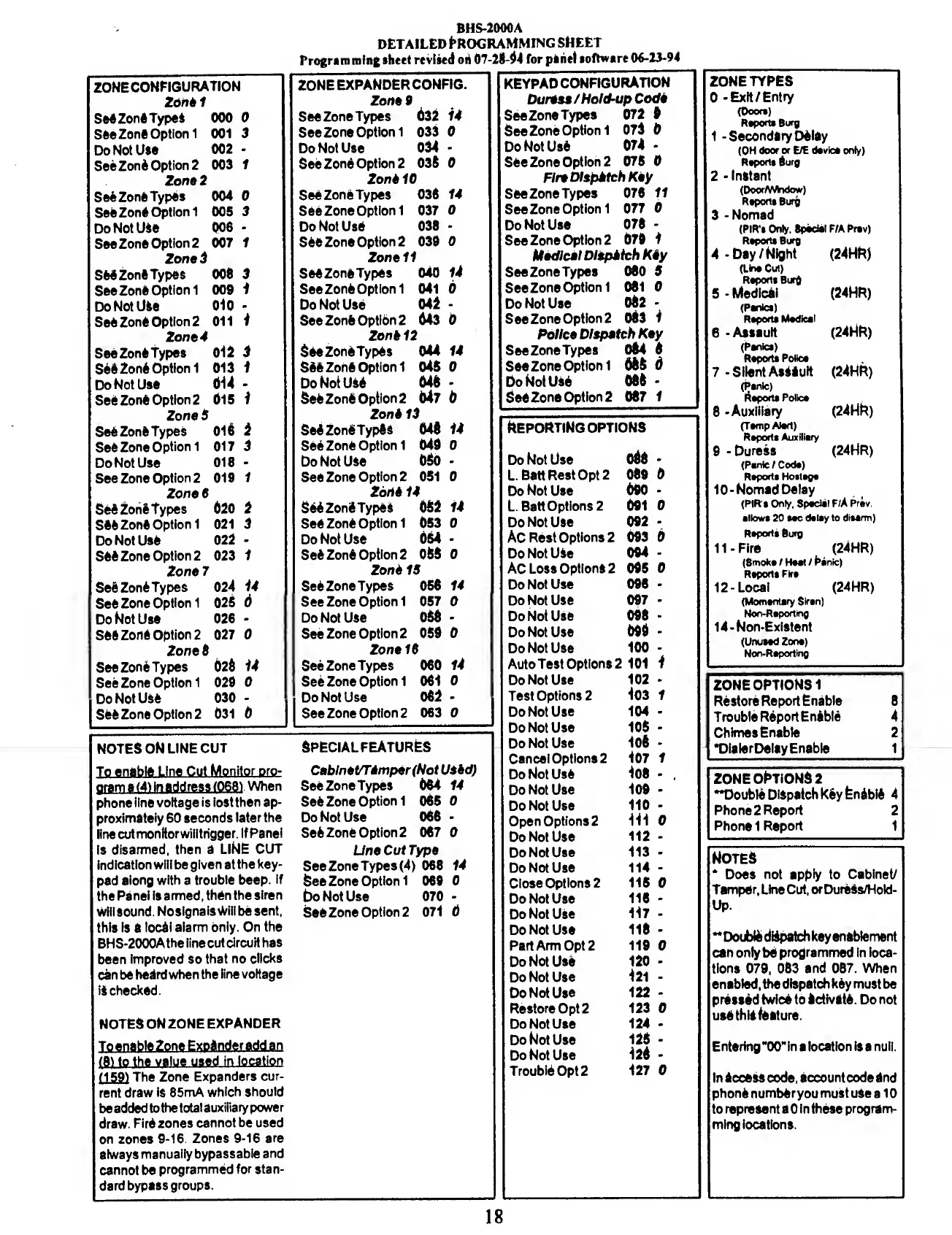
BRINKS BHS 2000A - Detailed Programming Sheet; Zone Configuration and Types; Reporting and Special Features

BRINKS BHS 2000A
31 pages
Print Icon
To Next Page IconTo Next Page
To Previous Page IconTo Previous Page
Loading...
ZONE
CONFIGURATION
Zone
1
Se4Zon6
Types
000
0
See
Zon*
*
Option
1
001
3
Do
Not
Use
002
-
See
Zoni
Option
2
003
1
Zone
2
Se6
Zone
Types
004
0
See
Zon*
Option
1
005
3
Do
Not
U4e
006
*
See
Zone
Option
2
007
1
Zona
3
SWZonft
Types
006
3
See
Zone
Option
1
009
1
Do
Not
Use
010
-
See
Zone
Option
2
011
1
Zona
4
See
Zone
Types
012
3
See
Zone
Option
1
013
1
Do
Not
Use
014
-
See
Zone
Option
2
015
1
Zone
S
See
Zone
Types
016
i
See
Zone
Option
1
017
3
Do
Not
Use
018
-
See
Zone
Option
2
019
1
ZonaS
See
Zone
Types
020
2
see
Zone
Option
1
021
3
Do
Not
Use
022
-
See
Zone
Option
2
023
1
Zone
7
Se6
Zone
Types
024
14
See
Zone
Option
1
025
6
Do
Not
Use
026
*
see
zone
option
2
027
0
Zone
6
See
Zone
Types
628
14
See
Zone
Option
1
029
0
Do
Not
Use
030
-
See
Zone
Option
2
031
0
BHS-2000A
DETAILED
PROGRAMMING
SHEET
Programming
sheet
revised
oh
07-28-44
for
panel
software
06-23-94
KEYPAD
CONFIGURATION
Duress
/
Hold-up
Code
See
Zone
Types
072
0
See
Zone
Option
1
075
0
Do
Not
Use
074
-
See
Zone
Option
2
075
0
Fire
Dlspktch
Key
See
Zone
Types
076
11
See
Zone
Option
1
077
0
Do
Not
Use
078
-
See
Zone
Option
2
079
1
Medical
Dispatch
Kiy
See
Zone
Types
080
5
See
Zone
Option
1
081
0
Do
Not
Use
082
-
See
Zone
Option
2
063
1
Police
Dispatch
Key
SeeZoneTypes
084
8
See
Zone
Option
1
686
6
Do
Not
Use
086
-
See
Zone
Option
2
087
f
I
ZONE
EXPANDER
CONFIG.
Zone
9
SeeZoneTypes
632
14
See
Zone
Option
1
033
0
Do
Not
Use
634
-
See
Zone
Option
2
036
0
Zone
10
SeeZoneTypes
036
14
See
Zone
Option
1
037
0
Do
Not
Use
038
-
see
Zone
Option
2
039
O
Zonell
SeeZoneTypes
040
14
See
Zone
Option
1
041
0
Do
Not
Use
042
-
SeeZoneopti6n2
643
0
Zone
12
SeeZoneTypes
044
14
See
Zone
Option
1
046
0
Do
Not
use
646
-
See
Zone
Option
2
647
6
Zone
13
SeeZon§Typ8s
648
14
See
Zone
Option
1
649
0
Do
Not
Use
680
See
Zone
Option
2
051
0
Zone
14
SeeZoneTypes
682
14
See
Zone
Option
1
053
0
Do
Not
Use
654
-
See
Zone
Option
2
058
0
1
Zone
IS
SeSZoneTypes
056
14
See
Zone
Option
1
057
0
Do
Not
Use
058
-
See
Zone
Option
2
059
0
Zone
16
SeeZoneTypes
060
14
See
Zone
Option
1
061
0
Do
Not
Use
062
-
See
Zone
Option
2
063
0
NOTES
ON
LINE
CUT
pram
a
(4)
in
address
(068)
.
When
phone
line
voltage
is
lost
then
ap¬
proximately
60
seconds
later
the
line
cut
monitor
will
trigger.
ItPanel
is
disarmed,
then
a
LINE
CUT
Indication
will
be
given
at
the
key¬
pad
along
with
a
trouble
beep.
If
the
Panel
is
armed,
then
the
siren
will
sound.
No
signals
Will
be
sent,
this
Is
a
local
alarm
only.
On
the
BHS-2000Athe
line
cut
circuit
has
been
Improved
so
that
no
clicks
can
be
heard
when
the
line
voltage
iS
checked.
NOTES
ON
ZONE
EXPANDER
I
,
rrmmtxn
^iw-Tiw-Trw
iui
(159)
The
Zone
Expanders
cur¬
rent
draw
IS
85mA
which
should
be
added
to
the
total
auxiliary
power
draw.
FirS
zones
cannot
be
used
on
zones
9-16.
Zones
9-16
are
always
manually
bypassable
and
cannot
be
programmed
for
stan¬
dard
bypass
groups.
Special
features
Cablnet/TimperfNot
Uskd)
SeeZoneTypes
664
14
See
Zone
Option
1
065
0
Do
Not
Use
066
Se6
Zone
Option
2
067
0
Une
Cut
Type
See
Zone
Types
(4)
068
14
See
Zone
Option
1
069
0
5o
Not
Use
070
-
See
Zone
Option
2
071
6
Reporting
options
Do
Not
Use
688
-
L.
Batt
Rest
Opt
2
689
6
Do
Not
Use
690
-
L.
Batt
Options
2
691
0
Do
Not
Use
092
-
AC
Rest
Options
2
693
6
Do
Not
USe
094
-
AC
Loss
Options
2
095
0
Do
Not
Use
096
-
Do
Not
Use
697
-
Do
Not
Use
098
-
Do
Not
Use
696
-
Do
Not
Use
100
-
Auto
Test
Options
2
101
1
Do
Not
Use
102
-
Test
Options
2
103
1
Do
Not
Use
104
-
Do
Not
Use
105
-
Do
Not
Use
106
Cancel
Options
2
107
1
Do
Not
Use
108
-
Do
Not
Use
109
-
Do
Not
Use
110
-
Open
Options
2
111
0
Do
Not
Use
112
-
Do
Not
Use
113
-
Do
Not
Use
114
-
Close
Options
2
115
0
Do
Not
Use
116
-
Do
Not
Use
117
-
Do
Not
Use
116
-
Part
Arm
Opt
2
119
0
Do
Not
Use
120
-
Do
Not
Use
121
-
Do
Not
Use
122
-
Restore
Opt
2
123
0
Do
Not
Use
124
-
Do
Not
Use
125
-
Do
Not
Use
126
-
Trouble
Opt
2
127
0
ZONE
TYPES
0
-
Exit/Entry
(Door*)
Report*
Bury
1
-Secondary
Delay
(OH
door
or
E/E
device
only)
Report*
Surg
2
-
Instant
(Door/Window)
Report!
Burg
3-
N
omad
(PIR'l
Only.
8pod*l
F/A
hrev)
Reoofti
Buro
4-
D
ay/Night
(24HR)
(Lin*
Cut)
Report*
Burg
5-
M
edical
(24HR)
(Panic*)
Report*
Medical
6
-
Assault
(24HR)
(Panic*)
Report*
Police
7-SilentAssault
(24HR)
(Psnle)
Report*
Poiic*
8
-
Auxiliary
(24HR)
(Temp
Alert)
Report*
Auxiliary
9
-
Duress
(24HR)
(Panic
/
Code)
Report*
Hoitage
10-
N
omad
Delay
(PIR't
Only,
Special
F/A
Prav
allow*
20
*ec
delay
to
ditarm)
Report*
Burg
11-
F
ire
(24HR)
(8moke
/
Heat
/
h*nic)
Report*
Fire
12-
L
ocal
(24HR)
(Momentary
Siren)
Non-Reporting
14-Non-Existent
(Unused
Zone)
Non-Reporting
ZONE
OPTIONS
1
Restore
Report
Enable
8
Trouble
R6portEn4ble
4
Chimes
Enable
2
•Dialer
Delay
Enable
1
ZONE
OPTIONS
2
"Double
Dispatch
kSyPnibli
4
Phone
2
Report
2
Phone
1
Report
1
Notes
*
Does
not
apply
to
Cabinet/
Tamper,
Une
Cut,
or
DureSs/Hold-
Up
-
Double
diipatch
key
enablement
can
only
be
programmed
in
loca¬
tions
079,
083
and
087.
When
enabled,
the
dispatch
k6y
must
be
pressed
twice
to
Icth/Ste.
Do
not
use
this
feature.
Entering
“00"
in
a
location
Is
a
null.
In
access
code,
account
code
and
phone
number
you
must
use
a
10
to
represent
a
0
in
these
program¬
ming
locations.
18

Related product manuals