EasyManua.ls Logo

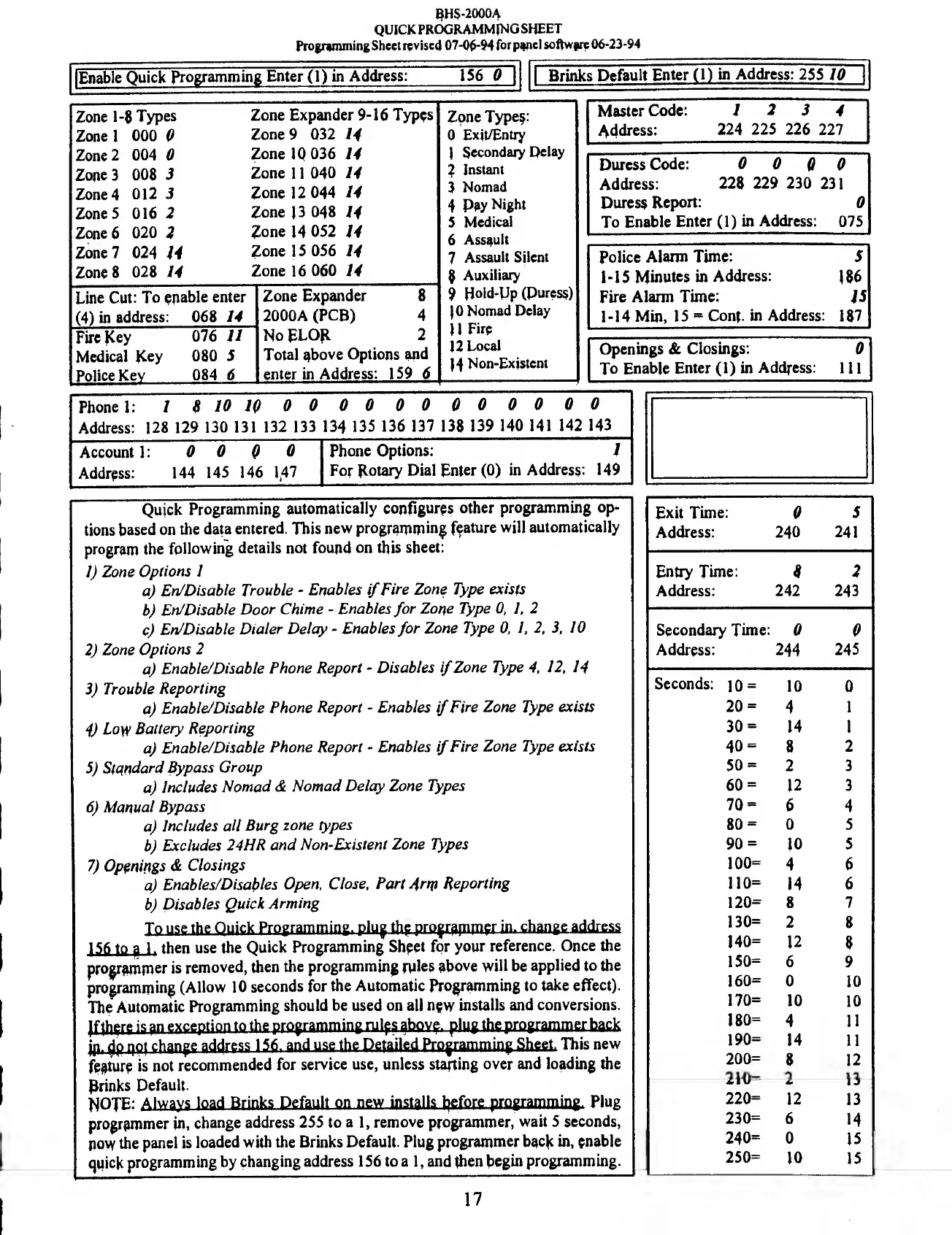
BRINKS BHS 2000A - Quick Programming Sheet; Address and Option Mapping

BRINKS BHS 2000A
31 pages
Print Icon
To Next Page IconTo Next Page
To Previous Page IconTo Previous Page
Loading...
8HS-20004
QUICK
PROGRAMMING
SHEET
Programming
Sheet
revised
07-06-94
forpanel
software
06-23-94
Enable
Quick
Programming
Enter
(1)
in
Address:
Brinks
Default
Enter
(1)
in
Address:
255
10
Zone
1-8
Types
Zone
1
000
0
Zone
2
004
0
Zone
3
008
3
Zone
4
012
5
Zone
5
016
2
Zone
6
020
2
Zone
7
024
14
Zone
8
028
14
Line
Cut:
To
enable
enter
(4)
in
address:
068
14
Fire
Key
076
11
Medical
Key
080
5
Police
Key
084
6
Zone
Expander
9-16
Types
Zone
9
032
14
Zone
10
036
14
Zone
11
040
14
Zone
12
044
14
Zone
13
048
14
Zone
14
052
14
Zone
15
056
14
Zone
16
060
14
_
Zone
Expander
8
2000A
(PCB)
4
No
ELOR
2
Total
above
Options
and
enter
in
Address:
159
6
Zone
Type$:
0
Exit/Entry
I
Secondary
Delay
?
Instant
3
Nomad
4
Pay
Night
5
Medical
6
Assault
7
Assault
Silent
8
Auxiliary
9
Hold-Dp
(Puress)
10
Nomad
Delay
II
Fire
12
Local
14
Non-Existent
Master
Code:
Address:
12
3
4
224
225
226
227
Duress
Code:
0
0
0
0
Address:
228
229
230
231
Duress
Report:
0
To
Enable
Enter
(1)
in
Address:
075
Police
Alarm
Time:
5
1-15
Minutes
in
Address:
186
Fire
Alarm
Time:
15
1-14
Min,
15
=
ConL
in
Address:
187
Openings
&
Closings:
To
Enable
Enter
(1)
in
Address:
Phone
1:
1
8
10
10
0
0
0
0
0
0
0
0
0
0
0
0
Address:
128
129
130
131
132
133
134
135
136
137
138
139
140
141
142
143
Account
1:
0
0
0
0
Phone
Options:
1
Address:
144
145
146
1,47
For
Rotary
Dial
Enter
(0)
in
Address:
149
Quick
Programming
automatically
configures
other
programming
op¬
tions
based
on
the
data
entered.
This
new
programming
feature
will
automatically
program
the
following
details
not
found
on
this
sheet:
1)
Zone
Options
1
a)
En/Disable
Trouble
-
Enables
if
Fire
Zone
Type
exists
b)
En/Disable
Door
Chime
-
Enables
for
Zone
Type
0,
1,
2
c)
En/Disable
Dialer
Delay
-
Enables
for
Zone
Type
0,
1,
2,
3,
10
2)
Zone
Options
2
a)
Enable/Disable
Phone
Report
-
Disables
if
Zone
Type
4,
12,
14
3)
Trouble
Reporting
a)
Enable/Disable
Phone
Report
-
Enables
if
Fire
Zone
Type
exists
4)
Low
Battery
Reporting
a)
Enable/Disable
Phone
Report
-
Enables
if
Fire
Zone
Type
exists
5)
Stqndard
Bypass
Group
a)
Includes
Nomad
&
Nomad
Delay
Zone
Types
6)
Manual
Bypass
a)
Includes
all
Burg
zone
types
b)
Excludes
24HR
and
Non-Existent
Zone
Types
7)
Openings
&
Closings
a)
Enables/Disables
Open,
Close,
Part
Am
Reporting
b)
Disables
Quick
Arming
156
to
ji
1.
then
use
the
Quick
Programming
Sheet
for
your
reference.
Once
the
programmer
is
removed,
then
the
programming
rules
above
will
be
applied
to
the
programming
(Allow
10
seconds
for
the
Automatic
Programming
to
take
effect).
The
Automatic
Programming
should
be
used
on
all
new
installs
and
conversions.
j
p
r
flp
1404
change
address
15
6
.
a
nd
use
the
De
t
ail
ed
Pro
g
r
a
mm
i
n
g
Sheet
.
This
new
feature
is
not
recommended
for
service
use,
unless
starting
over
and
loading
the
Brinks
Default.
NOTE:
Always
load
Brinks
Default
on
new
installs
before
programming.
Plug
programmer
in,
change
address
255
to
a
1,
remove
programmer,
wait
5
seconds,
pow
the
panel
is
loaded
with
the
Brinks
Default.
Plug
programmer
back
in,
enable
quick
programming
by
changing
address
1
56
to
a
1,
and
(hen
begin
programming.
1-
Exit
Time:
0
.1
5
Address:
240
241
Entry
Time:
8
2
Address:
242
243
Secondary
Time:
0
0
Address:
244
245
Seconds:
10
=
10
0
20
=
4
1
30
=
14
1
40
=
8
2
50
=
2
3
60
=
12
3
70
=
6
4
80
=
0
5
90
=
10
5
100=
4
6
110=
14
6
120=
8
7
130=
2
8
140=
12
8
150=
6
9
160=
0
10
170=
10
10
180=
4
11
190=
14
11
200=
8
12
210=
2
13
220=
12
13
230=
6
14
240=
0
15
250=
10
15
17

Related product manuals