EasyManua.ls Logo

BRINKS BHS 2000A - System Control Station (SCS); SCS Overview and Mounting; SCS Connectivity and Wiring

BRINKS BHS 2000A
31 pages
Print Icon
To Next Page IconTo Next Page
To Previous Page IconTo Previous Page
Loading...
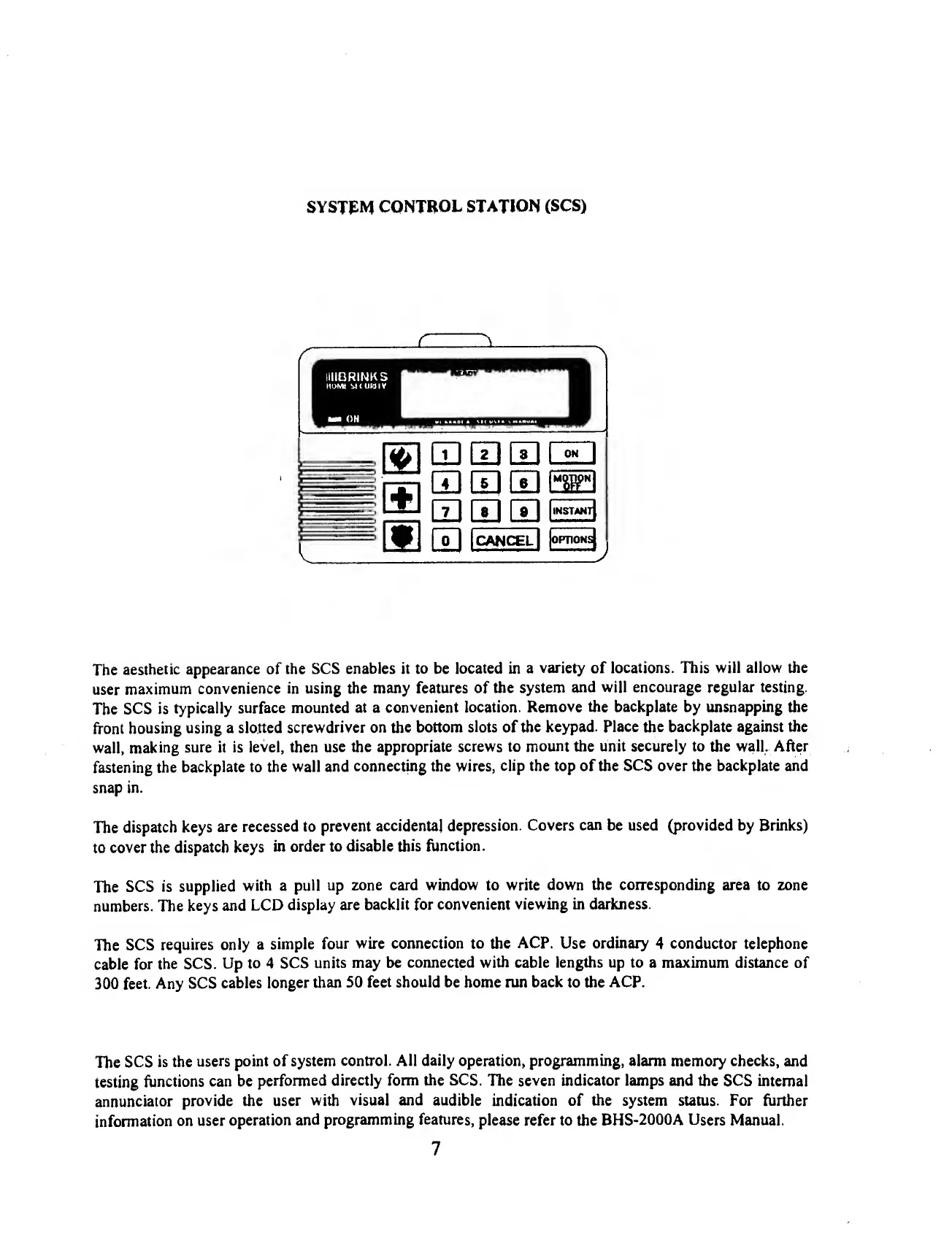
SYSTEM
CONTROL
STATION
(SCS)
-C-
H.
IIIIBRINKS
HOW
SKUWlY
ON
QD
53
S
EHI10®
QD
[7]
QD
l*
1
"^
IT]
I
CANCEL
|
|opnoNs|
The
aesthetic
appearance
of
the
SCS
enables
it
to
be
located
in
a
variety
of
locations.
This
will
allow
the
user
maximum
convenience
in
using
the
many
features
of
the
system
and
will
encourage
regular
testing.
The
SCS
is
typically
surface
mounted
at
a
convenient
location.
Remove
the
backplate
by
unsnapping
the
front
housing
using
a
slotted
screwdriver
on
the
bottom
slots
of
the
keypad.
Place
the
backplate
against
the
wall,
making
sure
it
is
level,
then
use
the
appropriate
screws
to
mount
the
unit
securely
to
the
wall.
After
fastening
the
backplate
to
the
wall
and
connecting
the
wires,
clip
the
top
of
the
SCS
over
the
backplate
and
snap
in.
The
dispatch
keys
are
recessed
to
prevent
accidental
depression.
Covers
can
be
used
(provided
by
Brinks)
to
cover
the
dispatch
keys
in
order
to
disable
this
function.
The
SCS
is
supplied
with
a
pull
up
zone
card
window
to
write
down
the
corresponding
area
to
zone
numbers.
The
keys
and
LCD
display
are
backlit
for
convenient
viewing
in
darkness.
The
SCS
requires
only
a
simple
four
wire
connection
to
the
ACP.
Use
ordinary
4
conductor
telephone
cable
for
the
SCS.
Up
to
4
SCS
units
may
be
connected
with
cable
lengths
up
to
a
maximum
distance
of
300
feet.
Any
SCS
cables
longer
than
50
feet
should
be
home
run
back
to
the
ACP.
The
SCS
is
the
users
point
of
system
control.
AH
daily
operation,
programming,
alarm
memory
checks,
and
testing
functions
can
be
performed
directly
form
the
SCS.
The
seven
indicator
lamps
and
the
SCS
internal
annunciator
provide
the
user
with
visual
and
audible
indication
of
the
system
status.
For
further
information
on
user
operation
and
programming
features,
please
refer
to
the
BHS-2000A
Users
Manual.
7

Related product manuals