7
Before You Begin Taking Photos
Display Icons
Set Up screen
At Set Up screen
At Preview screen
Status icon
BATTERY
EMPTY
FULL
ERROR
NO CARD
Preview screen
1
2
3
4
5
6
7
8
9
10
11
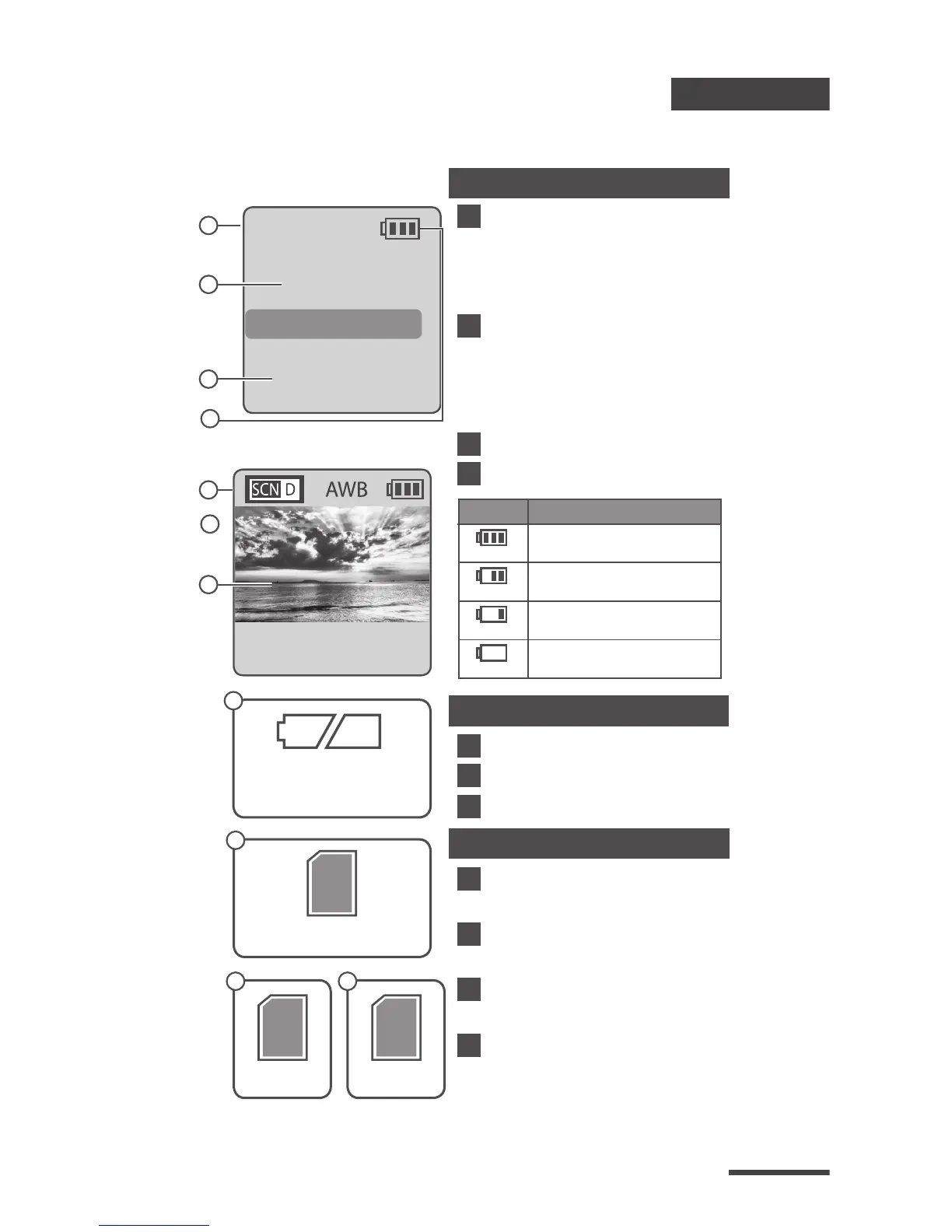
Capture mode
T.Lapse: Time Lapse mode
Shutter: Stop Motion mode
Motion: Motion Activated mode
Time interval
Select a pre-set time
interval or customize
yourself.
System date and time
Battery level
Scene mode
White Balance mode
Preview image capture window
Battery Empty
Please replace battery immediately.
SD Card Full
Please download les to clear SD card space.
SD Card Error
Please replace SD card.
No Card
Please Insert SD card.
T.Lapse
ASAP
2013/03/01
22:58:32
OK
READY
1
2
5
3
7
Icon
(green)
(green)
(yellow)
(red)
Description
Battery fully charged.
Battery partially charged.
Low battery.
Replace as soon as possible.
Out of battery.
Replace battery immediately.
8
9
10 11
SD
SD SD
6
4



 To Next Page