11
Mode
Time Lapse Mode
1. Setting the Time Interval:
In Time Lapse Mode, the camera will take one photo at
the time interval you selected. When you are nished
recording, the camera will convert those photos into a
time lapse video!
Before you begin recording, you can change the “Time
Lapse Frame Rate”. For more information please refer
to page 16.
Output le format: AVI. (Without audio)
Resolution: 720P
Time Lapse video length: The maximum size of each
single AVI le ranges between 8,192 to 20,480 frames,
depending on the time interval setting.
Time Interval range: from below 1 second to 24 hours.
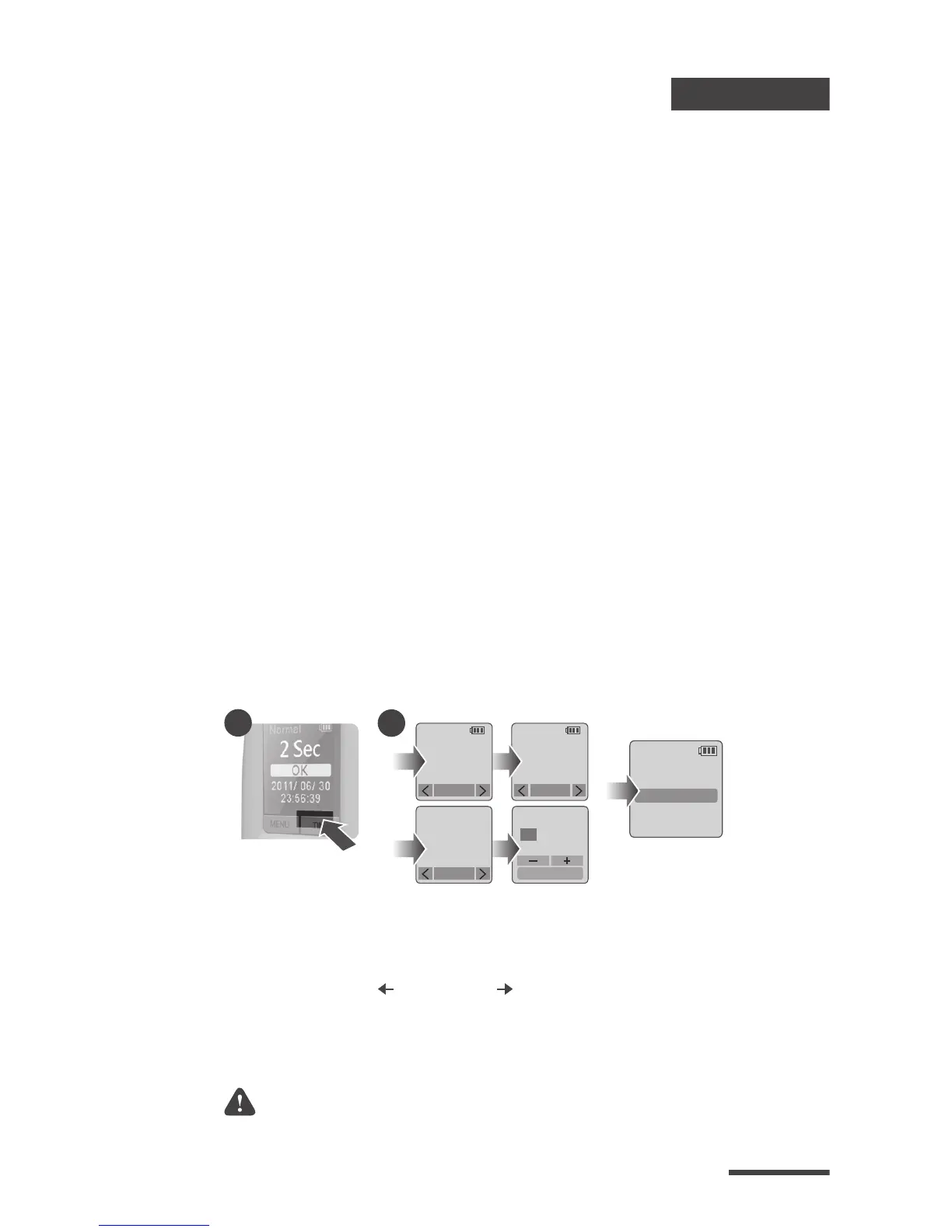
Press TIME button to enter time interval set up.
Press MENU ( ) and TIME ( ) to select a pre-set time
interval or customize it by yourself. When complete,
press the OK Button to confirm and return to the
Set up screen.
1-1
1-2
1-1
TIME
10 Min
TIME
OK : Next
22 : 58 : 32
TIME
2 Sec
CUSTOM
1-2
OK
OK
OK
T.Lapse
1 Sec
2013/03/01
22:58:32
OK
Set up screen



 To Next Page