6
Using the Dispenser
IMPORTANT: This unit has been tested and sanitized prior to packing and shipping� During transit
dust and odors can accumulate in the tank lines� Dispense and dispose of at least one
quart of water prior to drinking any water�
Turn the Dispenser On/O
IMPORTANT: Before you plug in the dispenser and turn on the heating and cooling switches, ensure
a full bottle of water is installed�
1. If you have not already done so, plug in dispenser and wait 5 minutes to allow tanks to fill with water�
2. Press and hold hot and cold water buttons until water begins to dispense�
3. To power on the cooling system, flip the cooling switch on the back of the dispenser to the On position�
The cold water button illuminates in blue, indicating that the dispenser is cooling water� The light
changes to white when the cooling process is complete�
4. To power on the heating system, flip the heating switch on the back of the dispenser to the On position�
The hot water button illuminates in red, indicating the dispenser is heating water� The light changes to
white when the heating process is complete�
5. To power on the ice-making system, flip the ice-making switch on the back of the dispenser to the On
position� The ice button illuminates in white, indicating the dispenser is making ice� The light turns o
when the ice-making process is complete�
NOTE: To protect the refrigeration system, the compressor and fan do not begin working until 2
minutes after the power cord has been plugged in�
Set the Time
1. Simultaneously press and hold the up and down arrow buttons for 3 seconds or until the displayed time
begins to blink�
2. To adjust hours, press the hot water button, then use the up and down arrow buttons to scroll to the
correct hour� To adjust minutes, press the cold water button, and use the up and down arrow buttons to
scroll to the correct the minutes�
3. Press the lock button when finished� The selected time will be displayed�
Set the Cold Water Temperature Level
You can select from 3 dierent cold water dispensing temperature levels: C1 (cold), C2 (colder), and C3 (coldest)�
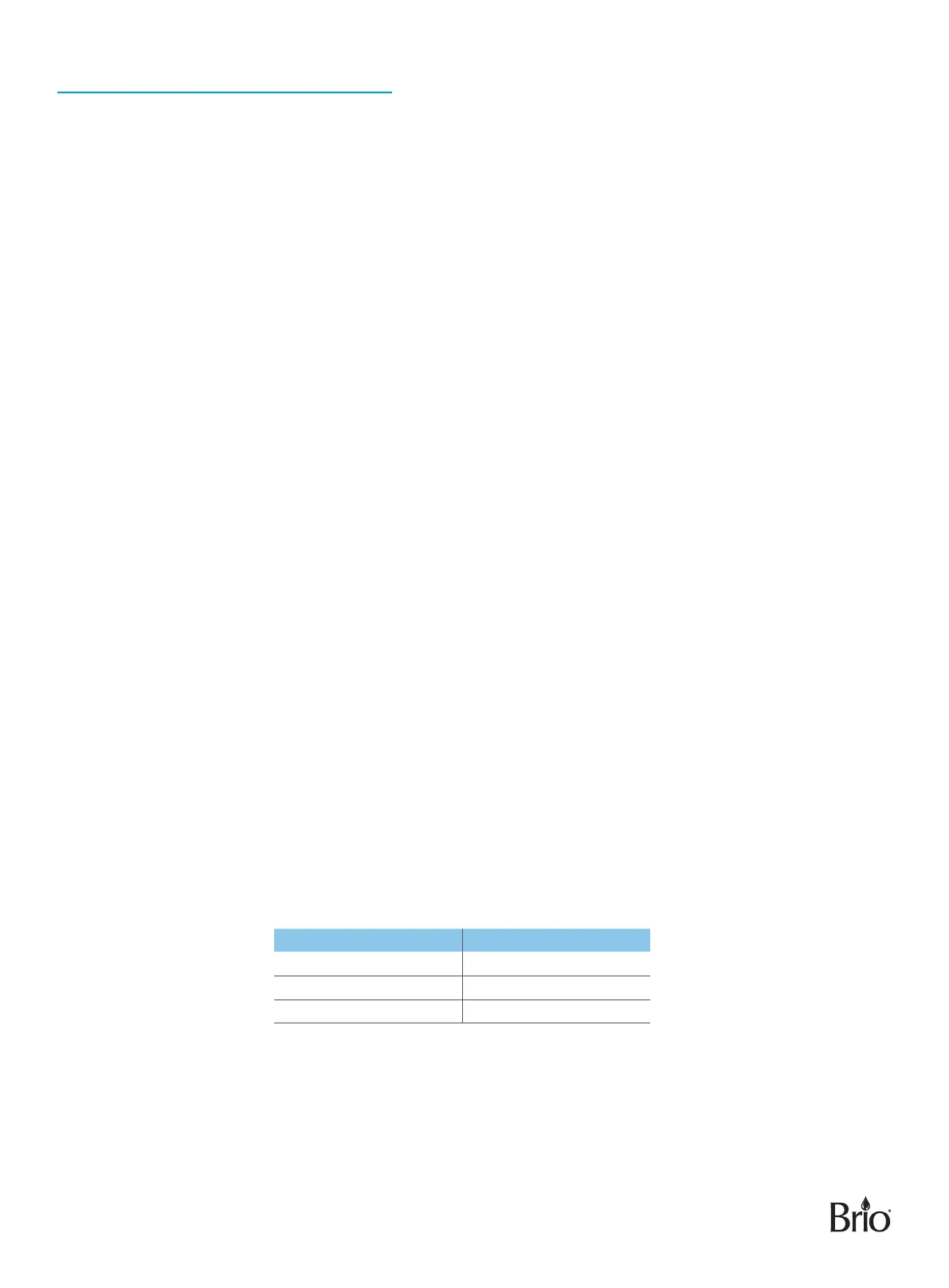
Temperature Level Dispensing Temperature Range
C1 49°F to 55°F
C2 43°F to 49°F
C3 37°F to 43°F
NOTE: The default temperature dispensing level for cold water is C3 (coldest)�
To change the cold water temperature dispensing level, please do the following:
1. Press and hold the down arrow button for 3 seconds� The cold water button and time display screen
begin to flash�


 To Next Page