© 2023 Brivo Systems LLC. All rights reserved. PUB-Brivo ACS-SDC-E Installation Manual_v1.2
13
Brivo ACS-SDC-E Installation Manual
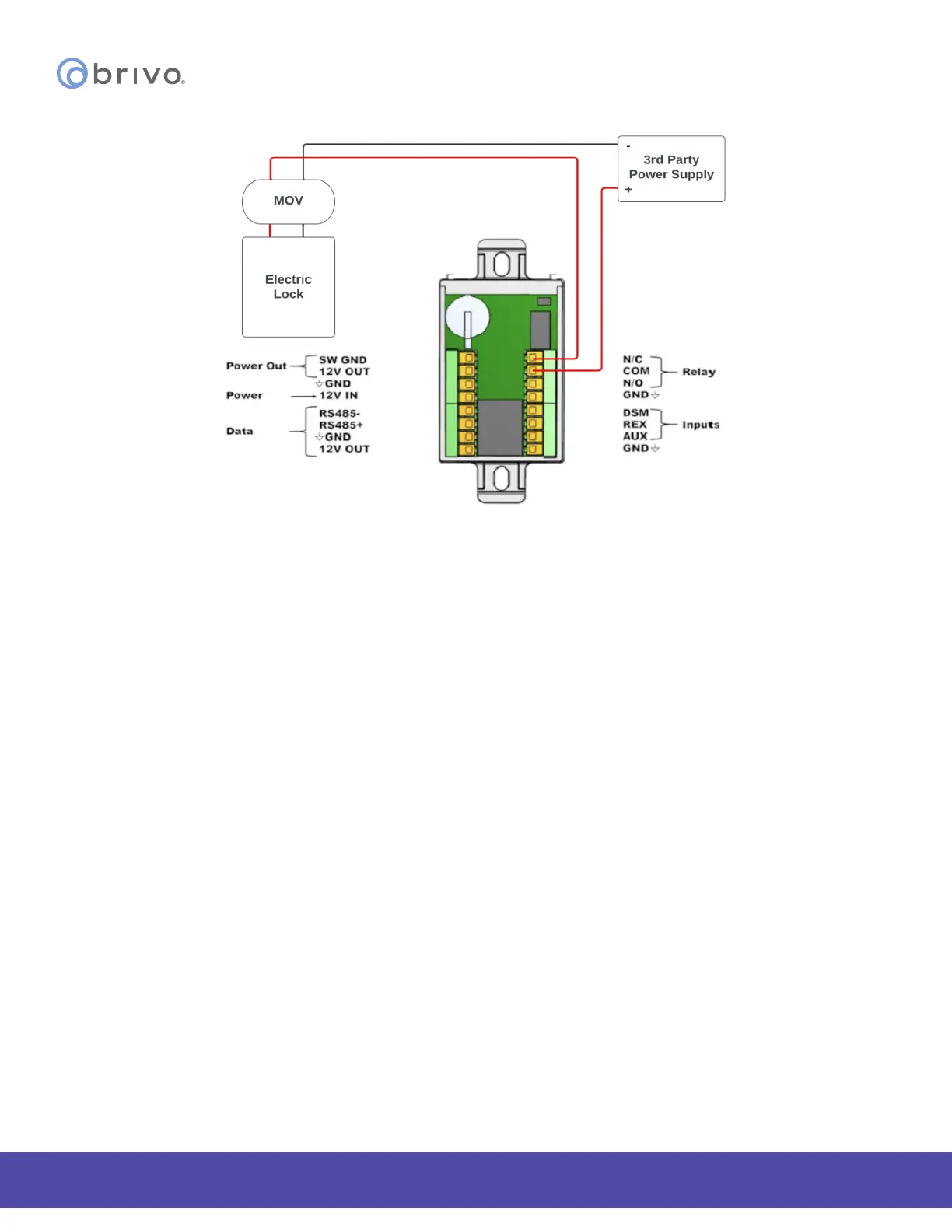
Lock Wiring with 3rd Party power supply (normally closed shown)
Switched Ground (Aux Output)
Switched Ground output enables or disables a Ground connection. This acts as a electronic relay switch to Ground.
1. Congure the default power as either Power-On or Default Power-O through the Brivo Access
Account Cong Tool.
Supervised Inputs
1. There are three (3) Supervised Inputs:
· Request To Exit (REX)
· Door Switch Monitor/Door Contact (DSM)
· Auxiliary Input (AUX).
The Inputs can be congured as:
· Two (2) State (non-supervised) with Closed / Open Status.
· Four (4) State (use of two 2Kohm End of Line Resistors) supervised with Closed / Open /
Short / Cut Status.
2. If used, wire the Aux Input using the Aux wire and the Ground wire. The Aux Input can be used for a
variety of purposes, and is programmed through the Brivo Access Account Cong Tool.



 To Next Page