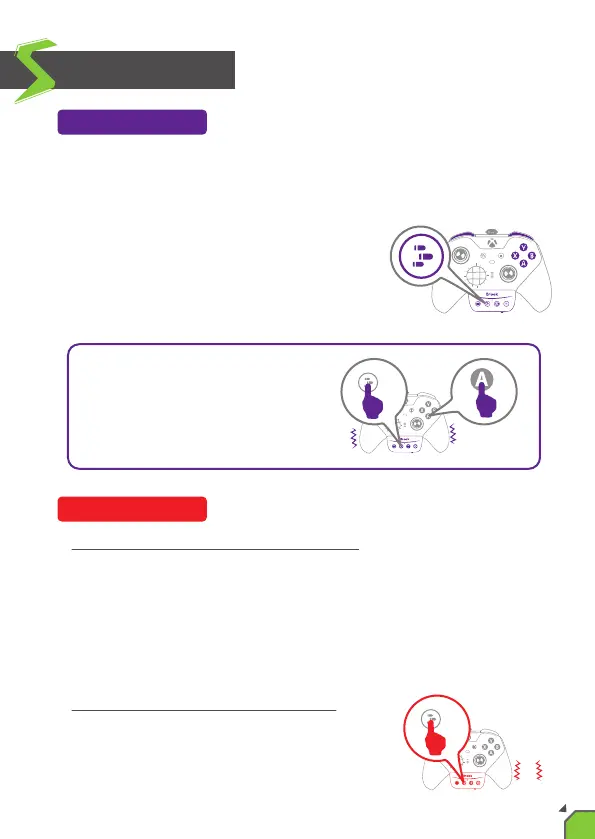
Buons that can be set as Turbo funcon buons include: A, B, X, Y, LB,
RB, LT, RT, LSB, RSB and 4 paddles for the Xbox One Elite Series 2 itself
(hereinaer referred to as FK).
Press the “Turbo buon” and the FK buon
at the same me, the controller will vibrate
to indicate the successful seng.
Cancellaon of single buon turbo funcon:
If you press the "Turbo buon” and the FK buon that has been config-
ured with the turbo funcon, the controller will vibrate to indicate that
the seng is canceled.
EX: If you press the "Turbo buon” and the "A" buon at the same me,
the "A" buon will cancel the turbo fire.
Cancellaon of all buon turbo funcon:
Press and hold the “Turbo buon” for 2 seconds,
the controller will vibrate 3 mes to cancel all
the sengs.
Turbo Funcon
Funcon Sengs
Cancelling Funcon
EX:
If you press "Turbo buon" and "A"
buon at the same me, then "A"
buon can be turbo fire.
2s
3
12


 To Next Page