Buons that can be Hold include: D-Pad, A, B, X, Y, LB, RB, LT, RT,
LSB, RSB and 4 paddles for the Xbox One Elite Series 2 itself (here-
inaer referred to as FK).
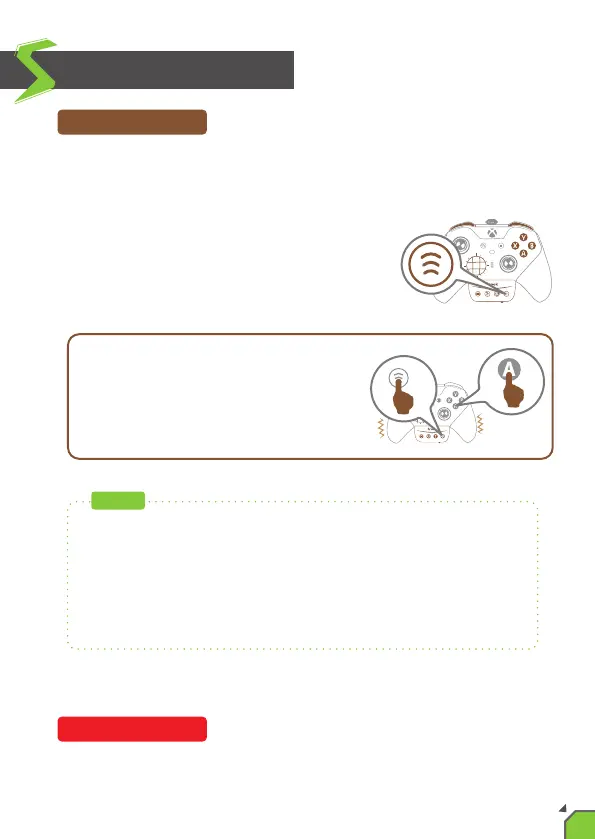
Press the “Hold/Wireless pairing buon”
and the FK buon at the same me, the
controller will vibrate to indicate the
successful seng.
Pressing a buon that has been set for Hold Buon Funcon
automacally cancels its Hold Buon Funcon.
Hold Buon Funcon
Funcon Sengs
Cancelling Funcon
EX:
If you press the “Hold/Wireless pairing
buon” and the “A” buon at the same
me, and then release it, the “A” buon is
considered to be being held connuously.
This funcon can be used in conjuncon with the Turbo funcon
and Remap Funcon.
EX: If you set a buon that has Turbo funcon, and then set the
Hold Buon Funcon on it, the buon will sll be burst when you
release your hands.
NOTE
13


 To Next Page